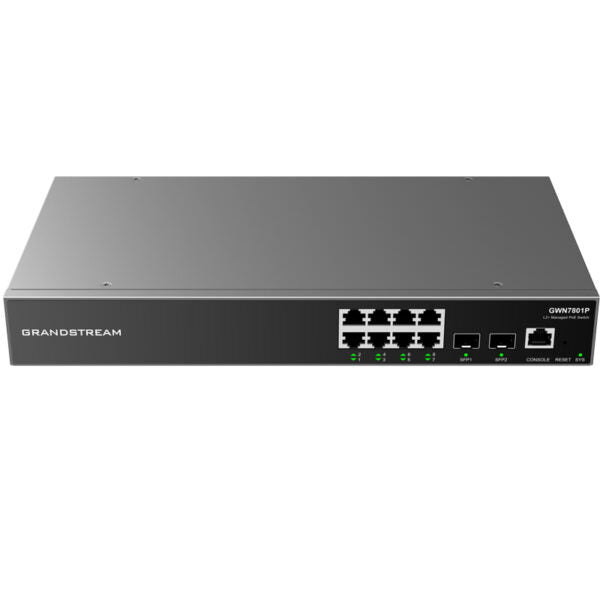
Grandstream GWN7803P Enterprise Layer 2+ Managed Network Switch

Frequently Asked Questions

First, check that the port’s PoE status LED is lit. If not, verify in the switch’s web interface that PoE is enabled on that port and that the total power budget hasn’t been exceeded. Also try a different Ethernet cable—a faulty cable can prevent power delivery. If the issue persists, a Toronto-based VoIP support provider can usually diagnose a power budget or hardware fault remotely.
Create the VLAN IDs in the switch’s VLAN configuration page, then assign the voice VLAN to the ports where your IP phones connect. On those ports, set the native VLAN to your data network and tag the voice VLAN. Most Grandstream phones can automatically discover the voice VLAN via LLDP or CDP, so ensure those protocols are enabled on the switch.
Confirm that the switch has internet access and can reach Grandstream’s cloud servers—DNS and firewall rules can block the connection. The switch must be running firmware that supports cloud management, so verify the version in the web interface. If you’re behind a corporate firewall, allow outbound HTTPS to the GWN.Cloud domain. A reboot of the switch often forces a fresh registration attempt.
Start by verifying that QoS is actually tagging voice packets on the correct ports. On the switch, check the QoS settings to ensure the trust mode is set to DSCP or CoS, and that the voice VLAN is being prioritized in the egress queues. Also, look for a bandwidth bottleneck on the uplink—if the SFP or trunk port is saturated, QoS can only help so much.
Disconnect all cables except power and the console cable, then power it on. Watch the console output for any error messages during POST. If it hangs, try a different power outlet and cable. Do not attempt a factory reset unless you’ve confirmed the configuration is backed up; contact support if the boot process doesn’t complete.
Absolutely. The switch follows standard protocols like 802.3af/at for PoE and 802.1Q for VLANs, so any compliant device will work. You may need to adjust the QoS settings to match the DSCP markings your third-party gear uses, but otherwise it’s fully interoperable.
Check the system log for any recurring error messages just before the reboot. An unstable power source can cause this, so try a different outlet or a UPS. Overheating is another possibility—ensure the vents are clear and the ambient temperature is within spec. If the log points to a specific port, disconnect that device to see if the reboots stop.
Confirm your computer is on the same management VLAN and subnet as the switch’s IP address. If you’ve forgotten the IP, use the console port to check the current configuration. Also ensure no access control list (ACL) is blocking your IP. A simple reboot might restore access if the web server process has hung.
The switch’s advanced QoS can recognize SIP and RTP packets based on protocol signatures. In the QoS settings, enable the “Auto VoIP” or “Voice Detection” feature, which will automatically assign high priority to those flows. Then just ensure the voice VLAN is set on the ports and the trust mode is appropriate.
Start with the cable—a damaged or low-quality cable can cause auto-negotiation to fall back to 100 Mbps. Try a known-good Cat5e or Cat6 cable. In the switch’s port settings, verify the speed/duplex is set to auto-negotiate and not forced to a slower speed. If the problem follows the device, the issue may be on the connected device’s NIC.
Switches

Grandstream GWN7803P Enterprise Layer 2+ Managed Network Switch

• The GWN7800 series are Layer 2+ managed network switches designed for small-to-medium enterprises to build scalable, secure, and high-performance networks. They support advanced VLANs for flexible traffic segmentation, QoS for automated latency prioritization of voice/video traffic, IGMP Snooping for network performance optimization, and comprehensive security capabilities. • Key features: • 24 Gigabit Ethernet ports • 4 Gigabit SFP ports • 24 PoE ports with smart power control for dynamic PoE/PoE+ allocation per port • Supports deployment in IPv6 and IPv4 networks • Provides quaternary binding of IP, MAC, VLAN, and port; ARP Inspection, IP Source Guard, DoS protection, port security, and DHCP snooping • Device management via SNMP, RMON, CLI, HTTPS, TR069, GWN Manager, and GWN.Cloud • Advanced QoS for automated detection and prioritization of latency-sensitive audio/video/RTP/VoIP/SIP packets • The switches have a 3-Year Warranty Guaranteed. • Additional Information: • Weight: 7.28 lb • Dimensions: 17.32 × 7.88 × 1.74 in • Switch Type: Managed Switches • Number of Ports: 24-28 • Main Port Speed: Gigabit • Uplink Ports: Gigabit SFP • Technical Specifications: • Network Protocol: IPv4, IPv6, IEEE 802.3, etc. • Gigabit Ethernet Ports: 24 • Console: 1 • Forwarding Mode: Store-and-forward

About This Product

The GWN7803P is a Layer 2+ managed switch built for small-to-medium businesses that need more than just basic connectivity. It fits well in offices where VoIP phones, access points, and IP cameras share the same network, because its smart PoE budget and QoS engine can automatically prioritize voice and video without manual tuning. For a growing company in the GTA, this switch provides a solid foundation—24 PoE+ ports mean you can deploy a floor of desk phones and Wi-Fi APs without reaching for injectors or extra power supplies.

It pairs naturally with Grandstream’s own access points and IP phones, but it will work with any standards-compliant gear. The four SFP uplinks give you room to link to a core switch or server over fiber, making it a capable access-layer device. If you’re running a small office with a handful of devices, this switch is overkill—a simpler unmanaged PoE switch would do the job for less. On the other hand, if you need dynamic routing or deep Layer 3 features, you’d be better served by a full Layer 3 switch; the GWN7803P is strictly Layer 2+ with static routing only.

One practical limit to know: the total PoE budget is fixed, so if you’re planning to power many high-draw devices like PTZ cameras, you’ll want to check the per-port and total wattage against your load. For most office deployments with phones and APs, it’s more than adequate. Management options are flexible—you can run it from the local web interface, the CLI, or Grandstream’s free cloud platform, which is handy if you’re managing multiple sites from a central Toronto office.

Overall, it’s a workhorse switch for a voice-and-data network that needs segmentation and security without complexity. If you’re already in the Grandstream ecosystem, the single-pane-of-glass management via GWN.Cloud is a genuine advantage.
Services We Provide
  • Professional Installation & Configuration
  • Ongoing Maintenance & Support
  • Troubleshooting & Repairs
  • System Upgrades & Updates