
Grandstream GWN7801P Enterprise Layer 2+ Managed PoE Network Switch
Frequently Asked Questions
Grandstream GWN7801P Enterprise Layer 2+ Managed PoE Network Switch
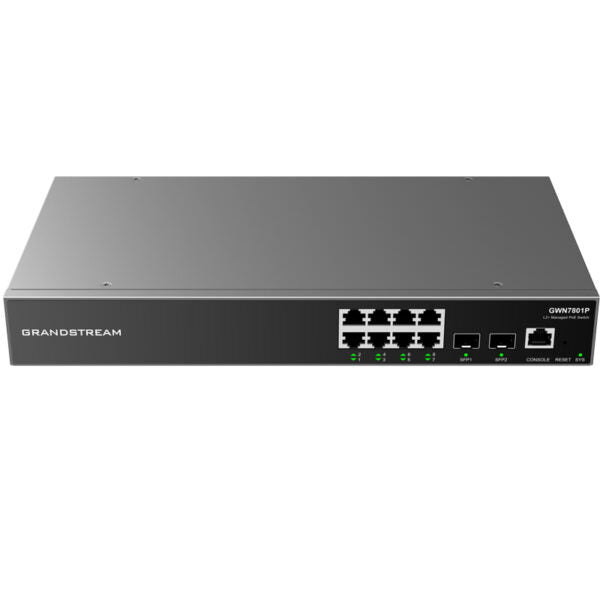
• The GWN7800 series are Layer 2+ managed network switches that allow small-to-medium enterprises to build scalable, secure, high performance, and smart business networks. • Advanced VLAN for flexible and sophisticated traffic segmentation • Advanced QoS for automated detection & prioritization of latency sensitive voice/video traffic • IGMP Snooping for network performance optimization • Comprehensive security capabilities against potential attacks • PoE models provide smart dynamic PoE output to power IP phones, IP cameras, Wi-Fi access points and other PoE endpoints • Managed in various ways including local network controller, GWN Manager software, and GWN.Cloud cloud network management platform Key Features: • 8 Gigabit Ethernet ports • 2 Gigabit SFP ports • 8 PoE ports • Smart power control to support dynamic PoE/PoE+ power allocation per port for the PoE models • Supports deployment in IPv6 and IPv4 networks • Provides quaternary binding of IP, MAC, VLAN & port with ARP Inspection, IP Source Guard, DoS protection, port security & DHCP snooping • Device management via SNMP, RMON, CLI, HTTPS, TR069, GWN Manager, GWN Cloud • Advanced QoS auto detects and prioritizes latency sensitive audio/video/RTP/VoIP/SIP packets • 3-Year Warranty Guaranteed Additional Information: • Weight: 4.41 lbs • Dimensions: 1.18 × 6.89 × 1.74 in • Brand: Grandstream • Product Family: GWN-Cloud • Switch Type: Managed Switches • Number of Ports: 5-10 • Main Port Speed: Gigabit • Uplink Ports: Gigabit SFP • Layer Support: L2+ • PoE Support: Yes • PoE Budget: Medium (100-199 W) • Redundant Power Supply: No Technical Specifications: • Model: GWN7801P • Network Protocol: IPv4, IPv6, IEEE 802.3, IEEE 802.3i, IEEE 802.3u, IEEE 802.3ab, IEEE 802.3z, IEEE 802.3x, IEEE 802.3af/at, IEEE 802.1p, IEEE 802.1Q, IEEE 802.1w, IEEE 802.1d, IEEE 802.1s • Gigabit Ethernet Ports: 8 • Gigabit SFP Ports: 2 • Console: 1 • Number of PoE Ports: 8 • Integrated Power Supply: 150W • Max Output Power per PoE Port: 30W • Max Total PoE Output Power: 120W • PoE Standards: IEEE 802.3af/at • Auxiliary Ports: 1x Reset Pinhole • Forwarding Mode: Store-and-forward • Total non-blocking throughput: 10Gbps • Switching Capability: 20Gbps • Forwarding Rate: 14.88M packets per second • Packet Buffer: 4.1MB
About This Product
From a compatibility standpoint, the GWN7801P shines when paired with Grandstream’s own ecosystem of phones and access points, but it’s fully standards-based and powers any 802.3af/at endpoint. The cloud management option through GWN.Cloud makes it attractive for multi-site Canadian businesses that want to monitor and configure switches across a few locations without deploying an on-premises controller. Its advanced QoS automatically detects and prioritizes voice and video traffic, which helps maintain call quality for hosted VoIP systems commonly used in the GTA.
Buyers should keep a few practical limits in mind. The 120W PoE budget is sufficient for a mix of phones and cameras, but if you plan to connect several high-draw devices like multi-stream Wi‑Fi 6 access points that each push the 30W per-port ceiling, you may hit the total budget quickly. The switch has no redundant power supply, so a single internal power-supply failure will take all ports offline—something to factor into uptime planning. The Gigabit SFP uplinks provide a solid pathway to the core network, but they aren’t 10G, so this isn’t designed for bandwidth-heavy aggregation work.
This model finds its sweet spot as the smart edge switch in a growing business. It’s overkill for a micro-office with only two or three devices where a simple unmanaged PoE switch would suffice, and it’s underpowered for a large campus deployment that demands stacking, hot-swappable power, and high port density. For a Canadian SMB that wants managed visibility, VLAN segmentation, and voice-ready PoE without breaking the budget, the GWN7801P sits in a compelling middle ground.
Services We Provide
- Professional Installation & Configuration
- Ongoing Maintenance & Support
- Troubleshooting & Repairs
- System Upgrades & Updates



