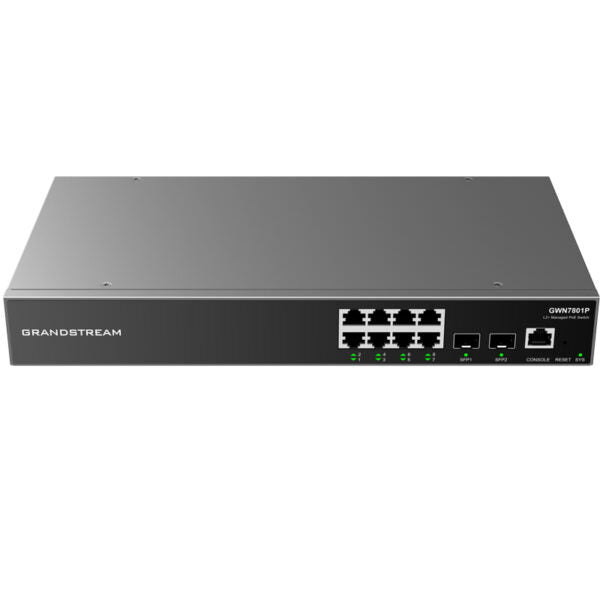
Grandstream GWN7702P Unmanaged Network Switch, 16 x GigE (8 x PoE)

Frequently Asked Questions

First confirm you are plugging into one of the eight PoE-capable ports; only ports 1 through 8 supply power on this model. Next, check that the cable is undamaged and uses all four pairs, because PoE requires intact pairs to deliver power. Verify the connected device itself supports 802.3af or 802.3at, as passive PoE gear won’t negotiate power properly. If the device still doesn’t start, try it on a different PoE port and swap the Ethernet cable before suspecting a deeper hardware fault.
Choppy audio is often a sign that the phone’s traffic is competing with large data transfers on the same network segment. This unmanaged switch uses strict-priority QoS, which helps when upstream devices also honour the priority tags, so confirm the phone is marking its packets correctly and the router or firewall is set to respect those markings. Also check for a looped cable or a device flooding the switch with multicast traffic; the built-in storm control limits this to 100 Mbps, which is usually enough to protect voice quality but may not silence a severe flood entirely.
No configuration is needed. The switch is completely unmanaged and begins forwarding traffic as soon as it is powered on and cables are connected. Auto MDI/MDIX eliminates the need for crossover cables, and the QoS and storm control features operate with fixed defaults that you cannot change. If your network requires VLAN segregation or custom port settings, you would need a managed switch instead.
Yes, a warm chassis is expected because the GWN7702P uses passive, fanless cooling to stay silent. Ensure it has at least a few inches of clearance on all sides, especially above it, and avoid stacking other heat-producing equipment directly on top. If the environment is already warm, such as a poorly ventilated telecom closet, consider adding active airflow nearby to keep the operating temperature within safe limits.
Yes. The box includes standard rack-mounting brackets and screws, allowing you to install the GWN7702P in a 19-inch equipment rack. The switch occupies roughly 1U of vertical space when mounted, though it is not a full-depth unit, so you may need to manage cable strain from behind.
Start by moving the device to another port with a known-good patch cable to rule out a faulty port or cable. If the problem follows the device, verify its IP configuration, because an unmanaged switch cannot hand out addresses; the device must receive one from a DHCP server or have a valid static address. Also check that the upstream router or firewall isn’t blocking the device’s MAC address or imposing access controls.
It will forward frames containing VLAN tags transparently because it does not inspect or strip 802.1Q headers. However, the switch itself cannot create VLANs or assign ports to specific VLANs, so all tagged and untagged traffic shares the same switching fabric. This design works for simple router-on-a-stick setups where the router handles the VLAN separation, but it won’t isolate traffic at the switch level.
The GWN7702P has fixed broadcast, multicast, and unicast storm control that clamps excess traffic to about 100 Mbps per affected port. If a PC is generating a broadcast storm, the switch will automatically throttle it, which usually preserves basic network usability. To identify the source, disconnect LAN cables one at a time until the flood stops, then investigate that device for a misconfigured application or a faulty NIC. If the issue persists, a Toronto-based VoIP support provider can usually resolve this remotely.
This model has no management interface, so the usual sign of trouble is that all LEDs behave unexpectedly or traffic stops entirely. Start with a careful power cycle: unplug the AC cable, wait 20 seconds, and reconnect it. If the switch remains unresponsive, test the power outlet with another device and try a different IEC power cord. Because there is no firmware that an end user can reload in the field, persistent hardware-level unresponsiveness should be handled by Grandstream support after ruling out power and cabling.
Grandstream states the switch supports long cable connections beyond the standard 100-metre Ethernet limit under certain conditions, though the maximum distance varies with cable quality and electromagnetic interference. For reliable Gigabit operation, stick to well-terminated Cat5e or better cabling and stay at or below the standard 100-metre length. If a longer run is unavoidable, test with a cable certifier and be prepared for a possible link-speed negotiation to a lower rate.
Switches

Grandstream GWN7702P Unmanaged Network Switch, 16 x GigE (8 x PoE)

• The GWN7700 series are unmanaged network switches that provide a quick and cost-effective way to add high-speed Gigabit connectivity to home offices and small/medium businesses. They require no configuration or installation, offer a desktop and wall-mountable design, and provide auto MDI/MDIX to eliminate the need for crossover cables. Key Features: • 16 x GigE (8 x PoE) • 802.3 af/at compliant with up to 30W on each port • Green technology reduces power consumption • Auto MDI/MDIX crossover for all ports • Broadcast/Multicast/Unicast Storm Control (fixed to 100Mbps) to monitor traffic levels • Supports long cable connections • Quality of Service (QoS) with default strict priority when present • Weight: 4.81 lb • Dimensions: 14.41 × 8.28 × 2.09 in • PoE switch, unmanaged switch • Number of ports: 11-18 • Main port speed: Gigabit • Uplink ports: Gigabit RJ45 • Layer support: L2 • Power over Ethernet (PoE) support with medium budget • IEEE 802.3i, 802.3u, 802.3ab, 802.3x, 802.1p, 802.3af, 802.3at standards and protocols Box contents: • 1 x Switch • 1 x 1.2m AC cable • Rack-mounting standard brackets • 4 x Rubber feet • 1 x Quick installation guide (QIG) Note: The product data sheet can be found on the manufacturer's website for a full list of specifications.

About This Product

The Grandstream GWN7702P is a practical choice for small offices, retail counters, or satellite locations that need to connect a handful of devices without touching a configuration screen. Its 16 Gigabit ports and built-in PoE on half of them mean you can wire up workstations, printers, and VoIP phones or access points through a single piece of hardware. Because it is fully unmanaged, there is no VLAN setup, no web interface to learn, and no switch-level security policies to maintain, which suits teams that want dependable wired connectivity and have simpler network topologies.

This model fits neatly beneath a router or firewall in a modest rack or on a sturdy shelf, and the included rack ears make it easy to mount in a standard cabinet. In a Toronto professional office or a GTA retail back room, it provides enough PoE budget to power eight class-3 devices such as IP phones or entry-level cameras, while leaving eight non-PoE ports available for other Ethernet gear. Its automatic crossover and QoS with strict priority help preserve call quality for VoIP traffic, provided the upstream gateway handles the rest of the traffic management.

Buyers should note that the unmanaged nature is a double-edged sword. You cannot isolate voice and data traffic at the switch level, so if the network grows crowded, a managed switch with VLAN support would give finer control. The storm control is fixed at 100 Mbps and cannot be tuned, which normally keeps broadcast chatter in check but may feel blunt in a network with unusual traffic patterns. The device also relies on fanless passive cooling, so it stays silent, though it needs a little open space around it for heat dissipation if mounted flat.

For a small deployment where the priority is simple, reliable wired access and the number of PoE devices won’t grow beyond eight, this switch offers good value. It is overkill for a home office that only needs three or four connections, and underpowered for a growing mid-sized office that will soon require more than eight powered ports or Layer 2 management features. It pairs naturally with Grandstream’s own VoIP phones and access points, but works equally well with any standards-based Ethernet device on the other side of the cable.
Services We Provide
  • Professional Installation & Configuration
  • Ongoing Maintenance & Support
  • Troubleshooting & Repairs
  • System Upgrades & Updates