
Grandstream GWN7700MP Unmanaged 2.5 MultiGigabit Switch with 5 x 2.5 GigE (4 x PoE), 1 x SFP+

Frequently Asked Questions

First, confirm the power adapter is securely connected to the switch and to a working wall outlet. If the switch has no LED activity, try a different power cable or outlet that you know works. This switch does not support PoE input, so it must use the included AC adapter.
Verify that the device plugged into a PoE port actually requires 802.3af or 802.3at power and that the total PoE draw for all ports does not exceed the switch’s budget (30–70 W). Unplug non-essential PoE devices, then re-test the problematic one. Also check that the Ethernet cable is fully seated and not damaged.
This is an unmanaged switch, so it does not support VLAN configuration or any web-based management. It forwards all traffic transparently. If you require VLAN segmentation, you will need a managed switch, or you can configure VLANs on a compatible router or access point upstream.
Make sure you are using a Category 5e or higher Ethernet cable, as older Cat5 cables may not reliably support 2.5 Gbps. Also confirm that both the switch port and the connected device are set to auto-negotiate, and that the device itself supports 2.5 GbE (not all devices that claim multi-gig operation do).
This model is designed with a fanless, metal enclosure that dissipates heat through the chassis, so some warmth is normal. Ensure it is placed in a well-ventilated area away from direct sunlight or other heat sources. If the switch becomes too hot to touch or starts dropping connections, check that the vents (if any) are not blocked.
Check if the phone is on a PoE port and that the switch’s total PoE budget is not being exceeded, which may cause the phone to lose power and reboot. Also verify the Ethernet cable from the phone to the switch is not intermittently failing. If your network has heavy traffic, the switch’s fixed 100 Mbps storm control could also be a factor.
Yes, the SFP+ port supports both 1 Gbps and 10 Gbps SFP modules. If you insert a 1 Gbps SFP module, the port will negotiate to gigabit speed. Just ensure the module is compatible with the switch and your fiber or copper cabling.
First, confirm the SFP module is fully inserted and locked in place. Then verify that the fiber or twisted-pair cable (depending on your module) is correctly connected at both ends and that the remote device is powered on and configured for the same speed. Try swapping the module with a known-working one if possible.
The GWN7700MP includes mounting brackets and screw holes for wall mounting. Ensure you use appropriate anchors for your wall type, attach the brackets securely, and leave enough cable slack to avoid strain on the ports. Always mount with the LEDs facing outward for easy status checking.
Switches

Grandstream GWN7700MP Unmanaged 2.5 MultiGigabit Switch with 5 x 2.5 GigE (4 x PoE), 1 x SFP+
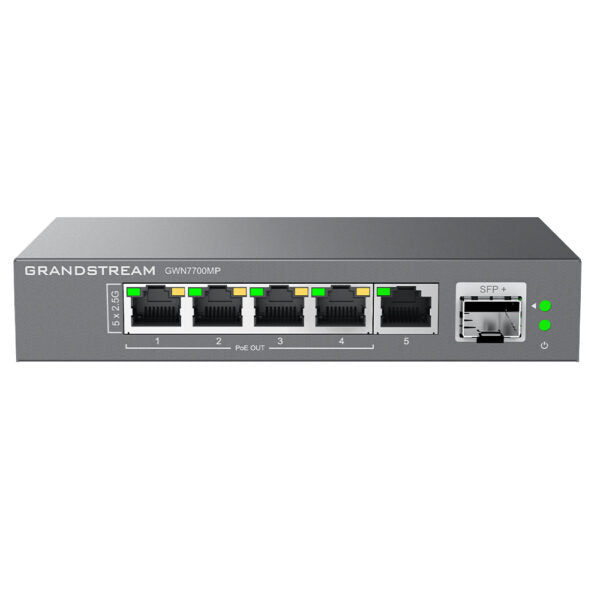
• The GWN7700M series are unmanaged multi-Gigabit network switches that provide high-speed network connectivity up to 2.5Gbps to home offices and small-to-medium businesses. Key Features: • Fast Ethernet, 1-Gigabit, and 2.5-Gigabit network speeds • Auto MDI/MDIX for elimination of crossover cables • Auto negotiation on each port for optimal performance • IEEE 802.3af/at compliant smart dynamic PoE output • Whisper Quiet fanless design • Broadcast/Multicast/Unicast Storm Control (fixed to 100Mbps) • Green technology reduces power consumption • Quality of Service (QoS) with Default Strict Priority • Includes: • 5-10 multi-Gigabit copper ports with 100/1000/2500Mbps connectivity • One SFP+ fiber port with 1 Gigabit or 10-Gigabit connectivity • Desktop and wall-mountable for flexible installation • Technical Specifications: • Model: GWN7700MP • Enclosure: Metal, desktop/wall-mountable • Number of Ports: 5-10 • Main Port Speed: 2.5G • Uplink Ports: 10G SFP+ • PoE Support: Yes, low power budget (30-70 W) • Dimensions: 145 x 80 x 27mm • Weight: 0.31KG

About This Product

This unmanaged switch is a practical fit for small offices or home offices that need to move beyond standard gigabit speeds, particularly where a few devices—such as a high-performance workstation, a NAS, or a Wi-Fi 6 access point—can benefit from 2.5 GbE connections. It also includes a 10 G SFP+ uplink port, making it a cost-effective way to connect to a faster backbone or a single 10 Gbps device without upgrading the entire network. The four PoE ports support both 802.3af and 802.3at, so you can power devices like IP phones, cameras, or access points directly from the switch, which simplifies cabling in a tight space. However, this is an unmanaged switch with no web interface or VLAN support, so it is best suited for simple networks where plug-and-play operation is sufficient—if you need traffic segmentation, link aggregation, or remote management, you should look at a managed switch instead. For a small Canadian business deployment, such as a GTA office with a handful of VoIP phones and a local file server, the GWN7700MP can deliver a noticeable performance boost over a legacy 1 Gbps switch, but its limited PoE budget (30–70 W total) means you should plan your powered devices carefully to avoid overloading the power supply.
Services We Provide
  • Professional Installation & Configuration
  • Ongoing Maintenance & Support
  • Troubleshooting & Repairs
  • System Upgrades & Updates



