
Grandstream GWN7700P Layer 2 Unmanaged PoE Switch, 5 x GigE (4 x PoE), Metal Case

Frequently Asked Questions

First confirm the Ethernet cable is fully seated and not damaged, and that the phone itself supports PoE. Then check the LED on the switch port: if the port LED stays off, try a known-good short patch cable and a different PoE-capable device, such as another phone or a camera, to rule out the phone or cable. If a second device also fails, move it to another PoE port on the switch; if it powers up there, you may have a single bad port and should contact your supplier.
A common cause is a network loop created by an extra cable accidentally connecting two ports on the same switch or on another nearby switch. Inspect all cabling for unintentional loops and remove any that you find. Also verify the power adapter is firmly connected and the switch’s ventilation is unobstructed, because overheating can cause erratic behavior.
Yes. The GWN7700P is a standard unmanaged Gigabit switch, so it works transparently behind any Canadian carrier-supplied gateway or router. Simply connect one of its ports to a LAN port on the gateway and power it on; the switch will automatically pass traffic without any configuration on your part.
Not necessarily. Try a known-working Ethernet cable and confirm the camera’s power draw is within the 30 W limit per port. If the camera is long-distance, test with a shorter factory-made patch cable right at the switch to eliminate cabling as the cause. Should the port still not deliver power after that test, flag it with your vendor or reach out to a Grandstream partner for warranty assessment.
All ports show activity LEDs, but this unmanaged switch does not expose usage counters. If you suspect congestion, temporarily disconnect non-critical devices one by one while performance is poor; if the problem clears after removing a specific device, that device or its application is likely generating excessive broadcast or multicast traffic. Because the switch has fixed storm control at 100 Mbps, a noisy device can still saturate a single port.
The switch uses a default strict-priority queue based on hardware-level QoS markings, so it will give precedence to properly tagged packets, which Grandstream phones typically send by default. However, with only one output queue per port and no configurable policies, heavy simultaneous data transfers on the same port can still cause brief jitter. For a handful of phones on their own ports, performance is usually acceptable.
If the switch has power but no port shows a link after devices are connected, check that you are using straight-through or auto MDI/MDIX cables, which the switch supports automatically. Try a direct connection with a known-good device and a short patch cable; if still nothing, perform a simple power cycle by unplugging the adapter for 30 seconds and plugging it back in. If the issue persists, the switch hardware may need evaluation by your support provider.
Yes, the GWN7700P ships with a wall-mountable metal case. Mount it with the ports facing down or to the side so dust does not settle inside the jacks, and leave at least a few centimeters of clearance around the vents to allow passive cooling. In a cramped Toronto telecom closet, ensure it is not stacked directly on top of warm equipment.
No. The GWN7700P is not a PoE-powered device. It must be powered using the included AC adapter. The PoE capability is only for downstream devices connected to the four PoE-enabled ports.
Switches

Grandstream GWN7700P Layer 2 Unmanaged PoE Switch, 5 x GigE (4 x PoE), Metal Case
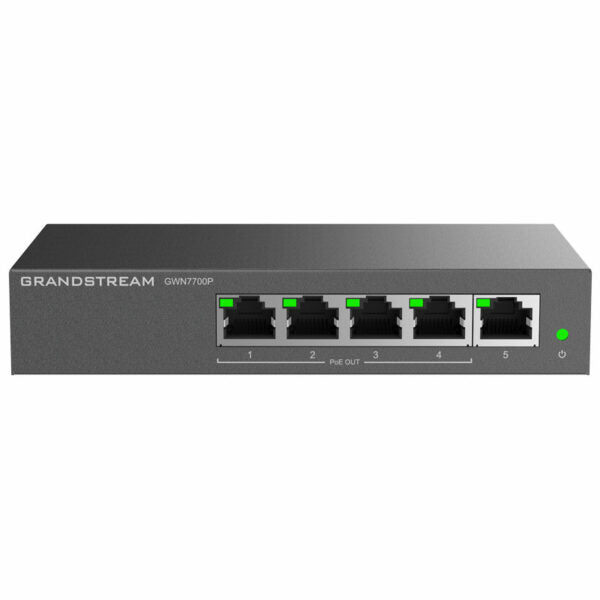
The GWN7700 series are unmanaged network switches designed for home offices and small/medium businesses, providing a quick and cost-effective way to add high-speed Gigabit connectivity. Key features include: • Layer 2 Unmanaged PoE Switch • 5 x GigE (4 x PoE) • Metal Case • 802.3 af/at compliant with up to 30W on each port • Green technology reduces power consumption • Auto MDI/MDIX crossover for all ports • Broadcast/Multicast/ Unicast Storm Control (fixed to 100Mbps) to monitor traffic levels • QoS – Supports Default Strict Priority when present Additional features include: • LED indicators with per-port and per-device information • MAC address table of 2K entries • Switching capacity of 10Gbps • Jumbo frame size of 9KB • Advanced features such as Mac Address Auto-Learning And Auto-Aging, IEEE 802.3x Flow Control, 802.1p/DSCP QoS, and IGMP Fast-Leave The GWN7700 series is available in desktop and wall-mountable designs, with a power adapter and quick-start guide included.

About This Product

The Grandstream GWN7700P is a straightforward, unmanaged switch built for small offices, retail counters, or home-office setups where a handful of PoE devices need simple, reliable connectivity. It suits environments that are deploying a few Grandstream access points, IP phones, or cameras and want to avoid running separate power injectors. The metal chassis and four PoE ports delivering up to 30 watts each cover the basics without requiring any configuration, which makes it a good fit for a non-technical owner or a slim IT team in a Toronto-area startup.

Tradespeople and integrators will appreciate that it pairs cleanly with Grandstream’s own GWN-series access points and Wi-Fi-capable IP phones, creating a single-vendor stack for a small branch or clinic. It can also slot into a mixed environment as a port-expansion switch behind a managed core switch, though you lose visibility because the GWN7700P itself offers no SNMP monitoring, VLAN support, or remote management. That is the key tradeoff: you get gigabit speed and PoE in a tough, compact case, but zero on-switch intelligence.

For a business expecting to grow beyond a handful of powered devices, the fixed five-port count and unmanaged nature become limiting fast. There is no way to segment voice and data traffic or prioritize queues beyond the switch’s default strict-priority QoS, which might be enough for a single phone system but not for a converged network with real-time video and bulk data moving simultaneously. Canadian organizations subject to PIPEDA or other compliance frameworks should note this switch cannot enforce network access controls; that responsibility must live elsewhere in the network.

In a home lab or a micro-branch where the switch literally feeds one access point, two phones, and a printer, the GWN7700P is a tidy, low-power solution that will run quietly for years. It becomes a weak link when the same business later adds a second access point, a PoE camera, and a NAS on the remaining port. At that point you are buying another switch rather than starting with a model that has headroom and light management features.
Services We Provide
  • Professional Installation & Configuration
  • Ongoing Maintenance & Support
  • Troubleshooting & Repairs
  • System Upgrades & Updates



