
Grandstream GWN7701 Layer 2 Unmanaged Switch, 8 x GigE, Plastic Case

Frequently Asked Questions

First, try a different Ethernet cable—faulty or miswired cables are the most common cause. If the cable works in another device, test the port with a known-good device like a laptop. If the port still shows no link, power cycle the switch by unplugging it for 30 seconds and plugging it back in. If the issue persists, the port may be defective and the switch should be returned or replaced.
Check the Ethernet cables you're using—they should be at least Cat5e for Gigabit speeds. Make sure your devices also support Gigabit; a device with a 10/100 port will cap the connection at 100 Mbps. The switch itself is Gigabit-capable and shouldn't slow traffic, but if you're using a router with lower-speed uplink, that will be the bottleneck. Try testing with a direct connection between two Gigabit devices to isolate the issue.
Intermittent drops are often caused by loose connections, failing cables, or electrical interference. Reseat all Ethernet cables firmly at both ends. If the switch is daisy-chained to another switch, make sure there is no loop in the network. Power cycle the switch and the connected router. If drops continue, try moving the switch away from large power supplies or fluorescent lights. Contact your VoIP support provider if the network also affects phone calls.
The GWN7701 does not provide Power over Ethernet (PoE). Any IP phone or device that relies on PoE for power will not work unless you use a PoE injector between the switch and the phone. If your phones come with power adapters, you can plug them into a nearby outlet. For a cleaner setup, consider a PoE switch like the GWN7700P model.
No. The GWN7701 is an unmanaged switch and does not read or forward VLAN tags. It treats all frames as standard Ethernet traffic. If you need VLANs to separate voice and data networks, you must use a managed switch that supports 802.1Q. You can still connect VLAN-unaware devices to this switch, but the traffic segmentation will have to happen at the router level, which may cause issues.
Continuous flashing usually indicates traffic on the port, often from broadcast or multicast packets (like from a printer, smart TV, or PC running background services). This is normal behavior. If the flashing is extremely fast and the port seems to be transmitting non-stop, it could be a sign of a broadcast storm—though this switch has built-in storm control to limit that. Try disconnecting one device at a time to isolate the source of the excessive traffic.
The GWN7701 is unmanaged and has no configurable settings, so there is no factory reset procedure. If the switch is misbehaving, simply unplug it for 30 seconds and power it back on. That clears any internal buffer issues. If there is still a problem, the switch may be defective and should be replaced.
Yes, as long as your Bell or Rogers ONT (optical network terminal) or modem has a standard RJ45 Ethernet port, you can connect it to any port on the GWN7701. The switch will pass the internet connection to all downstream devices. Note that if you have a TV service that requires a specific VLAN tag from the ISP, this switch won't preserve that tag—you would need a managed switch in that case. For typical internet and VoIP, it works without issue.
It is normal for this switch to become warm—it has a plastic case and no fan, so heat dissipates through the shell. As long as the switch is in a well-ventilated area (not stacked under equipment or inside a closed cabinet), it should operate within safe temperatures. If it becomes hot enough to be uncomfortable to hold, double-check that the vents (if any) are clear and consider moving it to a cooler spot.
Yes, the switch has mounting slots on the bottom for wall mounting. However, it does not include screws or wall anchors. You will need to supply your own, typically two screws with heads small enough to fit the slots. For a secure mount, use screws appropriate for your wall type (drywall anchors if needed). If you prefer, you can simply place it on a desktop.
Switches

Grandstream GWN7701 Layer 2 Unmanaged Switch, 8 x GigE, Plastic Case
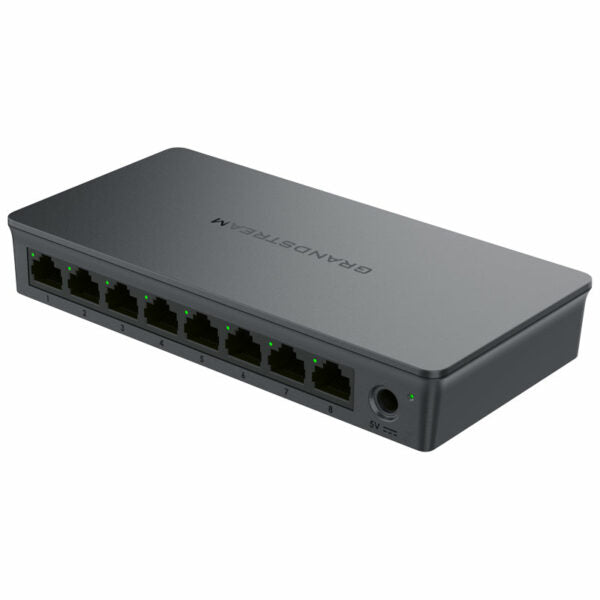
*The GWN7700 series is an unmanaged network switch designed for home offices and small/medium businesses, providing a quick and cost-effective way to add high-speed Gigabit connectivity. The switches are plug-and-play, requiring no configuration or installation. Key Features: • Layer 2 Unmanaged Switch • 8 x GigE ports • Desktop and wall-mountable design • Auto MDI/MDIX crossover for all ports • Broadcast/Multicast/Unicast Storm Control (fixed to 100Mbps) to monitor traffic levels • QoS – Supports Default Strict Priority when present • Green technology reduces power consumption • LED indicators for per port link/activity/speed and device power Additional Information: * Weight: 0.55 lb * Dimensions: 8.78 × 3.56 × 2.13 in * Switch Type: Unmanaged Switches * Number of Ports: 5-10 * Main Port Speed: Gigabit * Uplink Ports: Gigabit RJ45 * Layer Support: L2

About This Product

The Grandstream GWN7701 is an unmanaged, plug-and-play Gigabit switch designed for small office and home office environments where simplicity matters more than advanced network control. It's a solid choice if you need to expand wired connectivity for a handful of devices like desktop computers, printers, or VoIP phones that have their own power source—just connect the cables and it works, no IT staff required. The plastic housing keeps it lightweight, and the fanless design means it runs silently, making it unobtrusive on a desktop or mounted to a wall in a meeting room or retail space.

Because this is an unmanaged switch, there is no web interface or VLAN support. If your network needs segmentation, traffic prioritization beyond basic QoS (default strict priority), or Power over Ethernet to run cameras or phones without separate power adapters, you'll need a managed or PoE switch instead. The fixed storm control at 100 Mbps is a safety net against broadcast loops but could occasionally cap traffic during a heavy multicast session—though for typical office data and voice traffic this rarely matters.

For a Canadian small business in the GTA or a home worker setting up a dedicated network for softphones and deskphones, this switch fills the gap when your router doesn't have enough LAN ports. It pairs well with Grandstream's own IP phones and ATA adapters, provided those devices are powered locally or through an injector. On the other hand, if you're planning a dense deployment with dozens of devices or require remote management across multiple locations, this switch will quickly become a bottleneck. It's a perfectly adequate, low-cost solution for basic connectivity, but know its limits before you buy.
Services We Provide
  • Professional Installation & Configuration
  • Ongoing Maintenance & Support
  • Troubleshooting & Repairs
  • System Upgrades & Updates



