
Grandstream GWN7701M Unmanaged 2.5 Multi-Gigabit Switch, 8 x 2.5 GigE, 1 x SFP+

Frequently Asked Questions

First, check that the device you are plugging in actually has a 2.5 Gigabit Ethernet port; many devices still only support 1 Gigabit. Next, ensure you are using a high-quality Cat5e or better Ethernet cable, as older or damaged cables can force a connection to drop to a slower speed. The LED indicators on the switch will confirm the link speed for each port, so check if the light is showing a 2.5G connection.
This switch has no power button and is designed to be powered on as soon as it is plugged in. First, ensure the power adapter is securely connected to both the switch and a working wall outlet. If it is plugged in and no lights are on, try a different power outlet to rule out a circuit issue, and check that the power adapter's cable is not damaged.
Yes, the 10G SFP+ port is designed as an uplink to connect this switch to the rest of your network. You will need an SFP+ transceiver module that matches your router's connection type, such as a fiber optic or direct attach copper cable. The port is backward compatible, so it can also link at 1 Gigabit if your router does not support 10G.
This is often a physical layer issue. The first step is to reseat the Ethernet cable at both ends, unplugging it and plugging it back in firmly. If the problem persists, swap the cable with a new one to rule out a faulty cable, and try a different port on the switch to isolate whether the issue is with the original port or the connected device.
This is a very common question, as this switch model does not provide Power over Ethernet. It can only connect devices that have their own power source. You will need to use the phone's own AC power adapter, or place a PoE injector or a PoE-capable switch between this switch and the phone.
Yes, this is an unmanaged switch that works transparently with any Canadian internet service provider, including Bell and Rogers. It simply extends your network and does not interfere with your modem or router's configuration. You can plug it directly into your router to add more ports, and it will not conflict with your ISP's equipment.
The switch itself is a passive device and is rarely the cause of a 'No Internet' error if the lights are on. First, power cycle your modem, router, and the new switch in that order, waiting for each to fully boot up. If the issue persists, the problem is likely in the IP address configuration of your computer or your main router, so check that your computer is set to obtain an IP address automatically.
This switch can only help if your internal network or internet plan is faster than a standard 1 Gigabit connection. It allows your devices to communicate with each other at up to 2.5 Gbps, but your internet speed is still limited by the plan you purchase from your provider. It will not make your 1 Gigabit internet plan any faster.
The SFP+ port itself does not use a cable directly; it requires an SFP+ transceiver module to be inserted first. The type of fiber cable you need depends entirely on the transceiver you choose, with common options being LC duplex connectors for multi-mode fiber. You must match the transceiver and cable type to the equipment on the other end of the connection.
Switches

Grandstream GWN7701M Unmanaged 2.5 Multi-Gigabit Switch, 8 x 2.5 GigE, 1 x SFP+
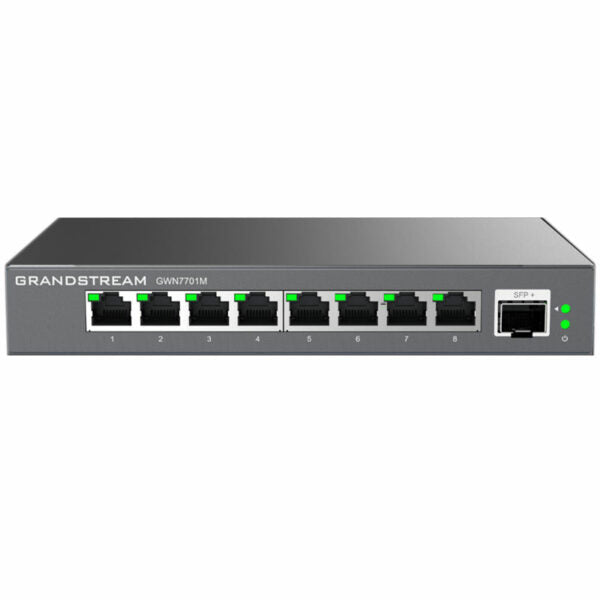
• Unmanaged multi-Gigabit network switches for home offices and small-to-medium businesses • Supports fast Ethernet, 1-Gigabit, and 2.5-Gigabit network speeds • Includes 1 SFP+ Gigabit fiber port with 1-Gigabit or 10-Gigabit high-speed uplink connectivity Key Features: • 8 Multi-Gigabit Copper Ports provide 100/1000/2500Mbps connectivity • One SFP+ Fiber Port with 1 Gigabit or 10-Gigabit connectivity • LED Indicators: Link/Activity/Speed Per device: Power • Auto MDI/MDIX crossover for all ports • Whisper Quiet: fanless • Broadcast/Multicast/ Unicast Storm Control (fixed to 100Mbps) to monitor traffic levels • Green technology reduces power consumption • QoS – Supports Default Strict Priority when present Additional Information: • Weight: 1.7 lb • Dimensions: 11.81 × 5.12 × 2.1 in • Switch Type: Unmanaged Switches • Number of Ports: 5-10 • Main Port Speed: 2.5G • Uplink Ports: 10G SFP+ • Layer Support: L2

About This Product

The Grandstream GWN7701M is a straightforward unmanaged switch designed to quietly solve a specific problem: bringing multi-gigabit speeds to a small cluster of devices without the cost or complexity of a managed network overhaul. It is best suited for a small office or a creative team that needs to move large files locally, perhaps between high-performance workstations and a NAS, without touching a complex interface. If you have a few new computers with 2.5 Gigabit Ethernet ports and a fast internet connection, this switch lets you take advantage of that hardware immediately. It is a simple, fanless way to bridge the gap between older Gigabit infrastructure and newer, faster devices, acting as a straightforward connectivity upgrade for a few key points in your network.

This switch is not designed to be the backbone of a large enterprise deployment. It is an unmanaged Layer 2 device, meaning it provides zero remote management, no VLAN configuration, and no traffic prioritization controls you can adjust. Its QoS is a fixed, strict priority system that engages automatically. This is a pure plug-and-play appliance. For a growing Toronto business, this makes it a perfect fit for a small branch or a satellite office that needs a reliable, high-speed connection for a handful of devices, where you would rather not pay for managed features you will never use.

A practical limit to understand is the switch's single 10G SFP+ uplink port. This design creates a funnel where up to eight devices, each capable of 2.5 Gbps, share a single 10 Gbps path back to the main network. For a team routinely transferring massive files from multiple workstations to a server simultaneously, this could become a bottleneck. The device is ideal when the primary need is high-speed communication between the devices plugged into it, with the uplink used for internet access or connection to a larger network at a more moderate aggregate speed. For a deployment in a larger office in the GTA that requires high-bandwidth, simultaneous access to a core network for every user, a switch with more uplink ports or higher total throughput would be a better fit.

For a Canadian business, this switch is a sensible choice for a straightforward network upgrade. It is a pure Ethernet switch with no configuration needed for compatibility with Canadian ISPs or VoIP services, as it simply passes traffic transparently. Its value lies in its quiet, energy-efficient operation and ability to modernize a small part of your network cost-effectively. It is the definition of overkill for a home with a single internet connection and basic web browsing, where a standard Gigabit switch would suffice, and underpowered as a core aggregation switch for a large or complex network.
Services We Provide
  • Professional Installation & Configuration
  • Ongoing Maintenance & Support
  • Troubleshooting & Repairs
  • System Upgrades & Updates



