
Grandstream GWN7701P Layer 2 Unmanaged PoE Switch, 8 x GigE (4 x PoE), Metal Case

Frequently Asked Questions

First, check that the switch itself is powered on and the power LED is lit. Then verify that the connected device is PoE-compatible (802.3af/at) and that the total power draw of all PoE devices does not exceed the 60W budget. Try connecting only one device at a time to isolate the issue. If the problem persists, a Toronto-based VoIP support provider can usually resolve this remotely.
Simply connect any of the eight Gigabit ports to your router or upstream switch using a standard Ethernet cable. The switch supports auto MDI/MDIX, so you can use either a straight-through or crossover cable. No configuration is needed—the switch will automatically negotiate the connection speed and duplex mode.
Start by checking the Ethernet cable between the phone and the switch—reseat it at both ends and try a different cable if possible. Also verify that the phone is receiving adequate PoE power; if the phone has a separate power adapter, try using that to rule out a PoE issue. If the problem continues, test the phone on a different port on the switch to see if the issue follows the port.
Yes, you can plug the switch's external power adapter into a UPS. The switch itself consumes very little power (about 3W without PoE load), but remember that the PoE devices will also draw power from the UPS. Ensure your UPS has enough capacity to handle the total load of the switch and all connected PoE devices for your desired runtime.
The link LED indicates a successful Ethernet connection. If it is off, check that the cable is securely connected at both ends and that the device on the other end is powered on and has a working network interface. Try a different cable or a different port on the switch to isolate the issue. If the LED still does not light, the cable or the connected device's port may be faulty.
No, the GWN7701P is an unmanaged switch, so it does not support VLAN configuration, port mirroring, or any other managed features. It simply forwards all traffic it receives. If you need VLAN support or traffic segmentation, you would need a managed switch.
The switch supports Gigabit speeds on all ports, so it should not be a bottleneck for typical office use. First, check the speed and duplex settings on the connected devices—ensure they are set to auto-negotiation. Also verify that your cables are Cat5e or better for Gigabit speeds. If you are using PoE, high power draw can sometimes cause voltage drop on long cables, which may affect performance.
The switch includes mounting holes on the bottom for wall mounting. You will need to supply your own screws and wall anchors suitable for your wall type. Ensure the switch is mounted in a well-ventilated area away from heat sources, and that the power adapter can reach an outlet. The metal case is durable, but avoid mounting it in a location where it could be bumped or exposed to moisture.
The metal case can become warm during normal operation, especially when powering multiple PoE devices. Ensure the switch has adequate ventilation—do not stack items on top of it or place it in an enclosed space without airflow. If the switch becomes too hot to touch comfortably, reduce the PoE load by disconnecting non-essential devices. If the issue persists, the switch may be faulty and should be checked by a technician.
Yes, this switch is standards-compliant and will work with any VoIP service that uses standard Ethernet and PoE. It does not require any configuration, so it will pass traffic from your VoIP phones to your router or modem without issue. Just ensure your router is configured correctly for your VoIP provider's settings.
Switches

Grandstream GWN7701P Layer 2 Unmanaged PoE Switch, 8 x GigE (4 x PoE), Metal Case
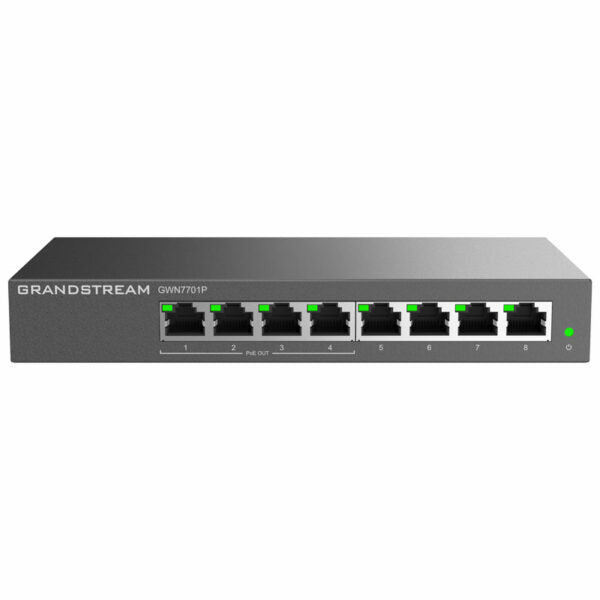
The GWN7700 series are unmanaged network switches that provide a quick and cost-effective way to add high-speed Gigabit connectivity to home offices and small/medium businesses. They require no configuration or installation, offer a desktop and wall-mountable design, and provide auto MDI/MDIX to eliminate the need for crossover cables. Key Features: • Layer 2 Unmanaged PoE Switch • 8 x GigE (4 x PoE) ports • Metal Case • Auto Negotiation • Auto MDI/MDIX • IEEE 802.3 af/at compliant, up to 30W on each port • Green technology reduces power consumption • LED Indicators: per port Link/Activity/Speed and per device Power • Broadcast/Multicast/ Unicast Storm Control (fixed to 100Mbps) to monitor traffic levels • QoS – Supports Default Strict Priority when present Additional Information: • Weight: 2 lb • Dimensions: 9.06 × 8.27 × 2.01 in • Switch Type: Unmanaged Switches, PoE Switches • Number of Ports: 5-10 • Main Port Speed: Gigabit • Uplink Ports: Gigabit RJ45 • Layer Support: L2+ • PoE Support: Yes • PoE Budget: Low (30-70 W) Technical Specifications: • Box Contents: 1x GWN7701P Switch, 1x Power Adapter, 1x QIG • Gigabit Ports: 8 • PoE Ports: 4 • Enclosure: Metal • Mounting: Desktop/ Wall-Mount • Standards and Protocols: IEEE 802.3i, IEEE 802.3u, IEEE 802.3ab, IEEE 802.3x, IEEE 802.1p, IEEE 802.3af, IEEE 802.3at • Port Feature: 8× 10/100/1000Mbps RJ45 Ports, Auto Negotiation, Auto MDI/MDIX • Network Media: 1000Base-T/100Base-TX/10Base-T, Half/Full-Duplex • PoE Configuration: 1~4 Ports 802.3 af/at compliant, up to 30 W on Each Port, Total 60W Power Budget • LED Indicators: per port Link/Activity Green and per device Power Green • Mac Address Table: 8K • Switching Capacity: 16Gbps • Jumbo Frame: 9KB • Advanced Features: Mac Address Auto-Learning And Auto-Aging, IEEE 802.3x Flow Control, 802.1p/DSCP QoS, Unlink clear FDB Feature, IGMP Fast-Leave, IGMP Snoop, Route Port Autolearn, Query Refresh Member Port • Power Adapter: External 48V-53.5V/1.22A • Max Power Consumption by Base System: 3W (excluding PoE output power) • Environmental: Operating Temperature: 0 to 40 °C (32 to 104 °F), Storage Temperature: -40 to 70 °C (-40 to 158 °F), Operating Humidity: 10% to 90% Non-condensing, Storage Humidity: 5% to 90% Non-condensing • Compliance: FCC, CE, RCM, IC, UKCA

About This Product

The Grandstream GWN7701P is an unmanaged PoE switch designed for small offices, home offices, or retail environments where simplicity and cost-effectiveness are priorities. With eight Gigabit ports, four of which provide Power over Ethernet (PoE) at up to 30W per port, it can power devices like VoIP phones, security cameras, or wireless access points without needing separate power adapters. This switch is ideal for a small business in the GTA looking to quickly set up a handful of PoE devices without the complexity of managed networking features. It pairs well with Grandstream's own IP phones or GWN series access points, but it will also work seamlessly with any standards-compliant PoE device from other manufacturers.

Because this is an unmanaged switch, there is no web interface or configuration options—it simply works out of the box. That makes it a great choice for non-technical users or for deployments where you just need to extend your network with minimal fuss. However, the lack of management means you cannot monitor traffic, set VLANs, or troubleshoot port-level issues remotely. The 60W total PoE budget is modest, so you should plan your device connections carefully: powering four high-consumption devices (like PTZ cameras or high-power access points) may exceed the budget. The switch also includes basic storm control and QoS, but these are fixed and not adjustable.

For a Canadian business context, this switch is well-suited to a small office in Toronto or a retail location in Vancouver where you need to connect a few VoIP phones and a Wi-Fi access point. It is overkill if you only need one or two PoE ports, and underpowered if you need to support a large number of PoE devices or require advanced network management. If your needs grow, you would likely want to step up to a managed PoE switch that offers VLAN support and PoE budget monitoring.
Services We Provide
  • Professional Installation & Configuration
  • Ongoing Maintenance & Support
  • Troubleshooting & Repairs
  • System Upgrades & Updates



