
Grandstream GWN7702 Unmanaged Network Switch, 16 x GigE

Frequently Asked Questions

First, ensure the power adapter is securely connected to the switch and to a working electrical outlet. Try a different outlet or test the adapter with another compatible device if possible. If the switch still does not power on, the adapter may be faulty and should be replaced.
Verify that the Ethernet cables are firmly plugged into both the switch and the devices. Try swapping cables with known working ones to rule out a bad cable. Also, check that the device's network port is enabled and that the switch's port LEDs are lit or blinking, indicating a link.
Start by power cycling the switch—unplug it for 30 seconds and plug it back in. This clears temporary issues. Also, check for any loose cable connections or damaged cables. If the problem persists, ensure no device on the network is flooding traffic, as the switch's storm control is fixed at 100Mbps and may not prevent all issues.
Yes, the GWN7702 is compatible with any standard VoIP phone that uses a 10/100/1000Mbps Ethernet port. It works with any Canadian carrier's service as long as your router provides internet connectivity. Just connect the phones to the switch and ensure your router handles the VoIP traffic.
This switch is unmanaged and does not support VLAN configuration. It treats all ports as part of the same broadcast domain. If you need VLANs for separating voice and data traffic, you will need a managed switch or a router that can handle VLAN tagging.
Check the Ethernet cable—it must be at least Cat5e to support Gigabit speeds. Also, verify that the connected device's network card supports Gigabit and that its driver is up to date. Try a different port on the switch to rule out a port issue.
Some warmth is normal for a 16-port switch under load, but if it feels excessively hot, ensure it is placed in a well-ventilated area away from heat sources. Do not stack other equipment on top of it. If overheating persists, it may indicate a hardware fault.
Yes, the GWN7702 is designed for both desktop and wall-mountable installation. Use the mounting holes on the bottom or back of the switch (check the manual for exact locations) and appropriate screws for your wall type. Ensure the switch is securely fastened and cables are not strained.
First, check for network congestion—if other devices are using heavy bandwidth (like streaming or large file transfers), it can affect voice quality. Try connecting the phone directly to the router to see if the issue persists. If it works directly, the switch may be experiencing traffic overload; consider using a managed switch with QoS for better traffic prioritization.
This is an unmanaged switch and does not have user-updatable firmware. It operates with factory firmware and does not require updates. If you suspect a firmware issue, contact Grandstream support for assistance.
Switches

Grandstream GWN7702 Unmanaged Network Switch, 16 x GigE
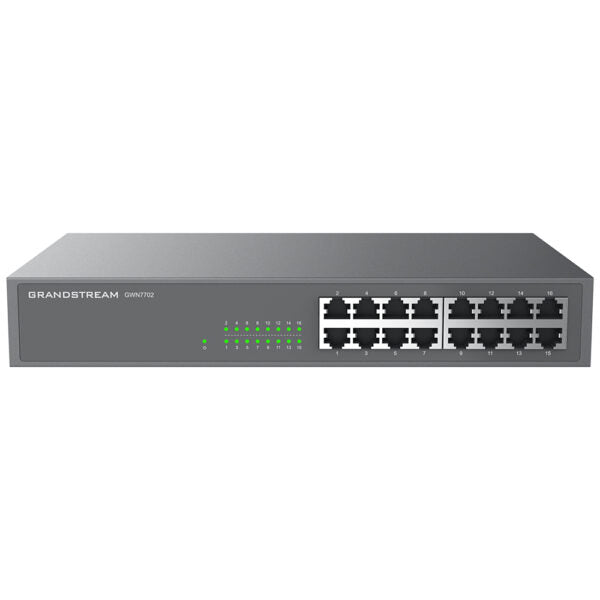
The GWN7700 series are unmanaged network switches that provide a quick and cost-effective way to add high-speed Gigabit connectivity to home offices and small/medium businesses. They offer a desktop and wall-mountable design, auto MDI/MDIX to eliminate the need for crossover cables, and support auto negotiation to recognize the link speed of any 10/100/1000Mbps network device. Key features: • Unmanaged Network Switch • 16 x GigE ports • Green technology reduces power consumption • Auto MDI/MDIX crossover for all ports • Broadcast/Multicast/Unicast Storm Control (fixed to 100Mbps) • Supports long cable connection • QoS – Supports Default Strict Priority when present The switches are plug-and-play, making them ideal for home offices and small-to-medium businesses. They also provide a reliable and efficient networking solution with features such as: • Gigabit ports: 16 • Port feature: 16/24× 10/100/1000Mbps RJ45 Ports • Auto negotiation • Auto MDI/MDIX • Half duplex backpressure Weight: 3.97 lb Dimensions: 14.41 × 8.28 × 2.09 in Switch Type: Unmanaged Switches Number of Ports: 11-18 Main Port Speed: Gigabit Uplink Ports: Gigabit RJ45 Layer Support: L2

About This Product

The Grandstream GWN7702 is an unmanaged 16-port Gigabit Ethernet switch designed for straightforward, plug-and-play network expansion. It is best suited for small offices, home offices, or retail environments where you need to add wired connectivity for computers, printers, VoIP phones, or security cameras without the complexity of configuring VLANs or management features. Because it is unmanaged, it requires no setup—just connect power and Ethernet cables, and it works immediately.

This switch pairs well with Grandstream's own IP phones or any standard VoIP equipment, providing reliable Gigabit speeds for voice traffic. It also supports auto MDI/MDIX, so you can use any standard Ethernet cable without worrying about crossover types. A practical tradeoff is that it lacks advanced QoS controls beyond a default strict priority, which means in a busy network with heavy data transfers, voice quality may degrade if the switch is not paired with a router that handles traffic shaping. It is overkill for a single-user home setup with only a few devices, but underpowered for a large enterprise that requires managed switching, VLAN segmentation, or PoE (Power over Ethernet) for devices like wireless access points or cameras.

For Canadian small businesses, particularly in the GTA, this switch is a cost-effective way to expand a wired network in a shared office or retail space. It is fanless and compact, making it quiet enough for open-plan offices. However, note that it does not provide PoE, so any connected devices that require power over Ethernet will need their own power adapters or a separate PoE injector.
Services We Provide
  • Professional Installation & Configuration
  • Ongoing Maintenance & Support
  • Troubleshooting & Repairs
  • System Upgrades & Updates



