
Grandstream GWN7703 Unmanaged Network Switch, 24 x GigE

Frequently Asked Questions

First, verify that the device is set to obtain an IP automatically via DHCP. Check that the router or DHCP server is connected to the switch and working. Also try a different Ethernet cable or port on the switch to rule out a physical issue. If the problem persists, restart both the switch and the device.
Confirm that you are using at least Cat5e Ethernet cables; older Cat5 cables may not support Gigabit speeds. Check the network adapter settings on your computer—some adapters allow you to force speed, but auto-negotiation is recommended. Try a different port on the switch and a known-good cable to isolate the issue.
First, verify that the power LED is lit. If not, check the AC cable connection and the outlet. Try a different power outlet if possible. If the switch has power but no port LEDs are on, disconnect all cables except the power, wait 30 seconds, then reconnect just one device. If that works, gradually reconnect other devices to see if one is causing the issue.
The GWN7703 includes a broadcast storm control feature that can limit broadcast, multicast, and unicast traffic to 100 Mbps in certain conditions. If you have a device sending excessive broadcast traffic (common with older network gear or improper configurations), it could throttle overall throughput. Check for network loops—ensure you're not creating a loop by connecting multiple switches in a cycle. If the slowdown persists, a managed switch would give you more visibility.
Yes, you can. The switch provides standard Gigabit Ethernet connectivity. However, note that this switch does not supply Power over Ethernet (PoE), so your IP phone will need to be powered through its own AC adapter or a PoE injector. The data connection will work fine either way.
Many 24-port switches generate noticeable heat during normal operation. Ensure the switch has adequate ventilation—do not block the side vents and avoid stacking other equipment directly on top of it. If the switch becomes too hot to keep your hand on for more than a few seconds, move it to a cooler location or improve airflow around it.
The switch comes with rack-mounting brackets and rubber feet. For wall mounting, use the included brackets by attaching them to the sides and securing the switch to a wall surface with appropriate screws (not provided). Consult the Quick Installation Guide for exact measurements. Make sure the wall can support the weight of the switch and cables.
No. The GWN7703 is an unmanaged switch, meaning it operates as a simple plug-and-play device with no configuration options. It cannot create VLANs or isolate traffic. All ports belong to the same broadcast domain. If you need VLAN support, you would need a managed or smart switch.
For full Gigabit speeds, use Cat5e or Cat6 cables. The switch supports automatic MDI/MDIX, so either straight-through or crossover cables will work. Keep cable runs under 100 meters, as per the IEEE specification, for reliable connectivity.
Yes, you can daisy-chain them by connecting a cable from any port on one switch to any port on the other. The auto MDI/MDIX feature eliminates the need for crossover cables. Be mindful of overall network diameter; too many cascaded switches can introduce latency or reduce performance, so typically up to three or four switches in a chain is acceptable for small office use.
Switches

Grandstream GWN7703 Unmanaged Network Switch, 24 x GigE
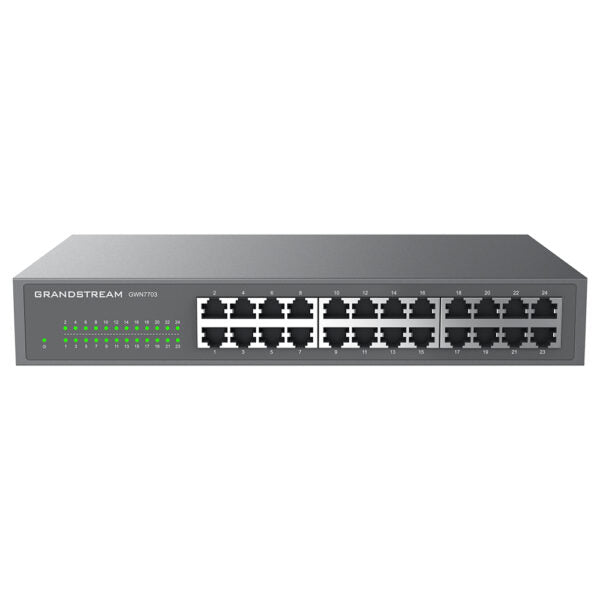
• Unmanaged Network Switch • 24 x GigE ports for high-speed connectivity • Green technology reduces power consumption • Desktop and wall-mountable design for flexible installation options • Auto MDI/MDIX crossover for all ports to eliminate the need for crossover cables • Broadcast/Multicast/Unicast Storm Control (fixed to 100Mbps) to monitor traffic levels • Supports long cable connections up to 100m • QoS – supports default strict priority when present • IEEE 802.3i, 802.3u, 802.3ab, 802.3x, and 802.1p protocols for compatibility • Auto negotiation for optimal performance • LED indicators provide real-time status updates on link/activity and power • Supports up to 8K MAC address table • Switching capacity of 48Gbps • Jumbo frame size of 10KB • Advanced features include Mac address auto-learning and aging, IEEE 802.3x flow control, and half-duplex backpressure Box contents: 1x Switch 1x 1.2m AC Cable Rack-mounting Standard Brackets 4x Rubber Feet 1x QIG Product specifications: Layer Support: L2 PoE Support: No Redundant Power Supply: No

About This Product

The Grandstream GWN7703 is a straightforward 24-port unmanaged switch built for small offices, home offices, or temporary network expansions where simplicity matters more than control. It offers plug-and-play Gigabit Ethernet connectivity, making it a good fit for environments that just need additional wired ports without the complexity of VLANs or remote management. For a small Toronto-based business with a handful of workstations and printers, this switch provides a cost-effective way to expand a local network without a dedicated IT person to configure it. Its desktop and wall-mountable design also makes it easy to tuck away in a server closet or under a desk.

The practical tradeoff here is the lack of Power over Ethernet (PoE)—if you plan to connect VoIP phones or wireless access points, each device will need its own power adapter or an external PoE injector. Additionally, as an unmanaged switch, you won't have features like port mirroring, traffic prioritization beyond basic QoS, or network segmentation. For a pure data network where all devices belong to the same subnet, these limits are rarely a problem. However, if your office grows or you need to isolate guest traffic, you would eventually need a managed or smart switch.

This switch pairs well with Grandstream IP phones that already have their own power supplies, or with any wired device where simplicity is key. It can serve as a replacement for an older 10/100 Mbps switch, giving you Gigabit speeds across all ports. In a deployment where you have fewer than 24 devices, it may be slightly oversized, but the extra ports offer room to grow. Conversely, if your network requires advanced features like link aggregation or SNMP monitoring, this switch will be underpowered and you should look at a managed alternative.
Services We Provide
  • Professional Installation & Configuration
  • Ongoing Maintenance & Support
  • Troubleshooting & Repairs
  • System Upgrades & Updates



