
Grandstream GWN7706 Unmanaged Network Switch, 48 x GigE, 2 x SFP

Frequently Asked Questions

First, ensure the power cable is securely connected to the switch and to a working electrical outlet. Check that the outlet is not controlled by a wall switch that might have been turned off. If that doesn't work, try a different power cable and outlet. The switch has an internal power supply, so if the LED indicator does not light up after these checks, contact a Toronto-based VoIP support provider to diagnose potential hardware failure.
Try reseating the Ethernet cable at both ends—the switch port and your device. If the light still doesn't light up, test the cable with another device to see if the cable is faulty. Also, check that your device's Ethernet port is working by connecting it to a different switch port. This is often a physical connection issue rather than a switch problem.
It's possible if the network is congested. Since the GWN7706 is an unmanaged switch, it doesn't prioritize voice traffic over other data. Check if other devices are using a lot of bandwidth (e.g., large file transfers, streaming video). A simple first step is to temporarily disconnect non-essential devices to see if audio improves. If the problem persists, consider using a managed switch with Quality of Service (QoS) for your VoIP phones, or contact a Toronto-based VoIP support provider for a network assessment.
No configuration is needed—it's plug-and-play. Just connect the switch to power, connect your router or upstream network to any of the switch ports (using a straight-through or crossover cable—auto MDI/MDIX handles it), and then plug in your devices like computers, IP phones, or printers. The switch will automatically negotiate speeds and connections. If you need to mount it in a rack, use the included brackets.
First, check if any network loops exist—an unmanaged switch cannot prevent loops from misconfigured redundant cabling. Also, look for devices that are broadcasting a lot of traffic (e.g., a malfunctioning network card). Try disconnecting one device at a time to isolate the culprit. The switch has built-in storm control, but it is fixed at 100Mbps for broadcast/multicast/unicast storms. If the slowdown persists, consider upgrading to a managed switch for better control.
Yes, the two SFP ports can be used with Gigabit SFP modules (sold separately) to connect to fiber optic cabling. This is useful for uplinking to a separate fiber modem or connecting to a distant switch or building. Ensure you use compatible SFP modules and cables. The switch supports 1000Base-X fiber connections.
It is normal for this switch to get warm, especially when many ports are active or PoE is used. The operating temperature range is 0 to 40 °C. Ensure the switch is in a well-ventilated area, not stacked in a closed enclosure with other equipment. If it feels unusually hot, check that the ventilation openings are not blocked and that the ambient temperature is not too high. If it shuts down or behaves erratically, contact support.
As an unmanaged switch, the GWN7706 does not have a web interface and typically does not require firmware updates. If a firmware update is released (e.g., for critical bug fixes), you would need to use a separate process—consult the official Grandstream support page for your specific model. In most cases, the switch operates without firmware updates. If you are experiencing issues, first verify physical connections and outlet power before considering firmware.
Yes, each port automatically negotiates to 10/100/1000 Mbps. The switch will connect to both 100Mbps and Gigabit devices at their respective speeds. However, if a port is connected to a 100Mbps device, that port will only operate at 100Mbps, which is normal. All devices can still communicate, but data transfers between a 100Mbps and a Gigabit device will be limited by the slower link.
Yes, as long as your provider's device has a standard RJ-45 Ethernet port, the switch will work. It is compatible with any router or modem that supports 10/100/1000 Mbps Ethernet. Simply connect the provider's device to any port on the switch. This is common in Canadian small business deployments, for example with Bell or Rogers internet services.
Switches

Grandstream GWN7706 Unmanaged Network Switch, 48 x GigE, 2 x SFP
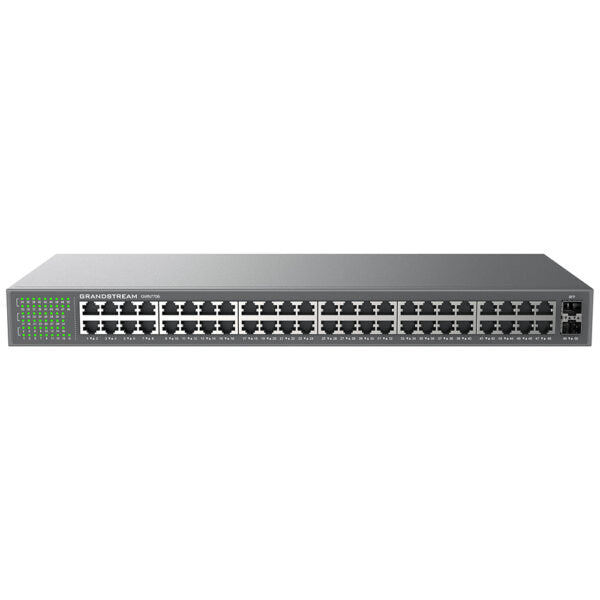
• The GWN7700 series are unmanaged network switches that provide a quick and cost-effective way to add high-speed Gigabit connectivity to home offices and small/medium businesses. • No configuration or installation is required, with a desktop and wall-mountable design. • Auto MDI/MDIX eliminates the need for crossover cables. • Each port supports auto negotiation, recognizing the link speed of any 10/100/1000Mbps network device and intelligently adjusting for compatibility and optimal performance. • PoE (Power-over-Ethernet) models provide IEEE 802.3af/at compliant smart dynamic PoE output to power IP phones, IP cameras, Wi-Fi access points and other PoE endpoints. Key Features: • Unmanaged Network Switch • 48 x GigE ports • 2 x SFP ports • Green technology reduces power consumption • LED indicators for link/activity and power • Auto MDI/MDIX crossover for all ports • Broadcast/Multicast/Unicast Storm Control (fixed to 100Mbps) to monitor traffic levels • Supports long cable connections • QoS – Supports Default Strict Priority when present Additional Information: • Weight: 7.89 lb • Dimensions: 19.69 × 12.70 × 3.43 in • Switch Type: Unmanaged Switches • Number of Ports: 48-52 • Main Port Speed: Gigabit • Uplink Ports: Gigabit SFP Technical Specifications: • Box Contents: 1x Switch, 1x 1.2m AC Cable, Rack-mounting Standard Brackets, 4x Rubber Feet, 1x GND Cable, 1x QIG • Gigabit Ports: 48 • Enclosure: Metal • Mounting: Desktop/Rack-Mount • Standards and Protocols: • IEEE 802.3i • IEEE 802.3u • IEEE 802.3ab • IEEE 802.3x • IEEE 802.1p • Port Feature: • 48× 10/100/1000 Mbps RJ-45 Ports • 2× SFP Fiber Ports • AUTO Negotiation, AUTO MDI/MDIX • Network Media: 1000Base-X, 1000Base-T/100Base-TX/10Base-Te, Half/Full-Duplex • LED Indicators: • Per port: Link/Activity Green • Per device: Power Green • Mac Address Table: 16K • Switching Capacity: 100Gbps • Jumbo Frame: 9KB • Advanced Features: • Mac Address Auto-Learning And Auto-Aging • IEEE 802.3x Flow Control • 802.1p/DSCP QoS • Power Adapter: • Internal 100-240V AC,50/60Hz,40W • Max Power Consumption by Base System: • 30W@220V/50Hz • Environmental: • Operating Temperature: 0 to 40 °C (32 to 104 °F) • Storage Temperature: -20 to 60 °C (-4 to 140 °F) • Operating Humidity: 10% to 90% Non-condensing • Storage Humidity: 10% to 90% Non-condensing

About This Product

The Grandstream GWN7706 is an unmanaged network switch designed for businesses that need to connect a large number of wired devices without the complexity of configuring VLANs or other advanced network settings. With 48 Gigabit Ethernet ports and two SFP uplink ports, it is a straightforward, plug-and-play solution for expanding a local area network in a small to medium-sized office, a warehouse, or a retail space. This switch is ideal for environments where you simply need to add wired connectivity for desktops, IP phones, printers, or security cameras, and you don't require managed features like traffic prioritization or network segmentation. It replaces the need for daisy-chaining multiple smaller switches, offering a single, reliable backbone for your wired network.

A key tradeoff is that this is an unmanaged switch, meaning you cannot configure port-level settings, monitor traffic per port, or set up link aggregation. If your VoIP deployment requires Quality of Service (QoS) to prioritize voice traffic, or if you need to isolate different types of devices for security, a managed switch would be a better choice. However, the GWN7706 does include basic QoS (Default Strict Priority) and storm control, which can help maintain performance in a simple flat network. For a Toronto-based office running a handful of IP phones and computers, this switch provides ample ports and reliable performance without the overhead of managed switch configuration.

This switch is suitable for use with Grandstream's GWN series of Wi-Fi access points and IP phones, as well as any standard Ethernet device. It supports Power over Ethernet (PoE) if you choose a PoE model, allowing you to power devices like IP cameras or VoIP phones directly through the Ethernet cables. For a business that already has a separate PoE injector or a PoE switch at the edge, this non-PoE model is a cost-effective way to add many wired connections at the core of the network. It is overkill for a home office with fewer than 10 devices, and it may be underpowered for a large enterprise that needs advanced features like SNMP monitoring or 10GbE uplinks.
Services We Provide
  • Professional Installation & Configuration
  • Ongoing Maintenance & Support
  • Troubleshooting & Repairs
  • System Upgrades & Updates



