
Grandstream GWN7710R 6-Port Outdoor L2 Lite Managed Switch

Frequently Asked Questions

First, ensure the switch itself is receiving power—check the PoE input on port 5 if using PoE injection, or confirm the DC power supply is connected. Then verify that the connected device is compatible with 802.3af/at and that PoE output is enabled on the port in the web management interface. Also, make sure the total PoE budget (up to 60W when PoE-powered) has not been exceeded.
Although the GWN7710R is IP66 rated, water can still enter through unsealed cable connections. Check that all Ethernet cables have weatherproof boots and that the switch's gaskets are clean and not damaged. Also confirm that the power source (PoE injector or DC adapter) is not exposed to moisture. Dry any visible dampness and test connectivity again.
By default the switch uses DHCP. Check your router's DHCP client list for a device named Grandstream GWN7710R. Alternatively, connect a computer directly to one of the switch's ports and set a static IP on the 192.168.5.x subnet (the default management IP is 192.168.5.15), then open a browser to that address.
The GWN7710R is rated for -40°C to 60°C, but direct sunlight can raise surface temperatures further. If the switch feels hot, mount it in a shaded area with good airflow. Also check for firmware updates and enable broadcast storm control to reduce excessive traffic that could cause port instability.
When powered via PoE in, the switch outputs up to 60W total. To increase the budget, connect a 12–57V DC power supply (sold separately) which can support up to 100W PoE output depending on the voltage used. Refer to the product manual for power supply specifications.
Verify that the upstream PoE source (injector or switch) can deliver sufficient wattage. The GWN7710R requires at least 802.3af (15.4W) to power itself, but for full PoE output, a 802.3at (30W) or 802.3bt (60W) injector is recommended. Test with a known working power source to isolate the issue.
Yes, the GWN7710R supports GWN.Cloud management. In the web interface, enable cloud management, then follow the prompts to link the switch to your GWN.Cloud account. This allows remote monitoring and configuration without needing a local management IP.
Access the web GUI, go to the VLAN settings, and create the desired VLAN IDs. Assign each switch port as either an access port (single VLAN) or a trunk port (tagged VLANs). Ensure the devices on those ports are configured with the matching VLAN IDs. The switch supports IEEE 802.1Q tagging.
First, power-cycle the switch by disconnecting and reconnecting power. If it still does not respond, perform a factory reset by pressing the reset button (located on the side) for 10 seconds while power is applied. Note: this erases all settings. If the issue persists, contact your VoIP support provider for assistance.
Switches

Grandstream GWN7710R 6-Port Outdoor L2 Lite Managed Switch
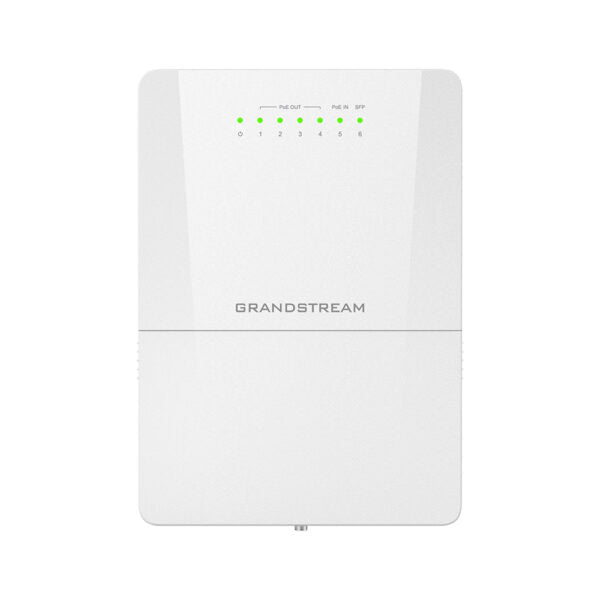
The GWN7710R is a 6-Port (5GE+1SFP) Outdoor Lite Managed PoE Switch designed for outdoor environments. It features IP66 dustproof and waterproof ratings, making it suitable for harsh weather conditions. Key Features: • 5 Gigabit RJ45 ports with 4 PoE output ports and 1 PoE input port • IEEE 802.3 at/af or 24V/48V DC passive PoE out • SFP Fiber Port for long-distance transmission • LED indicators for per port link/activity/poE power state and device power • IP66 dustproof and waterproof rating with wide operating temperature range (-40°C to 60°C) • Supports convenient and intelligent WEB management and GWN.Cloud management • Broadcast/Multicast/Unicast Storm Control to monitor traffic levels • Built-in QoS for prioritization of network traffic Additional Information: • Weight: 2.89 lb • Dimensions: 10.51 x 9.31 x 4.8 in • Switch Type: PoE Switches • Number of Ports: 5-10 • Main Port Speed: Gigabit • Uplink Ports: Gigabit SFP • PoE Support: Yes • PoE Budget: Medium (100-199 W) • Max Output Power Per Port: Standard PoE output Mode up to 30W on each PoE port Technical Specifications: • Model: GWN7710R • Package Contents: 1x Switch, Rack-mounting Standard Brackets, QIG, expansion screw, metal straps, and Phoenix connector • Network Protocol: IPv4, IEEE 802.3i, IEEE 802.3u, IEEE 802.3ab, IEEE 802.3x, IEEE 802.1p, IEEE 802.3af, IEEE 802.3at • Communication Ports: 5x Gigabit Ethernet Ports, 1x 1G/2.5G SFP Port • Power Supply: 12V-57V DC input, Standard PoE /PoE+/PoE ++ • PoE In and PoE Out Ports: PoE In on Port 5, PoE Out on Port 1 – Port 4 • PoE Output Power Budget: Powered by Standard PoE In (802.3af/at/bt): up to 60W output budget • Total non-blocking throughput: 6Gbps • Switching Capability: 15Gbps

About This Product

The Grandstream GWN7710R is built for outdoor network deployments where weather and temperature extremes are a concern. With an IP66 dust and water resistance rating and a wide operating range from -40°C to 60°C, it can handle the harshest Canadian winters and summer heat alike. This switch is ideal for powering outdoor IP cameras, wireless access points, or IoT sensors in parking lots, building perimeters, or industrial yards. It accepts power either through a standard DC input or via PoE on port 5, giving installers flexibility in remote locations where AC power may not be easily accessible. However, when powered solely by PoE in, the total PoE output budget is limited to 60W, so for higher power requirements—such as running multiple high-PTZ cameras—a dedicated 48V or higher DC power supply is recommended. This switch is a good fit for edge-of-network outdoor drops but would be overkill for a simple indoor office closet and may be underpowered for dense PoE arrays in a large surveillance system. It also supports cloud management through GWN.Cloud, making it convenient for Toronto-area IT teams to oversee multiple distributed sites remotely.
Services We Provide
  • Professional Installation & Configuration
  • Ongoing Maintenance & Support
  • Troubleshooting & Repairs
  • System Upgrades & Updates



