
Grandstream GWN7711 Managed Switch, Layer 2-Lite, 8 x GigE

Frequently Asked Questions

Start by verifying that the phone's Ethernet cable is securely connected to an active port and that the corresponding link light on the switch is lit. Confirm the switch port is not disabled or shut down in the management interface. If you are using a voice VLAN, check that the port's VLAN membership matches what the phone expects, as a mismatch will prevent it from reaching the call server.
Feeling slightly warm is normal for a compact device, but ensure nothing is stacked directly on top of the switch or blocking its side vents. For the dead link, try a different Ethernet cable first—cable failure is the most common cause. After that, move the device to a different port on the switch to rule out a single port failure.
Start by running the built-in cable test feature from the web management interface; a reported fault like an open circuit or a short will point to a physical cabling or termination issue. If the cable test passes, check that the port's speed and duplex settings are set to auto-negotiation on both the switch and the connected device, as a forced mismatch will cause packet loss. If the problem suddenly appeared on a previously working port, a simple power cycle of the switch can resolve rare hardware state issues.
Make sure the GWN7711's loop detection feature is enabled in the switch configuration; it will automatically identify the port causing the loop and can be set to shut it down to stabilize the network. Once the offending port is found, trace that cable to find where a device or another switch is inadvertently plugged into two wall jacks that both lead back to your network. Disconnect the redundant connection and verify the switch returns to normal operation before re-enabling the port.
No, the GWN7711 itself does not accept Power over Ethernet as a power source. It requires its included external DC power adapter. You must plug it into a standard AC outlet to power it on.
Unfortunately, the primary local password recovery method for this model involves a hardware reset, which would erase your current configuration. Before performing any reset, try every password variation you may have used. If you must proceed with a reset, know that it will revert the device to factory defaults, so it is best done during a maintenance window when you have a backup of your configuration file ready to reload or can manually reprogram it. If you only manage the switch via GWN.Cloud, your cloud login credentials remain unaffected and you can continue to manage it through that platform.
First, verify that the switch's gateway and DNS server addresses are correct in its IP settings; without valid DNS, it cannot resolve the cloud server's hostname to connect. Double-check that outbound HTTPS traffic is not being blocked by a firewall rule on your network. If you recently moved the switch from another site, you may need to re-adopt it by resetting it locally, but contact support first because the cloud platform's device list may need to be updated to release the old registration.
Yes, the switch's built-in QoS can assist. Assign a higher priority to the ports connecting your VoIP equipment. Alternatively, if your phones tag their traffic with 802.1p, configure the switch to trust those tags. This ensures phone data is placed in a higher-priority output queue, reducing the chance of voice packets being dropped during spikes in other traffic. If the issue persists, a Toronto-based VoIP support provider can usually resolve this remotely by examining the end-to-end QoS map.
Switches

Grandstream GWN7711 Managed Switch, Layer 2-Lite, 8 x GigE
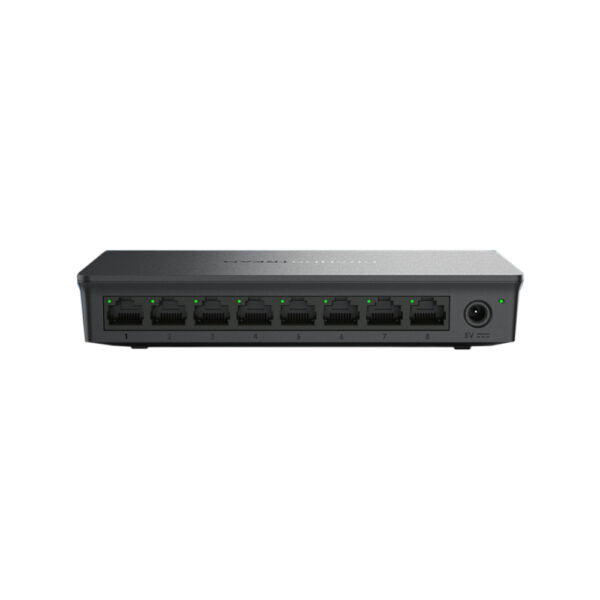
• The GWN7711 is a Layer 2 lite managed network switch designed for small-to-medium enterprises. It provides scalable, secure, high-performance, and smart business networks that are easy to use and manage. • Key features: • Managed Switch • Layer 2-Lite • 8 x GigE ports • Supports Loop Detection, Cable Test, and Port Mirror for quick network fault location • Whisper Quiet: fanless design • Convenient and intelligent WEB management and GWN.Cloud management • Broadcast/Multicast/Unicast Storm Control to monitor traffic levels • Built-in QoS for prioritization of network traffic • Technical Specifications: • Weight: 0.84 lb • Dimensions: 7.96 × 6.54 × 2.13 in • Switch Type: Managed Switches • Number of Ports: 5-10 • Main Port Speed: Gigabit • Layer Support: L2 • Network Protocol: IPv4, IEEE 802.3i, IEEE 802.3u, IEEE 802.3ab, IEEE 802.3x, IEEE 802.1p, IEEE 802.3af, IEEE 802.3at

About This Product

The Grandstream GWN7711 is positioned as an entry-level managed switch for small and mid-sized business environments that need a bit more control than an unmanaged switch provides, without the complexity or cost of a fully-featured enterprise Layer 3 switch. It fits naturally into a growing office, a retail location, or a professional services firm in the GTA where a handful of devices—VoIP phones, access points, cameras, and workstations—require reliable wired connectivity. Its eight Gigabit Ethernet ports are sufficient for a modest network segment, such as a single department or a small branch location, and it pairs logically with other Grandstream networking and communications products for centralized cloud management.

A notable practical advantage is its fanless design. In an open office or a quiet meeting room, there is no audible hum to contend with, making it a discreet addition under a desk or on a wall. Management happens either through a local web interface or via Grandstream's GWN.Cloud platform, which is a sensible fit for administrators who manage multiple sites and want to push configuration changes, monitor status, and apply firmware updates remotely without on-site visits.

Buyers should clearly understand that this is a Layer 2 Lite switch. It handles VLANs, storm control, and basic QoS for traffic prioritization, but it will not perform inter-VLAN routing or advanced Layer 3 functions. For a VoIP deployment in a Canadian business, its loop detection and cable diagnostic tools are genuinely helpful for isolating wiring faults, a common source of intermittent phone issues. However, the QoS capabilities are limited to basic port-based or 802.1p priority tagging. If your network requires sophisticated per-user bandwidth shaping, deep packet inspection, or dynamic voice VLAN assignment from a centralized policy, a more advanced managed switch would be needed.

Deploying the GWN7711 is sensible where the idea is to replace a simple desktop unmanaged switch with something that gives the IT provider a bit of visibility and control, especially in a mixed Grandstream environment. It is overkill for a home office or a network that simply needs to split a single Ethernet run into a few connections and will never be managed. Conversely, it is underpowered as a core switch for a larger office with more than 20-30 users or where fiber uplinks, LACP link aggregation, or advanced security features like 802.1X on every port are essential requirements.
Services We Provide
  • Professional Installation & Configuration
  • Ongoing Maintenance & Support
  • Troubleshooting & Repairs
  • System Upgrades & Updates



