
Grandstream GWN7711P Managed Switch, Layer 2-Lite, 8 x GigE, 4 x PoE/PoE+ or +24VDC Output Mode

Frequently Asked Questions

First, confirm that the included power adapter is securely plugged into the switch and into a working AC outlet. Try a different outlet or a known-good power strip. If the switch still shows no lights, inspect the power adapter's cable for damage; a physical break can prevent power delivery. If the issue persists, contact your VoIP support provider before attempting any repairs.
Check that the total power draw of all connected PoE devices does not exceed the switch's 60W budget. You can view per-port power usage in the web management interface. Also verify that each device is connected to one of the four PoE-labeled ports (ports 1–4) and that PoE is enabled for that port in the switch settings. If using 24VDC passive PoE, ensure the output mode is configured correctly for that device.
Make sure your computer is on the same subnet as the switch (default IP is 192.168.1.1, but check your unit's sticker). Temporarily disable any firewall or VPN software that might block the connection. If you still cannot connect, try a different Ethernet cable and port, or perform a safe reboot of the switch by disconnecting power for 10 seconds. If the problem continues, contact your network administrator or support.
Enable Quality of Service (QoS) on the switch to prioritize voice traffic. In the web interface, configure a QoS policy that marks VoIP packets (typically DSCP 46 or EF) as high priority. Also check that your network is not oversubscribed—ensure the switch's uplink port has sufficient bandwidth and that no single device is saturating the connection. Finally, verify that the switch's IGMP snooping is enabled if you are using multicast paging.
This is often a power issue. Verify that the external power adapter is providing a stable 48–53.5V DC—a failing adapter can cause intermittent resets. Also check that the total PoE load does not exceed 60W, as an overload can trigger a protective shutdown. If the switch is in a poorly ventilated area, move it to a cooler spot; overheating can cause instability. If the problem persists after these checks, contact your support team.
A loop occurs when a network cable creates a circular path between switch ports. Disconnect one cable at a time from the switch while watching the log or the loop detection LED. Once you remove the offending cable, the loop should clear. To prevent future loops, avoid connecting multiple cables between the same two switches, and enable Spanning Tree Protocol (STP) if your network topology requires it.
Yes, the GWN7711P is designed to pair well with Grandstream devices. Its PoE+ ports can power most Grandstream GXP and GXV series phones, and its 24VDC passive mode supports some older Grandstream models. The switch's VLAN and QoS features allow you to separate voice and data traffic, which is a common requirement in VoIP deployments. Just ensure your total PoE power draw stays within the 60W budget.
Log into the switch's web interface and navigate to the VLAN section. Create two VLANs—for example, VLAN 10 for voice and VLAN 20 for data. Assign the ports connected to IP phones to VLAN 10 (with the phone's PC pass-through port set to VLAN 20 if needed). Set the uplink port to trunk both VLANs. This setup isolates voice traffic from general data traffic and helps maintain call quality. If you are unsure, a VoIP provider can assist with the configuration.
A PoE fault usually indicates a short circuit or an incompatible device. First, disconnect the Ethernet cable from the switch and inspect the cable and device port for damage. Try connecting a different PoE device to the same port to see if the fault follows the cable/device. If the fault clears with a different device, the original device may have a power issue. If the fault remains on that port, the switch port itself may need service—contact your support provider.
Yes, the GWN7711P supports GWN.Cloud management, which allows you to monitor and configure the switch from anywhere. To enable it, register the switch's MAC address in your GWN.Cloud account, then under the switch's management settings, enter the cloud server URL and your account credentials. This is especially useful for Toronto-based IT providers managing multiple client sites, as it eliminates the need for on-site visits for routine changes.
Switches

Grandstream GWN7711P Managed Switch, Layer 2-Lite, 8 x GigE, 4 x PoE/PoE+ or +24VDC Output Mode
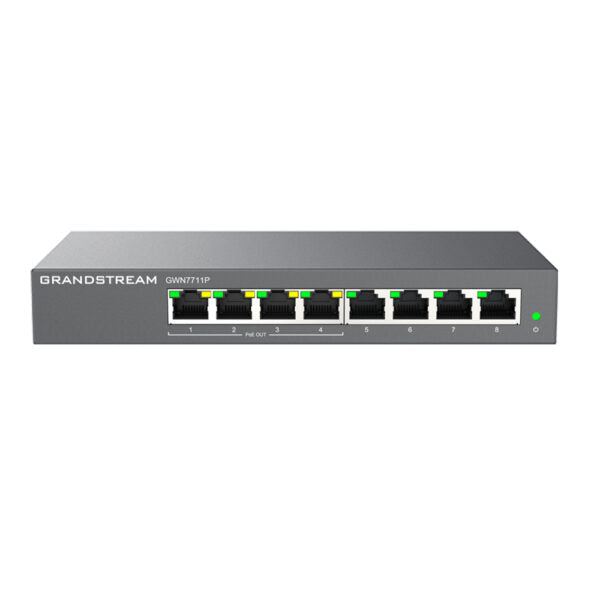
The GWN7711P is a Layer 2 lite managed network switch designed for small-to-medium enterprises. It supports VLAN, QoS, IGMP Snooping, and comprehensive security capabilities to build scalable, secure, high-performance networks. Key Features: • Managed Switch • Layer 2-Lite • 8 x GigE ports • 4 x PoE/PoE+ or +24VDC Output Mode • Supports Loop Detection, Cable Test, and Port Mirror for quick network fault location • Whisper Quiet fanless design • Convenient and intelligent WEB management and GWN.Cloud management • Broadcast/Multicast/Unicast Storm Control to monitor traffic levels • Built-in QoS for prioritization of network traffic • Smart power control for dynamic PoE/PoE+ power allocation per port Additional Information: • Weight: 2 lb • Dimensions: 7.48 × 3.94 × 1.11 in • Switch Type: Managed Switches • Number of Ports: 5-10 • Main Port Speed: Gigabit • Layer Support: L2 • PoE Support: Yes • PoE Budget: Low (30-70W) • Weight: 2 lb • Dimensions: 7.48 × 3.94 × 1.11 in Technical Specifications: • Model: GWN7711P • Box Contents: + 1x Switch + 1x QIG + 1x Power Adapter • Network Protocol: + IPv4, IEEE 802.3i, IEEE 802.3u, IEEE 802.3ab, IEEE 802.3x, IEEE 802.1p, IEEE 802.3af, IEEE 802.3at • Gigabit Ethernet Ports: 8 • PoE Out Ports: 4 • Power Supply: External 48-53.5VDC/1.22A • PoE Output: + Port compliance with the 802.3af/at standard (up to 30W on each PoE port, total 60W Power Budget) + Support for 24VDC Passive PoE-Out mode via UI • Max Total PoE Output Power: 60W • Maximum Output Power per PoE Port: 30W

About This Product

The Grandstream GWN7711P is a compact, fanless Layer 2-lite managed switch aimed at small-to-medium businesses that need to power a handful of VoIP phones or wireless access points without the noise or cost of a full enterprise switch. With eight Gigabit Ethernet ports and four PoE+/PoE ports sharing a 60W budget, it is well-suited for a small office or retail location where you might connect three or four PoE devices—such as Grandstream GXP series phones or GWN series Wi-Fi access points—alongside a few non-PoE clients like printers or PCs. The switch supports VLAN, QoS, and IGMP snooping, which means it can segment voice and data traffic and prioritize voice packets, making it a natural fit for a VoIP deployment where call quality matters. It also includes loop detection and cable test utilities, which help a non-specialist identify common wiring issues without needing a dedicated network tool.

Where this switch shines is in environments with modest PoE demands: the total budget of 60W means you can comfortably power two or three devices drawing up to 15W each, but if you need to run four high-power devices (like PTZ cameras or high-end access points) at full 30W, the budget will be exceeded—so plan your device power consumption accordingly. The switch can also output 24VDC passive PoE, which is useful for legacy devices or specific Grandstream models that accept that voltage, but note that this is not a standard 802.3af/at mode and requires manual configuration. For a small Toronto office with a handful of IP phones and a single access point, the GWN7711P is a quiet, affordable choice; for a larger deployment with dozens of high-power PoE devices, you would be better served by a higher-budget switch with more ports. Its management is handled through a web interface or Grandstream's cloud platform (GWN.Cloud), making remote provisioning and monitoring straightforward for a managed service provider.

One tradeoff to be aware of is the external power adapter: unlike some rack-mount switches that accept a standard IEC power cord, the GWN7711P uses a barrel-jack adapter, so if you are mounting it in a server rack, you will need to manage the adapter and its cable. The fanless design is a genuine advantage in a quiet office or open-plan workspace, but it also means the switch relies on passive cooling, so avoid placing it in a sealed enclosure or direct sunlight. For a small business that wants a managed switch without the complexity of a full Layer 3 device, the GWN7711P hits a practical sweet spot—just be realistic about your PoE power budget and port count before buying.
Services We Provide
  • Professional Installation & Configuration
  • Ongoing Maintenance & Support
  • Troubleshooting & Repairs
  • System Upgrades & Updates



