
Grandstream GWN7806P Enterprise Layer 2+ Managed PoE Network Switch, 48 x GigE, 6 x SFP+

Frequently Asked Questions

First, verify that the device is firmly plugged into one of the numbered ports and that the port LED is lit. If it's off, try a different port to rule out a port-specific issue. Then confirm the total PoE draw hasn't exceeded the switch's 400W budget; you can check this in the web interface under PoE status. If the issue persists, a Toronto-based VoIP support provider can usually resolve this remotely.
Most likely the switch is set to a static IP and your router's DHCP server is not reachable. Verify that the switch's management IP is on the same subnet as your gateway and that DHCP relay or snooping is not blocking client requests. You can also temporarily connect a laptop directly to a switch port and see if it receives an address.
Intermittent call drops on a wired network often point to link flapping or duplex mismatches. Check the switch port statistics for CRC errors or excessive collisions. Ensure both the phone and switch port are set to auto-negotiate, and that QoS is enabled to prioritize RTP traffic. A simple power cycle of the switch often clears transient issues.
Create your VLANs under the Layer 2 menu, then assign each port to the appropriate VLAN in access or trunk mode. For VoIP phones that support LLDP-MED, the switch can automatically push a voice VLAN tag. Remember to set the management VLAN to the same network as your admin computer so you don't lose access.
First, confirm your computer's IP is in the same subnet as the switch's management IP. If you can still SSH or ping the switch, the web server may have crashed; a reboot will usually restore access. If the switch is completely unresponsive, perform a safe power cycle (unplug for 30 seconds) but do not factory reset unless you have the configuration backed up.
The GWN7806P supports standard SFP+ modules, but Grandstream recommends using its own branded optics to guarantee compatibility. Many third-party 10G SFP+ transceivers work fine, but you may need to unlock the port in the switch's settings first. If you experience link issues, test with a Grandstream module or a known-good generic one.
Stacking uses any two SFP+ ports to create a dedicated stacking link between the switches. In the web interface, enable stacking on both units and assign a unique stack ID to each. Once connected, you'll manage all ports as one logical switch. Make sure firmware versions match across all stacked units.
An amber LED on a Gigabit port usually indicates the link is running at 10/100 Mbps rather than 1000 Mbps. This can happen if the connected device only supports Fast Ethernet, or if the cable is damaged or too long. Check the cable length and try a different Category 5e or higher cable to restore full speed.
Variable-speed fans are normal on a high-PoE switch like this, but a sudden increase in noise could mean the internal temperature has risen because of high PoE load or poor airflow. Check the ambient temperature (should be under 40°C) and ensure the rack vents are clear. If the sound persists and the switch is not overheating, it may be a fan bearing issue requiring replacement.
Yes, the GWN7806P supports LLDP-MED and VLAN configuration, so you can set a voice VLAN for the phone and a data VLAN for the PC pass-through port on compatible Grandstream phones. This allows a single cable from the switch to the phone, and the phone’s PC port to the desktop, while keeping voice and data traffic separate.
Switches

Grandstream GWN7806P Enterprise Layer 2+ Managed PoE Network Switch, 48 x GigE, 6 x SFP+
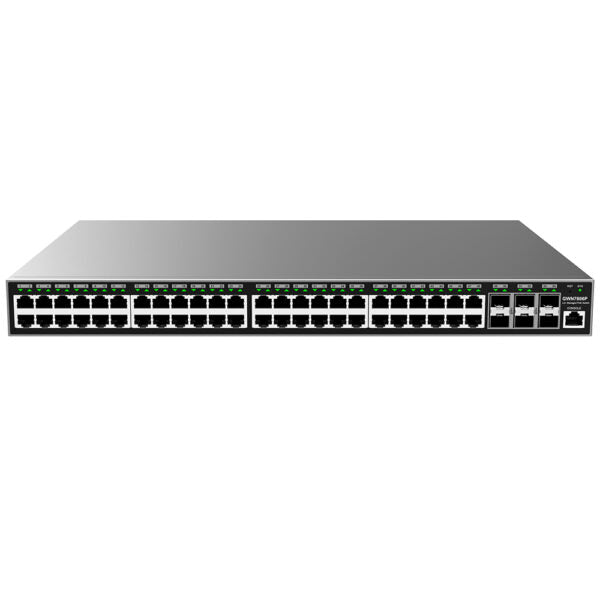
48 Gigabit Ethernet ports 6 Gigabit SFP+ ports Supports deployment in IPv6 and IPv4 networks Reliability features including fault detection, device protection, dual boot, dual system file redundancy, link aggregation, storm control, and more ARP Inspection, IP Source Guard, DoS protection, port security & DHCP Snooping Embedded controller to manage switch; GWN.Cloud and GWN Manager, Grandstream’s cloud and on-premise Wi-Fi management platform Built-in QoS allows for prioritization of network traffic Supports stacking for easy management of up to 16 switches in one interface while creating redundant backup between multiple devices Weight: 11.68 lb Dimensions: 21.54 × 17.95 × 4.21 in Switch Type: Managed Switches, PoE Switches Number of Ports: 48-52 Main Port Speed: Gigabit Uplink Ports: 10G SFP+ Layer Support: L2+ PoE Budget: High (≥200) Redundant Power Supply: No Box Contents: GWN7806P Switch 1x 1.2m(10A) AC Cable 1x 25cm Ground Cable 4x Rubber Footpads 2x Rack-Mounting Kits 8x Screws (PM 3*6) 1x Power Cord Anti-Trip 1x Quick Installation Guide 1x Console Cable(Optional) Network Protocol: IPv4, IPv6, IEEE 802.3, IEEE 802.3i, IEEE 802.3u, IEEE 802.3ab, IEEE 802.3z, IEEE 802.3ae, IEEE 802.3az, IEEE 802.3ad, IEEE 802.3x, IEEE 802.1p, IEEE 802.1Q, IEEE 802.3AB, IEEE 802.1p, IEEE 802.1D, IEEE 802.1s, IEEE 802.1w, IEEE 802.1x Gigabit Ports: 48 SFP+ Ports: 6 Console: 1 Number of PoE Ports: 48 Integrated Power Supply: 470W Maximum Output Power Per PoE Port: 30W Max Total PoE Output Power: 400W PoE Standards: IEEE 802.3af/at Switching Capability: 216Gbps Forwarding Rate: 160.704Mpps Packet Buffer: 16Mb

About This Product

This switch is built for medium-to-large businesses that need to centralize power and data delivery for many devices at once. With 48 Power over Ethernet (PoE) ports, it’s an ideal backbone for a voice-over-IP deployment in a busy office – think dozens of desk phones, wireless access points, and security cameras all drawing power from a single switch. The six 10G SFP+ uplinks let you connect multiple switches or link directly to a high-speed core, which is handy for growing GTA offices that plan to scale without swapping hardware. If you’re running a small shop with fewer than twenty devices, this switch will feel oversized; a 24-port model would save rack space and budget. On the other hand, environments that require redundant power supplies or full Layer 3 routing should look at a different class of switch, since the GWN7806P is a managed Layer 2+ unit without dual power inputs. For most VoIP-centric networks, though, the built-in QoS, IGMP snooping, and 400W PoE budget handle voice traffic cleanly without breaking a sweat.
Services We Provide
  • Professional Installation & Configuration
  • Ongoing Maintenance & Support
  • Troubleshooting & Repairs
  • System Upgrades & Updates



