
Grandstream GWN7811 Enterprise Layer 3 Managed Network Switch, 8 x GigE, 2 x SFP+

Frequently Asked Questions

First, verify the switch itself is receiving power and the PoE budget isn’t exceeded. The GWN7811 has a total PoE power budget (check your model’s spec); if too many devices are connected, some may not get power. Unplug a non-critical device and see if the others come on. Also, try a different cable and port. If the issue persists, a Toronto-based VoIP support provider can usually resolve this remotely.
Start by reseating the SFP+ module in both the switch and the connected device. Ensure the module is compatible and that both sides are set to auto-negotiate (or forced to the same speed/duplex). Check the cable type and length—some transceivers have distance limits. If the link still won’t come up, try swapping the module with a known-good one.
Access the switch’s web interface under VLAN configuration. Create a new VLAN (e.g., VLAN 20) and assign it as the voice VLAN. Then configure the ports connecting to phones as access ports with a native VLAN for data and the voice VLAN tagged. Enable LLDP-MED if supported, which lets phones auto-discover the voice VLAN. This separates voice traffic for better QoS.
Spanning Tree Protocol (STP) can temporarily block a port to prevent loops. This is normal during topology convergence. If a port remains blocked indefinitely, check for loops in your cabling or an improper configuration (like multiple switches connected in a ring without proper STP tuning). Disconnect redundant links until the network stabilizes.
First, confirm the destination subnet and next-hop IP address are correctly entered in the switch’s routing table. Check that the next-hop interface is up and has an IP in the same subnet as the next-hop address. Use the switch’s ping diagnostic from the CLI to test reachability to the next hop. If the route still fails, verify there are no conflicting routes or ACLs blocking the traffic.
Power cycle the switch by unplugging it for 30 seconds. If the web interface still doesn’t load, try connecting via SSH or console cable. Check if the switch responds to pings; if not, you may need to perform a safe reset by holding the reset button while powering on (consult the manual for exact procedure). Before any destructive step, contact Grandstream support to confirm the cause.
Yes, the SFP+ ports accept standard 10G SFP+ modules, so you can plug in a compatible module for your fiber ISP. Make sure the module matches the ISP’s signal type (e.g., single-mode or multi-mode) and wavelength. If your ISP provides a media converter or optical network terminal, you can connect via the Gigabit Ethernet ports instead.
Access the switch’s web GUI under Link Aggregation. Select the ports you want to bundle (up to 5 groups) and choose LACP mode (active or passive). Ensure the connected device also has LACP configured on its corresponding ports. After applying, check the aggregator status; if the link shows as down, verify both ends are using the same speed and duplex settings.
This often points to a PoE power cycling issue or a VLAN mismatch. Check that the port’s voice VLAN is correctly configured and that the phone’s received power is stable. Also, see if the switch’s PoE settings have a priority mode that may be cutting power to the phone during overload. Try a different port to isolate the problem.
The GWN7811 uses active cooling, so some fan noise is expected under load. If the fan sounds unusually loud or grinding, check that the ventilation is not blocked and ambient temperature is within spec. You can also check the switch’s system logs for over-temperature warnings. If the noise persists, contact support; the fan may need replacement.
Switches

Grandstream GWN7811 Enterprise Layer 3 Managed Network Switch, 8 x GigE, 2 x SFP+
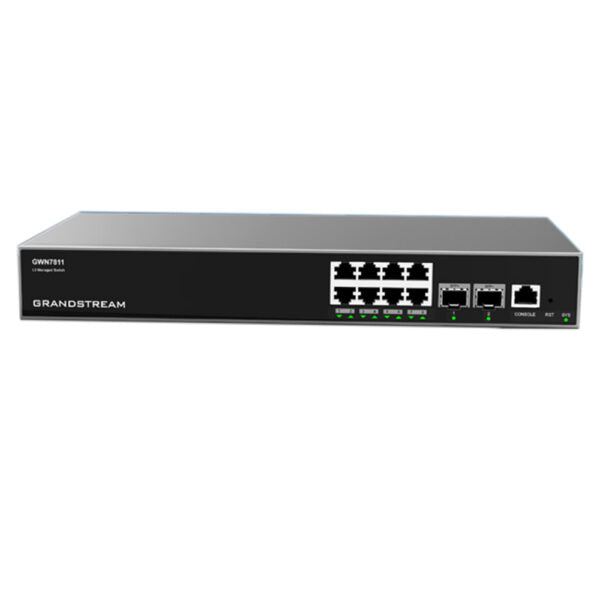
• The GWN7810 series are Layer 3 managed network switches designed for medium-to-large enterprises to build scalable, secure, high performance, and smart business networks. • Key features include: • Advanced VLAN for flexible traffic segmentation • QoS prioritization of network traffic • IGMP/MLD Snooping for network performance optimization • Comprehensive security capabilities against potential attacks • Smart dynamic PoE output to power IP phones, IP cameras, Wi-Fi access points, and other PoE endpoints • Switching capabilities: • 16K static, dynamic, and filtering MAC addresses • 4K VLANs, port-based VLAN, IEEE 802.1Q VLAN tagging, voice VLAN • VLAN virtual interface • GVRP (pending) • Spanning tree with up to 32 instances for STP/RSTP/MSTP • Routing capabilities: • Static routing • Dynamic routing, including RIP, RIPng, OSPF, and OSPFv3 • Multicast capabilities: • IGMP Snooping • MLD Snooping • Technical specifications: • Box contents: 1x Switch, 1x 1.2m (10A) AC Cable, 1x 25cm Ground Cable, 4x Rubber Footpads, 1x Power Cord Anti-Trip, 8x Screws, 1x Quick Installation Guide, 1x Console Cable (Optional) • Network protocol: IPv4, IPv6, IEEE 802.3, IEEE 802.3i, IEEE 802.3u, IEEE 802.3ab, IEEE 802.3z, IEEE 802.3ae, IEEE 802.3x, IEEE 802.1p • Gigabit Ethernet ports: 8 • 10Gigabit SFP+ ports: 2 • Console: 1 • Link aggregation: 5 • External redundant power supply (RPS): Not available • Total non-blocking throughput: 28Gbps • Switching capability: 56Gbps • Forwarding rate: 41.644Mpps • Packet buffer: 12MB

About This Product

The Grandstream GWN7811 is a Layer 3 managed switch built for medium-to-large enterprises that need to segment and secure their network. With 8 Gigabit Ethernet ports and two 10G SFP+ uplinks, it’s ideal for an office environment where you’re running a mix of IP phones, security cameras, and Wi-Fi access points—everything powered over PoE. It fits naturally alongside Grandstream VoIP systems, but it also works with any standards-based gear from other vendors, making it a flexible backbone for a growing business.

Practical tradeoffs to keep in mind: 8 access ports go fast once you connect a few desks and devices, especially in a dense office layout. The two SFP+ uplinks are excellent for linking to a core switch or server, but if you’re planning to daisy-chain many of these switches, you’ll want to plan your topology carefully to avoid bottlenecks. For a small retail shop or a five-person startup, this switch is overkill—a simpler unmanaged PoE switch would suffice. On the other end, in a data-center environment with hundreds of ports, you’d want a chassis-based or higher-density modular switch instead.

For Canadian businesses, particularly in the GTA where multi-floor office deployments are common, this switch’s VLAN and QoS features make it easy to separate voice and data traffic—a key requirement for reliable VoIP. It supports standard IEEE 802.3af/at PoE, so you can power popular Canadian VoIP phones without extra adapters. Just ensure your upstream router or core switch can handle the routing if you plan to use the static or dynamic routing features; otherwise, the GWN7811 can serve as a robust access-layer switch with solid security capabilities.
Services We Provide
  • Professional Installation & Configuration
  • Ongoing Maintenance & Support
  • Troubleshooting & Repairs
  • System Upgrades & Updates



