
Grandstream GWN7813 Enterprise Layer 3 Managed Network Switch, 24 x GigE, 4 x SFP+

Frequently Asked Questions

First, verify that the included AC power cable is securely connected to both the switch and a working wall outlet. Check that the power supply unit (PSU) is properly seated — if your switch has a redundant PSU module, ensure it's locked in. If the power LED remains off, try a different outlet or cable to rule out a simple power issue.
Factory reset should only be done if you have lost administrative access and have already confirmed all other diagnostic steps. To initiate a reset, press and hold the reset pinhole button on the front panel for about 10 seconds until the system LEDs flash. This will restore the switch to default settings, which will erase any custom configuration. If you are unsure, contact your network administrator or VoIP support provider before proceeding.
First, confirm that your computer is on the same subnet as the switch's default IP (usually 192.168.1.1). Check that your Ethernet cable is connected to a port that has link activity. If you've changed the IP address and forgotten it, you may need to connect via the console port or perform a factory reset. If the issue persists, a Toronto-based VoIP support provider can usually resolve this remotely.
Intermittent registration drops are often network-related. First, check that the switch ports are not being automatically disabled by features like Spanning Tree Protocol (STP) — enable PortFast on ports connected to phones. Also verify that the VLAN configuration for voice traffic is correct and that QoS settings are prioritizing your phone traffic. If the problem continues, inspect the cable and power source for the phone.
Access the switch's web interface or CLI, then navigate to the VLAN settings. Create a new VLAN (e.g., VLAN 10 for voice) and assign the ports that connect to your VoIP phones to that VLAN. You'll also need to configure the phone itself to use the same VLAN ID. Finally, set up inter-VLAN routing if the voice and data networks need to communicate.
The GWN7813 is designed for rack-mount deployment in a climate-controlled environment. If the chassis feels very hot to the touch, ensure the ventilation grilles are not blocked and that the ambient temperature is within the operating range (0°C to 45°C). Check that the built-in fans are spinning; if they are not, the switch may be overheating and should be moved to a cooler location or serviced.
Reseat the Ethernet cable on both the switch and the connected device. Try a different known-good cable and test the same port with a different device to isolate whether the issue is with the port, cable, or endpoint. If the port still doesn't link, verify that the port is not disabled in the switch's software configuration.
Yes, the GWN7813 supports standard Gigabit Ethernet and 10G SFP+ uplinks, so it can connect to most ISP-provided modems or ONTs via a copper or fiber SFP module. Just ensure the SFP+ module you purchase is compatible with the switch and your ISP's fiber type (single-mode or multi-mode). For a typical Canadian business fiber line, a single-mode SFP+ module will work.
First, check the speed and duplex settings on the ports — auto-negotiation should be enabled on both the switch and the connected device. If you have a mix of 1G and 10G devices, ensure the 10G SFP+ ports are not oversubscribed. Use the switch's dashboard to look for high error counts on any port, which could indicate a faulty cable or connector.
Download the latest firmware from Grandstream's support site. Log into the switch's web interface, go to the maintenance or firmware upgrade section, and upload the file. Do not power off the switch during the upgrade. After the update completes, the switch will reboot. If you manage the switch via GWN.Cloud or GWN Manager, you can also push firmware updates centrally.
Switches

Grandstream GWN7813 Enterprise Layer 3 Managed Network Switch, 24 x GigE, 4 x SFP+
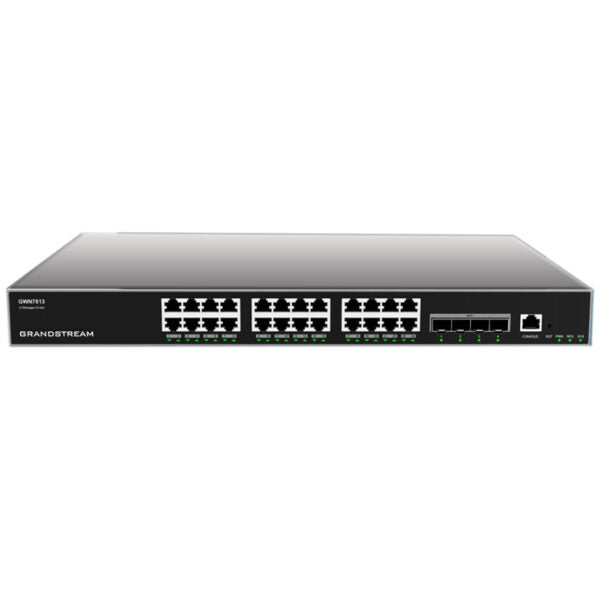
• Layer 3 managed network switches for medium-to-large enterprises • Scalable, secure, high-performance and smart business networks with advanced traffic segmentation and prioritization • Supports IPv6 and IPv4 networks • Includes features such as: • Advanced VLAN for flexible traffic segmentation • QoS for prioritization of network traffic • IGMP/MLD Snooping for optimized network performance • Comprehensive security capabilities against potential attacks • PoE models provide smart dynamic PoE output to power IP phones, cameras, Wi-Fi access points and other devices • Managed in various ways including local Web interface, CLI, GWN.Cloud and GWN Manager • Best value enterprise-grade managed network switches for medium-to-large businesses Weight: 7.872lb Dimensions: 19.69 × 13.07 × 3.43 in Switch Type: Managed Switches Number of Ports: 24-28 Main Port Speed: Gigabit Uplink Ports: 10G SFP+ Layer Support: L3 PoE Support: No Redundant Power Supply: Yes Model: GWN7813 Box Contents: 1x Switch 1x 1.2m(10A) AC Cable 1x 25cm Ground Cable 4x Rubber Footpads 1x Power Cord Anti-Trip 8x Screws (KM 3*6) 1x Quick Installation Guide 1x Console Cable (Optional) Network Protocol: IPv4, IPv6, IEEE 802.3, IEEE 802.3i, IEEE 802.3u, IEEE 802.3ab, IEEE 802.3z, IEEE 802.3ae, IEEE 802.3x, IEEE 802.1p Gigabit Ethernet Ports: 24 10Gigabit SFP+ Ports: 4 Console: 1 Number of PoE Ports: N/A Link Aggregation: 14 External Redundant Power Supply (RPS): 12V/5A(60W) Max Output Power per PoE Port: N/A Max Total PoE Output Power: N/A PoE Standards: N/A Auxiliary Ports: 1x Reset Pinhole Forwarding Mode: Store-and-forward Total non-blocking throughput: 64Gbps Switching Capability: 128Gbps Forwarding Rate: 95.232Mpps Packet Buffer: 12MB Switching: • 16K static, dynamic and filtering MAC addresses • 4K VLANs, port-based VLAN, IEEE 802.1Q VLAN tagging, voice VLAN • VLAN virtual interface • GVRP (pending) • Spanning tree, 32 instances for STP/RSTP/MSTP Routing: • Static routing • Dynamic routing, including RIP, RIPng, OSPF and OSPFv3 Multicast: • IGMP Snooping • MLD Snooping

About This Product

The Grandstream GWN7813 is a Layer 3 managed switch built for medium-to-large enterprise networks that need a solid, non-PoE backbone. With 24 Gigabit Ethernet ports and four 10G SFP+ uplinks, it's well-suited for connecting multiple access switches, servers, or high-bandwidth devices in a wiring closet or data room. This switch is a good fit for organizations that already have PoE injectors or separate PoE switches for their IP phones, cameras, and access points, as the GWN7813 focuses purely on high-performance packet switching and routing without built-in power delivery.

It pairs naturally with Grandstream's own UCM series PBXes, GXP phones, and GWN Wi-Fi access points, but it works equally well with any standards-compliant network gear. The switch supports advanced features like VLAN segmentation, QoS, and dynamic routing (RIP, OSPF), making it suitable for networks that require traffic isolation or multi-subnet routing without a dedicated router. The included redundant power supply input adds reliability for critical infrastructure, though you'll need to source an external RPS unit separately.

A practical consideration for Canadian deployments: the GWN7813 is a fan-cooled, rack-mountable unit that draws about 24W under typical load. It's not a compact or silent desktop switch, so it belongs in a temperature-controlled equipment room, not an open office. For small offices or branch locations with only a handful of devices, this switch would be overkill — a simpler Layer 2 or PoE model would be more cost-effective. Conversely, if you need PoE output for endpoints, the non-PoE GWN7813 will require separate power injectors or a companion PoE switch. Overall, it's a capable core or distribution switch for a growing business that values routing flexibility and port density without paying for unused PoE hardware.
Services We Provide
  • Professional Installation & Configuration
  • Ongoing Maintenance & Support
  • Troubleshooting & Repairs
  • System Upgrades & Updates



