
Grandstream GWN7816 Enterprise Layer 3 Managed Network Switch

Frequently Asked Questions

Start by confirming the AC cable is fully seated at both ends and the wall outlet is delivering power—try plugging in another device. The GWN7816 has an internal 70W power supply; if you have installed an optional hot-swap PSU, ensure it's properly inserted and its LED indicators are normal. If the switch remains dark with no fan or LED activity, stop there and contact your supplier or a Toronto-based VoIP support provider rather than opening the chassis.
First, swap the Ethernet cable and try a different port on the switch. Verify that the connected device is powered on and its network interface is enabled. Check the switch's interface status via the web UI or CLI—confirm the port is administratively up and not shut down by a VLAN misconfiguration. If the port is enabled but the link remains down, test with a known-good device to rule out a defective endpoint.
Connect to the console port using the included cable to see the current IP configuration. The management IP may have been changed or VLAN-tagged; the CLI will show the current address. Ensure your computer is on the same subnet and not firewalled from the switch. If the switch is already added to GWN.Cloud, you can also check and modify its IP from the cloud portal.
Double-check that the DAC cable does not exceed the 5-meter maximum supported length. If using a fiber module, confirm it is an MSA-compliant part—Grandstream's own SM-10G, MM-10G, or RJ45-10G modules are guaranteed compatible. Reseat the optic firmly, and verify the port speed and duplex settings are set to auto-negotiation unless you specifically need a forced speed.
Layer 3 routing between VLANs must be explicitly enabled. In the web interface or CLI, create an IP interface for each VLAN and assign it a gateway address, then enable IP routing globally. Check the routing table to confirm the connected routes appear. Also verify that the devices themselves have the correct default gateway set to the switch's VLAN IP. If the routes exist but traffic still fails, make sure no access rules are blocking inter-VLAN communication.
Inspect the power source—try a different power strip or a UPS-backed outlet to rule out electrical noise. Check the system logs for any over-temperature warnings; ensure the switch's air vents are unobstructed and the ambient temperature in the rack is within spec. Disconnect all non-essential cables and devices to see if the rebooting stops, which would point to a faulty connected device or a cable loop. If the behavior continues, contact your support representative before taking more invasive steps.
On the GWN7816, you can configure egress queuing and map Differentiated Services (DSCP) values to priority queues. First, identify the DSCP markings your phones use—often EF (46) for voice media. Then, in the switch's QoS settings, create a class map that matches that DSCP value and assign it to the highest-priority queue. If your phones support LLDP-MED, enable it on the voice VLAN to let the switch and phones negotiate QoS automatically.
Yes, Grandstream offers both a free cloud platform, GWN.Cloud, and an on-premises software controller called GWN Manager. After creating a site and claiming each switch using its MAC address or QR code, you can monitor, configure, and update firmware across all the switches from a single dashboard. This is especially useful for organizations with several floors or branch offices spread across the Toronto area.
Both ends of the LAG must be configured for the same protocol—typically LACP active or passive. Ensure all member ports share identical VLAN membership and speed. Test the LAG with a single cable first to confirm the operational state is 'up', then add additional links one at a time. Also pick a load-balancing algorithm that matches your traffic, such as src-dst-ip, so that conversations don't get pinned to a single link.
Always keep the console port accessible as a fallback, whether physically or via a console server. If the switch is enrolled in GWN.Cloud, you can often push a corrective configuration or reboot it through the cloud platform even if the local web interface is unreachable. For critical sites, having a trusted local IT partner in the GTA who can connect directly to the switch during an emergency is a wise part of your recovery plan.
Switches

Grandstream GWN7816 Enterprise Layer 3 Managed Network Switch
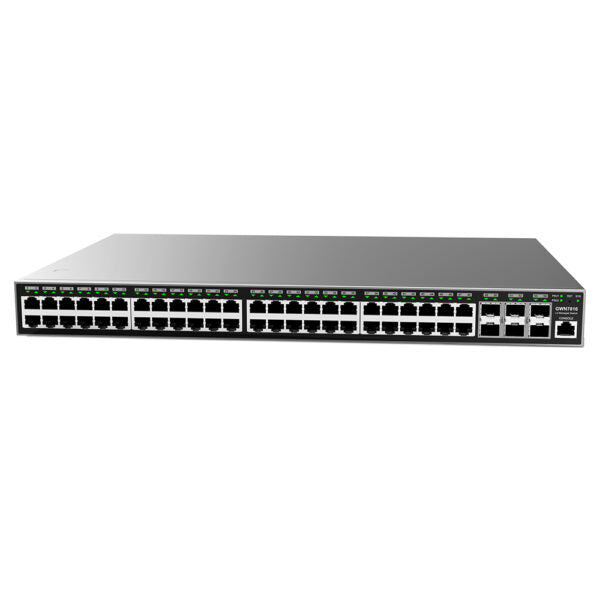
• The GWN7816 is a 48-port Layer 3 managed network switch, ideal for medium-to-large enterprises looking to build scalable and secure business networks. • Key features include: • Advanced VLAN support for flexible traffic segmentation • Enhanced QoS for prioritization of network traffic • IGMP/MLD Snooping for optimized network performance • Comprehensive security capabilities against potential attacks • Multi-management options, including local Web interface, CLI, GWN.Cloud, and GWN Manager • Additional information: • Weight: 10.27 lb • Dimensions: 21.54 × 17.95 × 4.21 in • Switch Type: Managed Switches • Number of Ports: 48-52 • Main Port Speed: Gigabit • Uplink Ports: 10G SFP+ • Layer Support: L3 • Technical Specifications: • Model: GWN7816 • Box Contents: • 1x GWN7816 Switch • 1x 1.2m AC Cable • 1x 25cm Ground Cable • 4x Rubber Footpads • 2x Front Rack-Mounting Kits • 8x Screws (KM 3*6) • Network Protocol: • IPv4, IPv6, IEEE 802.3, IEEE 802.3i, IEEE 802.3u, IEEE 802.3ab, IEEE 802.3z, IEEE 802.3ae, IEEE 802.3az, IEEE 802.3ad, IEEE 802.3x, IEEE 802.3af/at/bt, IEEE 802.1p, IEEE 802.1Q, IEEE 802.1d, IEEE 802.1s, IEEE 802.1w, IEEE 802.1x • Gigabit Ports: 48 • SFP+ Ports: • 6 Ports • Support for DAC cable, with a maximum length of 5m • Maximum Amount of Supported Modules: • SM-10G: 6 • MM-10G: 6 • RJ45-10G: 3 • Console: 1 • PSUs: • 1 PSU of 70W by default, with support for 1 hot-swap PSU (purchased separately) • Technical Specifications: • Maximum Output Power Per PoE Port: N/A • Max Total PoE Output Power: N/A • PoE Standards: N/A • Auxiliary Ports: 1x Reset Pinhole • Forwarding Mode: Store-and-forward

About This Product

The Grandstream GWN7816 is a Layer 3 managed switch built for growing businesses that need to move beyond flat, unsegmented networks. It sits comfortably in a mid-sized enterprise or a branch office where a dedicated IT team wants programmatic control over traffic paths, VLAN isolation, and quality of service without the cost of a fully modular chassis. Its 48 gigabit copper ports make it a practical access or distribution layer device for connecting workstations, printers, and local servers, while the six 10G SFP+ uplinks allow it to aggregate bandwidth to a core switch or high-speed storage array. Because the switch supplies no Power over Ethernet, it fits networks where phones, cameras, and access points are powered by injectors or by dedicated PoE switches—something to plan for in a VoIP-heavy deployment. In a Toronto office context, that means a typical floor of desks with a separate PoE edge switch can still benefit from the GWN7816 as a backbone switch handling inter-VLAN routing and uplink duties.

For businesses evaluating where this switch is overkill or underpowered, consider scale. A ten-person professional office with a single flat network and no need for routing or advanced segmentation would be better served by a simpler smart or unmanaged switch. At the opposite end, a data center or campus core demanding dense 25G/40G connectivity will find the GWN7816's 10G uplinks a bottleneck. But for the classic mid-market environment—perhaps a law firm, a multi-floor office, or a private school—this switch hits a useful balance. It offers IPv4 and IPv6 routing, comprehensive VLAN support, and multi-platform management through its local web interface, CLI, or Grandstream's cloud and on-premises controllers. The ability to drop the switch into an existing GWN.Cloud site and push configuration remotely is a real day-to-day advantage for lean IT teams managing multiple locations.
Services We Provide
  • Professional Installation & Configuration
  • Ongoing Maintenance & Support
  • Troubleshooting & Repairs
  • System Upgrades & Updates



