
Grandstream GWN7821P Enterprise Layer 3 Managed Multi-Gigabit PoE Network Switch

Frequently Asked Questions

First, confirm the phone is getting a valid IP address by checking its network settings. If it has an IP, verify that the VLAN configuration on the switch port matches the voice VLAN used by your PBX. A common oversight is not tagging the voice VLAN on the access port. If the issue persists, try power cycling the phone and checking the PBX registration logs.
Verify that the camera is connected to one of the 2.5G PoE++ ports, as the Gigabit ports may not supply enough power for high-draw devices. Check the switch's PoE status page to see if the port is delivering the expected wattage and whether the total PoE budget is being exceeded. Reseat the Ethernet cable and try a different port to rule out a physical issue.
Access the switch's web interface under VLAN settings, create a new VLAN (e.g., VLAN 20), and assign the ports where phones are connected as tagged or untagged members depending on your setup. Then enable VLAN routing if you need the phones to reach the PBX on a different subnet. For easy management, you can also configure LLDP-MED to auto-assign the voice VLAN to Grandstream phones.
Choppy audio is often a network congestion or prioritization issue. On the switch, enable QoS and set DSCP values for VoIP traffic to EF (46). Also check if any ports are experiencing errors or collisions. Connect a laptop directly to the switch and run a speed test to rule out upstream bandwidth issues.
Log into the switch management interface and navigate to Quality of Service. Create a traffic class for SIP packets using the DSCP value 46 or a custom ACL matching UDP ports 5060-5061. Assign this class to the highest priority queue. Then apply the QoS policy to the relevant ports. This ensures voice traffic is handled before bulk data.
First, check that the AP is receiving PoE by looking at the switch port's PoE status—it should show power being drawn. If not, try a different PoE++ port or a known-working cable. Then confirm the AP is getting an IP address from your DHCP server. If it has an IP but still no SSID, the AP may need to be adopted by a controller; check the management interface.
Wait a few minutes for the switch to fully boot, then try accessing it again using a wired connection on the same subnet. If it still doesn't load, check that your computer is on the management VLAN and that the switch's IP hasn't changed due to DHCP. Use a console cable for CLI access if needed—this is a safe, non-destructive step.
Yes, the GWN7821P supports cloud management through Grandstream's GDMS platform or GWN Manager. To set it up, register the switch in your GDMS account and then either use zero-touch provisioning (if the switch has internet access) or manually input the activation key. No additional hardware controller is required.
Check that the SFP+ module you are using is Grandstream-certified or at least compliant with IEEE 802.3ae. Non-certified modules may not work reliably. Also reseat the module and clean the fiber connectors. If the problem persists, try swapping the module with a known-working one to isolate the issue.
Log into the web interface and go to the PoE status page. There you will see the current power draw per port and the total consumption across all ports. You can also view this via CLI with 'show power inline'. Monitoring this helps you avoid exceeding the 240W budget and plan for additional devices.
Switches

Grandstream GWN7821P Enterprise Layer 3 Managed Multi-Gigabit PoE Network Switch
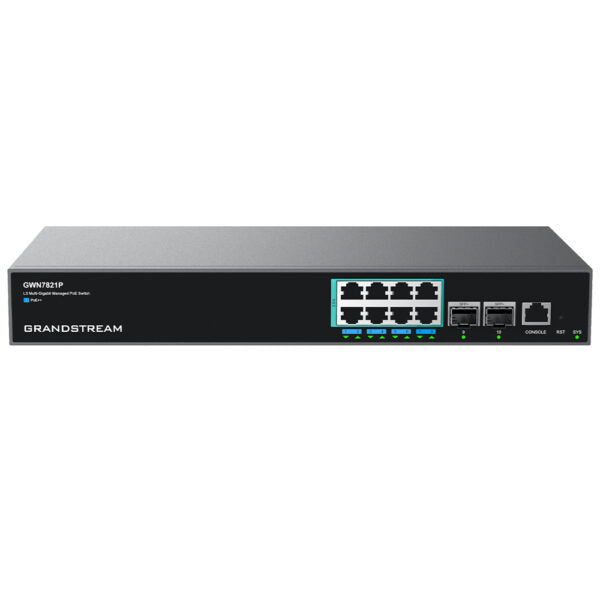
• Layer 3 multi-gigabit managed PoE switch with advanced VLAN and QoS features • Supports medium-to-large enterprises for building scalable, secure, high-performance networks • Smart dynamic PoE output powers IP phones, IP cameras, Wi-Fi access points, and other PoE endpoints • Managed in multiple ways, including local Web interface, CLI, GWN router, GDMS Networking, and GWN Manager Key Features: • 8 x 2.5 GigE PoE++ ports • 2 x 10G SFP+ ports • 8 & 24 Gigabit Ethernet ports and 2 & 4 Gigabit SFP+ ports • Smart power control for dynamic PoE/PoE+ and PoE++ • Supports IPv6 and IPv4 networks • Reliable features, including fault detection, device protection, dual boot, dual system file redundancy, link aggregation, storm control, and more • ACL filtering of data packets with configurable matching rules, processing operations, and time schedules • Management options include Embedded controller, GDMS Networking, GWN Manager, CLI management, and GWN router • Built-in QoS for prioritization of network traffic Additional Information: • Weight: 5.62 lb • Dimensions: 16.61 × 8.13 × 2.01 in • Switch Type: PoE Switches • Number of Ports: 5-10 • Main Port Speed: 2.5G • Uplink Ports: 10G SFP+ • Layer Support: L3 • PoE Support: Yes • PoE Budget: High (≥200) • Technical Specifications: • Model: GWN7821P • Package Contents: Switch, AC Cable, Ground Cable, Rubber Footpads, Power Cord Anti-Trip, Extended Rack-Mounting Kits, Screws, Quick Installation Guide • Network Protocols: IPv4, IPv6, IEEE 802.3, IEEE 802.3i, IEEE 802.3u, IEEE 802.3ab, IEEE 802.3z, IEEE 802.3ae, IEEE 802.3az, IEEE 802.3ad, IEEE 802.3x, IEEE 802.3af/at/bt, IEEE 802.1p, IEEE 802.1Q, IEEE 802.1d, IEEE 802.1w, IEEE 802.1s, IEEE 802.1x • Memory: 256MB RAM, 8MB Nor Flash, 128MB Nand Flash • Jumbo Frame: 10240 bytes • PoE Standards: IEEE 802.3af/at/bt • Gigabit Ports: 8 x 2.5G • Maximum Amount of Supported Modules: SM-10G: 2, MM-10G: 2, RJ45-10G: 2 • Link Aggregation Groups: 5 • Integrated Power Supply: 280W (54V/5.19A) • Maximum Output Power Per PoE Port: 60W • Max Total PoE Output Power: 240W

About This Product

The Grandstream GWN7821P is a Layer 3 managed PoE switch built for medium-to-large enterprise networks that need both performance and flexibility. With eight 2.5G PoE++ ports, it can power high-demand devices like Wi-Fi 6 access points and IP cameras while leaving headroom for bandwidth-heavy applications. The combination of Gigabit Ethernet ports and 10G SFP+ uplinks makes it a strong fit for growing offices in the GTA or other Canadian business hubs, where you might deploy it as a core switch for a multi-floor deployment or as a distribution layer in a larger structured network.

This switch pairs naturally with Grandstream IP phones, access points, and routers, especially if you are already using the GDMS or GWN Manager platforms for centralized provisioning and monitoring. The Layer 3 capabilities allow inter-VLAN routing without a separate router, which simplifies network design for organizations that segment traffic by department or function. For a small office with fewer than 20 endpoints, the GWN7821P is probably overkill; a simpler Layer 2 PoE switch would meet your needs at lower cost. On the other hand, if you need more than eight high-power PoE++ ports or require stacking for higher port density, you may need to plan for multiple units.

A practical consideration is the 240W total PoE budget. That is generous enough to power a mix of PoE++ and PoE+ devices, but if every port is running a 60W device simultaneously you will hit the limit. Ensure you calculate actual power draw before scaling. The switch supports both IPv4 and IPv6, includes storm control and ACL filtering, and can be managed locally via CLI or web, or remotely through GDMS or GWN Manager. For Canadian deployments, it is fully compatible with common ISPs and SIP trunk providers, and the dual boot and redundant file system add reliability for critical infrastructure.
Services We Provide
  • Professional Installation & Configuration
  • Ongoing Maintenance & Support
  • Troubleshooting & Repairs
  • System Upgrades & Updates



