
Grandstream GWN7822P Enterprise Layer 3 Managed Multi-Gigabit PoE Network Switch

Frequently Asked Questions

Confirm the power cord is securely connected to both the switch and a working electrical outlet. Verify that the outlet is powered by testing with another device. If the switch still won't power on, ensure no external circuit breaker has tripped. If the issue persists, a Toronto-based VoIP support provider can usually resolve this remotely.
Check the power budget: the GWN7822P supplies a total of 360 watts PoE. If you're drawing near or above that limit, unplug non-essential devices to see if the problem device powers up. Also confirm the device you're connecting is within the per-port limit (30 watts for ports 1–16, 60 watts for ports 17–24). Reseat the Ethernet cable on both ends; a loose or damaged cable can prevent power negotiation.
First, verify the cable is at least Cat5e or better—Cat6 is recommended for 2.5GBase-T at distance. Check that both ends of the connection are set to auto-negotiation (the switch defaults to this). If the device on the other end only supports 1 gigabit, it should still link; if not, try a different port or cable. Power cycle both the switch and the connected device.
Log into the switch management interface and confirm that the VLANs are created and assigned to the correct ports in tagged or untagged mode as needed. Check that any trunk ports carrying multiple VLANs are set to allow those VLANs. If you're using a router-on-a-stick configuration, ensure the router's interface is also configured with matching VLANs.
Verify that the DHCP server is enabled on the switch, and that the DHCP pool is correctly configured with the right subnet and IP range. If you're using DHCP relay, confirm the relay target IP is reachable. Also check that the VLAN the phones are on has a DHCP server assigned—if the phones are on a separate voice VLAN, that VLAN needs its own DHCP scope.
Connect the dedicated stacking ports (usually SFP+ interfaces) between the switches using appropriate cables or modules. Ensure both switches are running the same firmware version. Configure stacking via the management interface—assign one switch as the master. Power cycle the whole stack if the units don't detect each other automatically.
Create a dedicated voice VLAN and assign all IP phones to it. Then set up QoS rules to mark traffic from that VLAN with a high priority (e.g., DSCP EF or CoS 5). You can also enable LLDP-MED on the switch ports to automatically communicate QoS settings to compatible phones like Grandstream models.
Check the switch's event log for link flaps or port errors. Replace any suspect Ethernet cables—loose or damaged cables are a common cause. Verify that the power supply is stable and not overheating; ensure the switch has adequate ventilation. If you're using PoE, confirm you haven't exceeded the 360-watt budget, which can cause random port shutdowns.
Ensure your laptop is connected to the same VLAN as the switch's management IP. If you changed the management IP from default, double-check the address. Try pinging the switch IP to see if it's reachable. If the switch is behind a router, check that no ACL or firewall is blocking access. A power cycle of both the switch and your laptop may clear transient issues.
Set the GWN7822P to simple switching (Layer 2) initially, and configure a common VLAN on the uplink port to match your core switch's trunk. Adjust spanning-tree priorities to prevent loops. For advanced features like routing, enable Layer 3 on the GWN and configure static routes or OSPF as needed. Make sure both switches use the same MTU if jumbo frames are in use.
Switches

Grandstream GWN7822P Enterprise Layer 3 Managed Multi-Gigabit PoE Network Switch
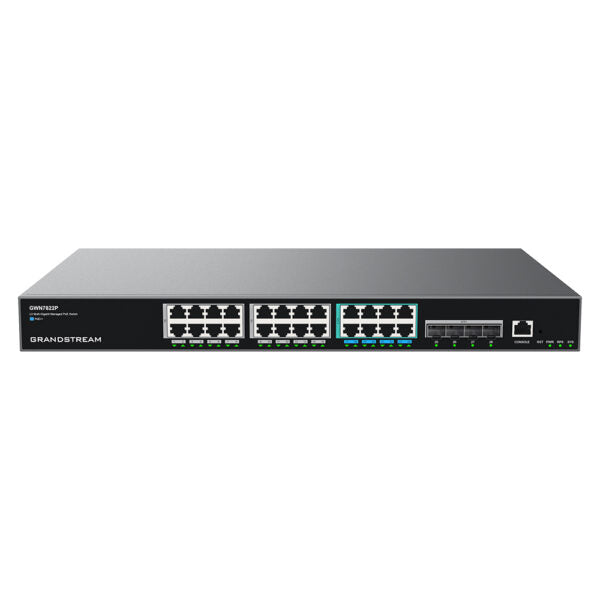
* The GWN7820 series are Layer 3 multi-gigabit managed PoE switches that enable medium-to-large enterprises to build scalable, secure, and high-performance networks. Key Features: • Advanced VLAN for flexible traffic segmentation • Priority QoS for network traffic prioritization • IGMP/MLD Snooping for optimized network performance • Comprehensive security capabilities against potential attacks • Smart dynamic PoE output to power IP phones, cameras, Wi-Fi access points, and other PoE endpoints Additional Information: • Weight: 9.7 lb • Dimensions: 21.93 × 16.26 × 5.43 in • Switch Type: PoE Switches • Number of Ports: 24-28 • Main Port Speed: 2.5G • Uplink Ports: 10G SFP+ • Layer Support: L3 • PoE Support: Yes • PoE Budget: High (≥200) Technical Specifications: • Package Contents: + 1x Switch + 1x 1.2m AC Cable + 1x 25cm Ground Cable + 4x Rubber Footpads + 1x Power Cord Anti-Trip + 2x Rack-Mounting Kits + 8x Screws (KM 3*6) + 1x Quick Installation Guide • Network Protocols: + IPv4, IPv6, IEEE 802.3, IEEE 802.3i, IEEE 802.3u, IEEE 802.3ab, IEEE 802.3z, IEEE 802.3ae, IEEE 802.3az, IEEE 802.3ad, IEEE 802.3x + IEEE 802.1p, IEEE 802.1Q, IEEE 802.1d, IEEE 802.1w, IEEE 802.1s, IEEE 802.1x • Memory: 256MB RAM 8MB Nor Flash, 128MB Nand Flash • Jumbo Frame (Bytes): 10240 • PoE Standards: IEEE 802.3af/at/bt • Gigabit Ports: 16x 1G, 8x 2.5G • Maximum Amount of Supported Modules: + SM-10G: 4 + MM-10G: 4 + RJ45-10G: 2 (Note: RJ45-10G modules must be interval inserted) • Link Aggregation Groups: 14 • Integrated Power Supply: 420W(54V/7.78A) • External Redundant Power Supply (RPS): 54V(300W) • Maximum Output Power Per PoE Port: + 30W for port 1-16, 60W for port 17-24 • Max Total PoE Output Power: 360W • Surge Protection: ±6KV CM and DM for power, ±4KV CM for network ports • ESD: ±12KV for contact discharge • Stacking: Yes, up to 4 devices • DHCP: DHCP server, DHCP relay, Option 82, 60, 160, and 43 • Mounting: Desktop or Rackmount (rack-mounting kits included) • Environmental: + Operation: 0°C to 45°C, humidity 10% to 90% RH (Non-condensing) + Storage: -10°C to 60°C, humidity: 10% to 90% RH (Non-condensing) Note: For a full list of specifications, please refer to the Product Data Sheet.

About This Product

The Grandstream GWN7822P is a Layer 3 managed PoE switch designed for medium-to-large enterprises that need a scalable, high-performance network backbone. It's an excellent fit for offices deploying multi-gigabit connections—such as high-speed Wi-Fi 6 access points, advanced IP security cameras, and modern VoIP phone systems—where conventional 1-gigabit switches become a bottleneck. The switch is equally at home in a Toronto-area office with a mix of Grandstream IP phones and GWN wireless access points, where its VLAN and QoS features help prioritize voice traffic and segment the network for security.

The GWN7822P offers a practical balance: sixteen 1-gigabit ports for standard devices and eight 2.5-gigabit ports for higher-bandwidth endpoints, plus four 10-gigabit SFP+ uplink ports for connecting to a core switch or server room. Its 360-watt PoE budget can power a substantial number of devices, though the per-port limit of 60 watts on the higher-speed ports means it can handle power-hungry equipment like pan-tilt-zoom cameras or outdoor access points without issue. Stacking up to four units gives you room to grow without sacrificing management simplicity.

Buyers should be aware that this switch is overkill for a small office with only a handful of 1-gigabit devices—a simpler, cheaper model would do. Conversely, if you need all ports to run at 10 gigabit speeds, this switch is underpowered for that scenario. The device is rack-mountable and includes installation hardware, making it straightforward to deploy in a standard IT closet. For Canadian businesses, the switch's support for common carrier VLAN and DHCP settings (including Option 43 and 60) means it integrates well with typical ISP configurations used across the GTA.
Services We Provide
  • Professional Installation & Configuration
  • Ongoing Maintenance & Support
  • Troubleshooting & Repairs
  • System Upgrades & Updates



