
Grandstream GWN7831 Enterprise Layer 3 Managed Aggregation Switch

Frequently Asked Questions

First, check that the switch is configured with a DHCP server or that a DHCP server is reachable on the VLAN the port is assigned to. If the port is in a VLAN without a DHCP relay or server, devices will not receive an IP. Verify the port's VLAN membership and ensure the uplink to the DHCP server is up. If the issue persists, a Toronto-based VoIP support provider can usually resolve this remotely.
Confirm that the power cable is securely connected to both the switch and a working power outlet. The GWN7831 has an integrated 60W power supply and supports an optional redundant power supply (RPS). If the switch still does not power on, try a different outlet or cable. If you have the RPS connected, ensure it is also powered. Avoid opening the unit; contact support if the problem continues.
Make sure your computer is on the same subnet as the switch's management IP. By default, the switch may use DHCP or a static IP like 192.168.1.1. Check the switch's LCD or console port for the current IP. If you still cannot connect, try a direct Ethernet connection to a port and manually set your computer's IP to the same subnet. A power cycle of the switch can also help if it is in a bad state.
Verify that the VLAN is created on the switch and that the ports are assigned to the correct VLAN with the proper tagging (access or trunk). A common mistake is forgetting to tag the uplink port for the VLAN, so traffic never reaches the router. Use the switch's CLI or web interface to review VLAN membership and port settings. If you are using 802.1Q trunks, ensure both ends agree on the allowed VLANs.
First, check the switch's CPU and memory utilization via the management interface. High utilization can indicate a broadcast storm or a loop in the network. Ensure Spanning Tree Protocol (STP) is enabled on all ports to prevent loops. Also, verify that the link speed and duplex settings match on both ends of each cable. If the issue is isolated to a specific port, try reseating the SFP module or cable.
Use the switch's QoS settings to mark VoIP traffic with a higher priority. Typically, you would set the DSCP value to EF (46) or the 802.1p priority to 5 for SIP and RTP traffic. Then, configure the switch to trust those markings on the ports where phones are connected. This ensures voice packets are queued ahead of data traffic. The GWN7831 supports advanced QoS, so you can also set rate limits if needed.
Ensure the SFP module is compatible with the switch and is fully inserted. Check that the fiber or copper cable is properly connected and not damaged. Verify that the remote device's SFP port is also configured correctly and that the link speed matches. You can test the port with a known-good SFP module and cable to isolate the issue. If the port still does not link, it may be disabled in software or faulty.
Yes, the GWN7831 works well with Grandstream UCM PBX systems and IP phones. It provides the Layer 3 routing and VLAN segmentation needed to separate voice and data traffic. However, remember that this switch does not provide PoE, so you will need PoE switches or injectors to power Grandstream phones. The switch's QoS features can prioritize voice traffic once configured correctly.
First, ensure the switch has internet access and can reach the GWN.Cloud servers (check firewall rules for outbound HTTPS). Verify that the switch is registered to your GWN.Cloud account using the correct activation code or serial number. If the switch is behind a NAT, make sure the management IP is reachable from the internet. A power cycle of the switch and a refresh of the cloud portal can also help.
Check that you are using 10G-rated SFP+ modules and cables, not 1G SFP modules. The switch's SFP+ ports support 10G but will fall back to 1G if the module or cable is only rated for that speed. Also, verify that the link partner also supports 10G and that the cable length is within specification. If both ends are 10G-capable, try reseating the module or testing with a different port.
Switches

Grandstream GWN7831 Enterprise Layer 3 Managed Aggregation Switch
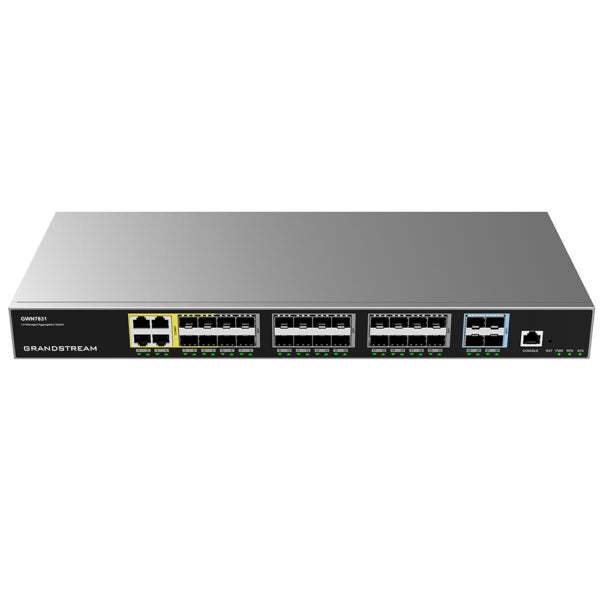
• Layer 3 aggregation managed switches for scalable, secure, high-performance and smart business networks • Supports advanced VLAN for flexible and sophisticated traffic segmentation • Advanced QoS for prioritization of network traffic • IGMP/MLD Snooping for network performance optimization • Comprehensive security capabilities against potential attacks Key Features: • 20 x SFP ports • 4 x SFP/GigE combo ports • Supports IPv6 and IPv4 networks • ARP Inspection, IP Source Guard, DoS protection, port security & DHCP snooping • Embedded controller with GWN.Cloud and GWN Manager for cloud and on-premise network management • Built-in QoS for prioritization of network traffic Additional Information: Weight: 6.94 lb Dimensions: 17.32 × 7.87 × 1.73 in Switch Type: Managed Switches Number of Ports: 24-28 Main Port Speed: Gigabit Uplink Ports: 10G SFP+ PoE Support: No Layer Support: L3 Redundant Power Supply: Yes Technical Specifications: Box Contents: 1x GWN7830 Switch 1x 1.2m (10A) AC Cable 1x 25cm Ground Cable 4x Rubber Footpads 1x Power Cord Anti-Trip 2x Rack-Mounting Kits 8x Screws (KM 3*6) 1x Quick Installation Guide Network Protocol: IPv4, IPv6, IEEE 802.3, IEEE 802.3i, IEEE 802.3u, IEEE 802.3ab, IEEE 802.3z, IEEE 802.3ae, IEEE 802.3az, IEEE 802.3ad, IEEE 802.3x, IEEE 802.1p, IEEE 802.1Q, Gigabit Ethernet Ports: 4x Combo, Gigabit SFP Ports: 24, Gigabit SFP+ Ports: 4 Maximum No. of Supported Modules: SM-1G: 24 MM-1G: 24 RJ45-1G: 12 SM-10G: 4 MM-10G: 4 RJ45-10G: 2 Console: 1 Integrated Power Supply: 60W External Redundant Power Supply (RPS): 12V/60W Auxiliary Ports: 1x Reset Pinhole Forwarding Mode: Store-and-forward Total Non-blocking Throughput: 64Gbps Switching Capability: 128Gbps Forwarding Rate: 95.232Mpps Packet Buffer: 12Mb Network Latency: <4µs

About This Product

The Grandstream GWN7831 is a Layer 3 managed aggregation switch designed for medium to large business networks that need to segment traffic, enforce security policies, and manage bandwidth across multiple VLANs. It fits naturally in a multi-floor office, a campus environment, or a data center where you need to aggregate traffic from several access switches before routing it upstream. With 20 SFP ports and 4 combo ports, it is well-suited for environments that already use fiber cabling or plan to, and it pairs cleanly with Grandstream’s GWN series access points and other managed switches for a unified network under GWN.Cloud or GWN Manager.

A key tradeoff to note is that this switch does not provide Power over Ethernet (PoE), so it cannot directly power phones, cameras, or access points. You will need separate PoE switches or injectors at the edge. The GWN7831 is overkill for a small office with a handful of devices, where a simpler unmanaged or Layer 2 switch would suffice. Conversely, it may be underpowered for a large enterprise core that requires higher port density or 25G/40G uplinks. For a Toronto-based business with a growing network, this switch offers a solid balance of Layer 3 features and fiber connectivity without the cost of full 10G on every port.

Canadian businesses should verify that their ISP or upstream provider supports the VLAN and routing configurations this switch can enforce, especially if using multiple internet connections or MPLS circuits. The redundant power supply option is a practical consideration for uptime-critical deployments in the GTA, where power fluctuations can occasionally occur. Overall, the GWN7831 is a capable aggregation switch for organizations that need to scale their network securely and have already addressed PoE requirements at the access layer.
Services We Provide
  • Professional Installation & Configuration
  • Ongoing Maintenance & Support
  • Troubleshooting & Repairs
  • System Upgrades & Updates



