Grandstream GXW4216 V2 16-Port FXS VoIP Gateway

Frequently Asked Questions

First, check the network cable between the gateway and your switch or router. Make sure the LAN LED is lit. If the physical connection looks good, log into the gateway's web interface and verify that the SIP server address, port, and credentials for each port match what your VoIP provider or PBX expects. Most registration failures in a GTA office come from a mismatch in the domain or username field.
This is commonly a codec or timing issue. First, confirm that T.38 fax relay is enabled on the gateway for that port. If it is already on, try switching to G.711 passthrough mode—some carrier connections handle passthrough more reliably. Also check that your fax machine is set to a slow speed, such as 9600 bps, to reduce errors.
Start by reseating the analog phone cable at both ends—at the port on the gateway and at the phone or fax device. If the cable is secure, power-cycle the gateway by disconnecting it from power for 30 seconds and reconnecting it. If dial tone still doesn't return, check in the web interface whether that particular port is enabled and configured for the correct line type (usually loop start for standard analog phones).
You will typically connect the PBX's analog extension ports to the FXS ports on the GXW4216 V2. Each gateway port acts as a separate extension. In the gateway's configuration, assign a unique SIP account or extension number per port, matching what your IP-PBX expects. Then test each extension by placing a call between the PBX and an IP phone on the same network.
This is almost always a network or SIP ALG issue. First, check if your router's SIP ALG feature is enabled; if so, disable it. Next, verify that the gateway's IP address is in the correct subnet and that no firewall rules block RTP ports (typically UDP 10000-20000). In a typical GTA office with a shared internet connection, one-way audio is often resolved by turning off SIP inspection on the router.
Yes, the GXW4216 V2 uses a standard Gigabit Ethernet port and works with any ISP that provides a wired Ethernet handoff, including fibre providers like Bell Fibe, Rogers Cable, or TekSavvy. As long as your modem or ONT gives you an Ethernet RJ45 connection, the gateway will function normally. No special configuration is needed for fibre.
A 30-second call drop often points to a session timer mismatch. Check the gateway's SIP settings for 'session timer' or 'SIP expire' value. Ensure it matches the timer used by your VoIP provider or IP-PBX. Also confirm that the router isn't forcing a TCP connection timeout; increasing the NAT keepalive interval on the gateway can help maintain the connection through a home-grade router.
Each port can have its own independent SIP profile. In the web interface, navigate to the 'FXS Ports' section and select the specific port you want to configure. Enter the SIP server domain, account ID, and password for that line. You can assign up to four SIP server profiles system-wide, so you can group ports under different carriers if needed. Repeat for each port that needs a separate account.
'No Service' means the gateway cannot register that line. Double-check that you have entered the correct SIP account credentials and that the server address is reachable from your network. Try pinging the SIP server IP from a computer on the same subnet to confirm network connectivity. Also ensure that the SIP server has that extension created and enabled.
No, the GXW4216 V2 is an FXS gateway—it provides a phone signal for analog phones, faxes, or PBX extensions. It does not have an FXO port to connect to a traditional analog telephone line (POTS) from a telecom provider. To connect to a Bell or Rogers analog line, you would need an FXO gateway. This device is strictly for connecting analog devices to a VoIP system.
VoIP Gateways

Grandstream GXW4216 V2 16-Port FXS VoIP Gateway
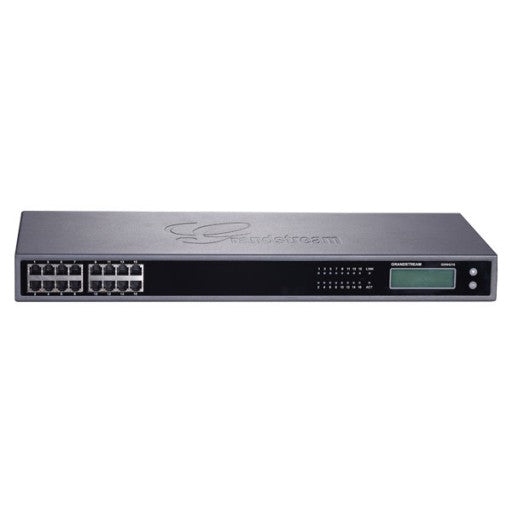
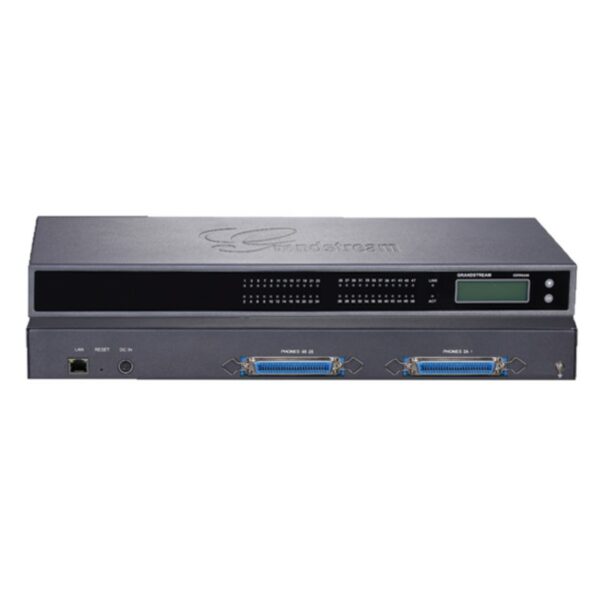
• The GXW4216 high-density FXS gateway series enables businesses to create a cost-effective hybrid IP and analog telephone system, offering the benefits of VoIP communications with Gigabit speeds while preserving investment on existing analog phones, fax machines and legacy PBX systems. • Key features: • 16 FXS ports • 1 Gigabit network port • 132×48 backlit graphic display with support for multiple languages • 4 SIP server profiles per system, independent SIP account per port • Designed and tested for full interoperability with leading IP-PBXs, soft-switches and SIP-based environments • Advanced security protection with SRTP/TLS/HTTPS • Additional Information: • Weight: 7.54 lbs • Dimensions: 19.5 × 4 × 13 in • Brand: Grandstream • Device Ports: FXS, Gigabit • Number of Ports: 16 FXS • Technical Specifications: • Telephone Interfaces: GXW4216: 16 x RJ11 & 1/1/2 50-pin Telco connectors • Network Interfaces: 1 x 10M/100M/1000Mbps auto-sensing RJ45 port • LED indicators: LAN Link, LAN Activity, Connection Per Telephone Port • LCD display: Backlit 128×32 graphic LCD display with support for multiple languages • Voice-over-Packet Capabilities: Window based carrier grade line echo cancellation, dynamic jitter buffer, modern detection & auto-switch to G.711 • Voice Compression: G.711, G.723.1, G.76 (40/32/24/16), G.729 A/B, iLBC • Fax over IP: T.38 compliant Group 3 Fax Relay up to 14.4kpbs and auto-switch to G.711 for Fax Passthrough • Telephony Feature: Caller ID display or block, call waiting, blind or attended call transfer, call forward, do not disturb, 3-way conference, last call return, paging, message waiting indicator LED (NEON LED) support and stutter tone, auto dial

About This Product

The Grandstream GXW4216 V2 is a 16-port FXS gateway for businesses that need to connect analog devices to a VoIP network. It's a good fit for offices with multiple analog phones, fax machines, or an older PBX system that isn't ready for a full IP phone replacement. The device allows each port to operate as an independent SIP extension, so it can integrate smoothly with most hosted or on-premise IP-PBX platforms.

This gateway is best suited to medium-sized deployments where a single, dense unit can serve a whole floor or department. In the GTA, businesses that rely on fax lines or have analog handsets in common areas often use a model like this to avoid replacing every endpoint at once. The dual Telco and RJ11 port options simplify cabling in standard server racks.

A practical limitation is the single Gigabit Ethernet port, which means the gateway itself can become a bandwidth bottleneck if you push heavy data traffic through it. It also lacks built-in PoE, so all 16 analog ports must connect to powered devices or a separate power source. For a small office with just two or three analog lines, this model is overkill; a 4-port or 8-port gateway would be simpler and more cost-effective. Conversely, in a large call centre environment with over 50 analog devices, a higher-density chassis may be more practical.

Deployment complexity is moderate: configuring independent SIP accounts per port gives you fine-grained control, but it also means setting up individual registrations if you don't use a provisioning server. Canadian businesses should confirm that their SIP trunk provider supports multiple discrete registrations from one customer premises device, as some carriers limit the number of simultaneous registrations per account.
Services We Provide
  • Professional Installation & Configuration
  • Ongoing Maintenance & Support
  • Troubleshooting & Repairs
  • System Upgrades & Updates