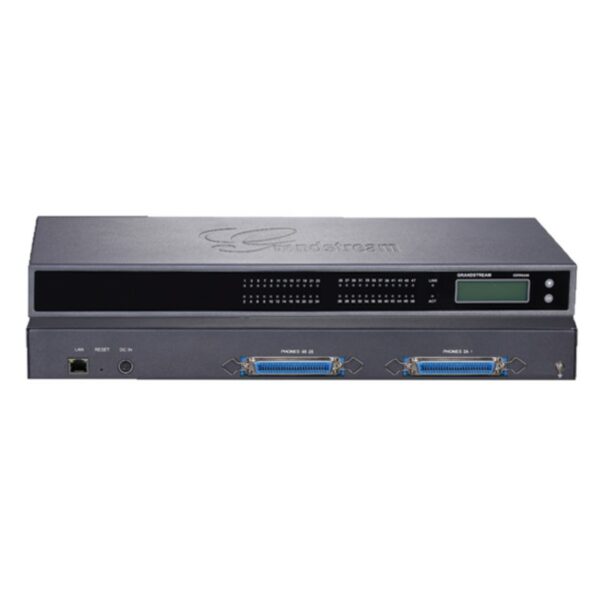
Grandstream GXW4224 V2 24 FXS Port VoIP Gateway

Frequently Asked Questions

First, verify that the SIP server settings (server address, port, username, password) are correctly entered in the gateway's web interface for the specific FXS port or system profile. Check that the phone is plugged into a working RJ11 port and that the line is not already in use. If the issue persists, a Toronto-based VoIP support provider can usually resolve this remotely.
Ensure the power adapter is securely connected and that the device's power LED is lit. Then verify that your analog phone is properly plugged into one of the RJ11 ports and that the phone itself is not faulty. If the phone works when plugged into a different port, the original port may be defective.
Choppy audio is often a network issue. First, check that the gateway is connected to a stable, high-speed Ethernet cable (Cat5e or better) and that your internet connection has enough bandwidth. You can also try lowering the audio codec priority in the gateway's settings (e.g., switch from G.722 to G.711) to reduce bandwidth demand.
An error display usually indicates a configuration or hardware issue. Note the exact error message or code, then power-cycle the gateway by unplugging it for 10 seconds. If the error reappears, check that all RJ11 ports are not shorted and that no cables are damaged. For persistent errors, contact your VoIP support team.
You will need to connect the PBX's trunk ports to the FXS ports on the gateway, then configure each port with an appropriate SIP account or profile. In the gateway's web interface, set the port to "PBX" mode if available, and ensure the dial plan matches your PBX's extension scheme. Detailed steps depend on your PBX model.
First, replace the Ethernet cable and try a different port on your switch or router. Verify that the gateway's IP address is set to static or has a reserved DHCP lease to avoid conflicts. Also check that the switch port is not set to a lower speed or duplex mismatch—autonegotiation is recommended.
Yes, as long as the provider supports SIP trunking and allows you to register multiple accounts. You'll need to create a separate SIP account for each FXS port you want to use, then enter those credentials in the gateway's web interface under the appropriate port or system profile. Most Canadian hosted providers support this setup.
Fax over VoIP can be tricky. First, enable T.38 fax passthrough in the gateway's settings for the port connected to the fax machine. Also reduce the fax speed to 9600 bps in the fax machine's settings and ensure no other calls are active on the same port. If problems continue, consider a dedicated ATA for faxing.
Try accessing the web interface from a different browser or computer on the same network. If it's still slow, check that the gateway's firmware is up to date. You can also reboot the gateway by power-cycling it. Avoid making changes while other VoIP traffic is heavy, as this can cause temporary interface lag.
VoIP Gateways

Grandstream GXW4224 V2 24 FXS Port VoIP Gateway
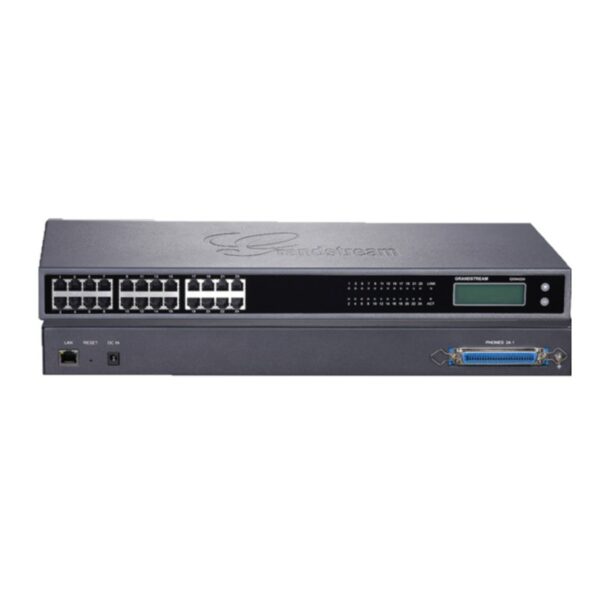
• The GXW4200 high-density FXS gateway series offers a cost-effective hybrid IP and analog telephone system, providing the benefits of VoIP communications while preserving investment on existing analog phones, fax machines, and legacy PBX systems. • Key features: • 16/24/32/48 FXS ports • Gigabit network port for fast data transfer • Broad interoperability with most service providers, soft-switches, and SIP-based environments • Advanced security protection with SRTP/TLS/HTTPS • Support for multiple languages on the 132×48 backlit graphic display • System capabilities: • 4 SIP server profiles per system, independent SIP account per port • Designed and tested for full interoperability with leading IP-PBXs, soft-switches, and SIP-based environments • Advanced security protection with SRTP/TLS/HTTPS • Support for various voice-over-packet capabilities • Technical specifications: • Telephone Interfaces: GXW4224: 24 x RJ11 & 1/1/2 50-pin Telco connectors • Network Interfaces: 1 x 10M/100M/1000Mbps auto-sensing RJ45 port • LED indicators: LAN Link, LAN Activity, Connection Per Telephone Port • LCD display: Backlit 128×32 graphic LCD display with support for multiple languages • Additional information: • Weight: 7.75 lbs • Dimensions: 19.5 × 4 × 13 in • Brand: Grandstream • Device Ports: FXS, Gigabit

About This Product

The Grandstream GXW4224 V2 is a 24-port FXS gateway designed for businesses that need to bridge legacy analog equipment—such as desk phones, fax machines, or older PBX systems—with a modern VoIP network. It fits naturally in a server rack (19-inch form factor) within a central telecom closet, making it a practical choice for medium-to-large offices or multi-floor deployments where dozens of analog endpoints must be connected to a single IP-PBX or hosted voice platform. In a Canadian context, this gateway works well with major SIP trunk providers and is commonly deployed in GTA office environments that require reliable, high-density analog-to-digital conversion.

This device is best suited for environments where the existing analog infrastructure is worth preserving, rather than replacing every handset. It pairs seamlessly with most IP-PBX systems and softswitches, and each of its 24 ports can be configured with its own independent SIP account. However, buyers should be aware that this is a rack-mount unit with significant depth, so it requires dedicated space and proper ventilation. It does not include built-in PoE, so each analog phone still needs its own power source. For a small office with only a handful of analog lines, this gateway would be overkill—both in port count and physical footprint. Conversely, if you need more than 24 ports, consider the 32- or 48-port variants of the same series.
Services We Provide
  • Professional Installation & Configuration
  • Ongoing Maintenance & Support
  • Troubleshooting & Repairs
  • System Upgrades & Updates