LINKVIL by Fanvil W712 RoIP Gateway

Frequently Asked Questions

First, verify that the IP address and port settings in the gateway’s web interface match your PBX’s SIP server and that the PBX allows registration from the W712’s MAC address. Then confirm that there are no firewall rules blocking UDP 5060 between the two devices. If the issue persists, a Toronto-based VoIP support provider can often diagnose this remotely by checking the SIP traces.
If you’re using PoE, ensure your switch provides PoE+ (802.3at) as the W712 requires at least 12V or PoE at. Start by swapping the Ethernet cable and trying a different switch port. If the device has a DC power supply, test with that to isolate whether the issue is PoE power or the gateway itself.
Audio problems often point to network jitter or insufficient bandwidth. First check that both the gateway and the SIP phone are on a wired LAN, not Wi‑Fi, and that the network supports the codec you’re using—try switching from Opus to G.722 in the W712’s web settings. Also confirm that the radio signal from the base station is clear and not affected by interference.
The gateway works with analog radios that have a standard two-pin or DB15 accessory port. Use the supplied radio interface cable to connect the radio’s speaker and microphone jacks (or PTT and audio lines) to the W712’s dedicated radio port. The web interface includes a wizard to set the carrier squelch and PTT delay for your specific analog model.
Yes, the gateway is carrier‑agnostic as long as the trunk uses standard SIP. During configuration, enter the carrier’s SIP server address and your credentials in the W712’s SIP account settings. For best results, enable NAT traversal if the gateway is behind a common business router—many Canadian business ISPs use CGNAT that can break registration.
This is usually a timeout issue. Check the radio’s power save or sleep mode settings—many portables will drop the accessory line to save battery. On the W712, increase the “RX hold time” under the radio interface settings so the gateway doesn’t release the transmit path too quickly. Also confirm that the radio battery is fully charged.
The W712 supports call recording to the TF card or USB storage inserted into the gateway. In the web interface, go to the recording menu, enable recording, and choose whether to capture all radio‑to‑SIP calls or only specific extensions. Recordings are saved as WAV files and can be accessed via the gateway’s file browser or FTP server.
First try power‑cycling the device. If the web interface still doesn’t respond, check if the gateway responds to ping. When all else fails, use the hardware reset button on the back—press and hold for about 10 seconds until the status LED blinks amber. This will restore factory defaults, so you’ll need to reconfigure it from scratch.
The W712 is a single‑channel gateway—it integrates one radio module at a time. If you need to bridge two separate radio frequencies (e.g., UHF and VHF, or two different talk groups), you would need a second W712 or a multi‑channel RoIP solution. For most small to medium deployments, one channel is sufficient for a single dispatch team.
VoIP Gateways

LINKVIL by Fanvil W712 RoIP Gateway
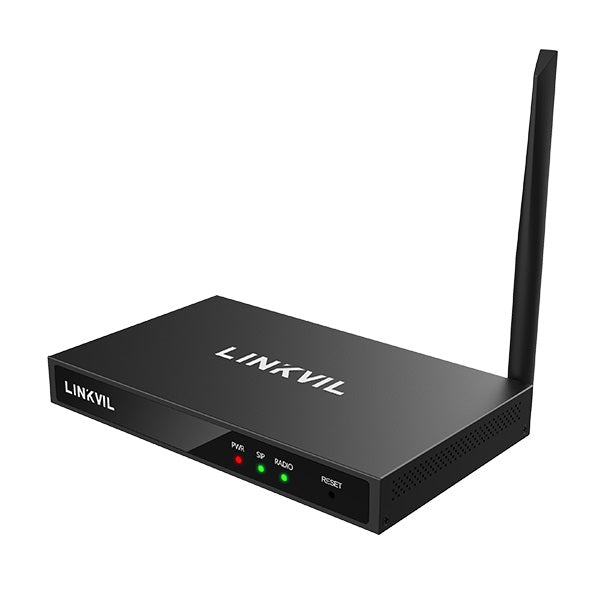
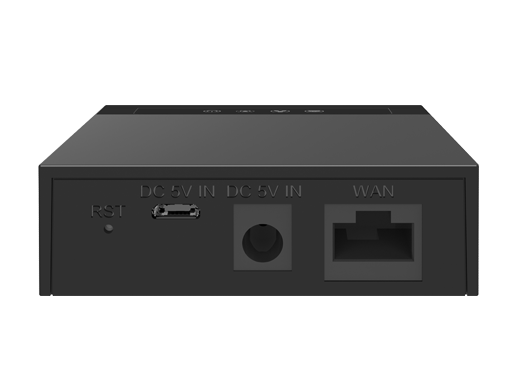
• The W712 RoIP gateway integrates the radio module in UHF 400-470 MHz and adopts the SIP standard protocol, enabling seamless interconnection between analog/DMR II digital intercom and SIP communication devices. • Key features: • Compatible with most mainstream IP PBX • Integrates 400~470 MHz radio modules for connection to analog/digital radios • Supports HD audio with G.722 and Opus • USB 2.0 interface and TF card interface for data storage or offline upgrade • Call recording and call logs support for two-way radios and SIP phones • Dual Megabit Ethernet for network transmission • Power supply via DC 12V PSU and PoE (at) • Web management for devices • Desktop and wall-mounted installation options • For a full list of specifications, please refer to the product datasheet.

About This Product

The LINKVIL W712 RoIP Gateway bridges the gap between traditional two-way radio systems and modern SIP-based telephony, making it a practical choice for businesses that rely on analog or DMR digital radios alongside VoIP phone systems. It’s particularly suited for environments like warehouses, construction sites, or campus security operations where a radio network is already in place and needs to be integrated with office phones or a cloud PBX. The device sits at the edge of your LAN, converting radio transmissions into SIP streams so that any SIP-enabled handset, softphone, or conference unit can communicate with radio users. For a GTA-based operation that might run a mix of carrier SIP trunks and an on-premise PBX like 3CX or FreePBX, this gateway adds the radio network as just another extension group, eliminating the need for separate dispatch consoles.
Services We Provide
  • Professional Installation & Configuration
  • Ongoing Maintenance & Support
  • Troubleshooting & Repairs
  • System Upgrades & Updates