Peplink Access Point One Rugged – APO-AC-RUG

Frequently Asked Questions

First, verify the Ethernet cable is fully seated at both the access point and the switch or injector. Check that the port you are connected to is providing Power over Ethernet if you are not using the included power adapter. If you are using a PoE switch, confirm the port is enabled and supplying sufficient power, as this device requires 802.3af PoE. A simple power cycle of the AP can also resolve a temporary boot hang.
Confirm that the upstream router or Peplink gateway has a working internet connection by plugging a laptop directly into the same switch port the AP uses. If the laptop gets online, the issue is likely between the AP and the network. Check the AP’s VLAN settings in the InControl dashboard or local interface; an incorrect management VLAN assignment is a common cause for this symptom.
Ensure the external omni-directional antennas are securely tightened to the RP-SMA connectors. A loose antenna will drastically reduce signal. Also, confirm the antennas are oriented vertically and are not blocked by metal objects. In a Canadian outdoor winter, ice buildup on the antennas can attenuate the signal, so check for physical obstructions first.
Connect the AP to a PoE switch or injector and use a computer on the same network segment. The AP will obtain an IP address from your DHCP server; you can find it in your router’s DHCP client list. Browse to that IP address to access the local web admin interface, where you can set up SSIDs and security settings without needing InControl.
Intermittent reboots often point to a power issue. Verify the PoE switch or injector is providing a stable 802.3af supply and is not overloaded. If you are using a long or low-quality Ethernet cable, the voltage drop can cause brownouts; test with a short, known-good cable. Also, check that the ambient temperature is within the unit’s operating range, as overheating can trigger a reboot, though this is unlikely given the rugged design.
Yes, the rugged metal enclosure is designed for outdoor exposure and can handle rain, snow, and wide temperature swings. However, you must ensure the cable entry points are sealed properly using weatherproof RJ-45 connectors or glands to prevent moisture ingress into the Ethernet ports. For a permanent outdoor installation in Ontario, mount the unit in a position where ice won't accumulate directly on the connectors.
The 2.4 GHz band is often congested with many devices and neighboring networks, especially in an urban area like Toronto. Log into the AP and try changing to a less crowded channel (1, 6, or 11). You should also check for sources of non-Wi-Fi interference, such as microwave ovens or older cordless phones, which can severely impact 2.4 GHz performance.
First, confirm the AP has internet access and can reach the InControl server. The most common cause is a DNS issue on the network that prevents the AP from resolving the InControl server name. Check your network's DHCP settings to ensure a valid DNS server is provided. You can also try adding the AP manually using its serial number in the InControl dashboard if auto-discovery is failing.
Test the port with a known-working cable and a laptop to rule out a cable or device fault. If the port is still down, log into the AP’s interface and check its configuration; it may have been disabled administratively. Physically inspect the port for any bent pins or debris if the unit has been in a dusty environment.
Access Points

Peplink Access Point One Rugged – APO-AC-RUG
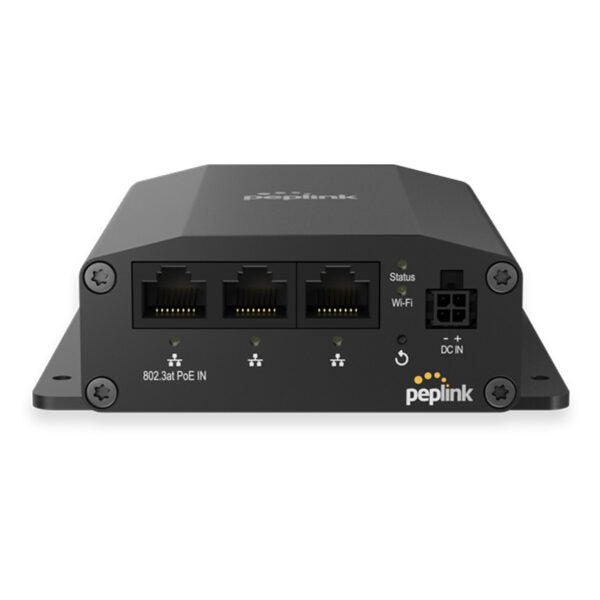
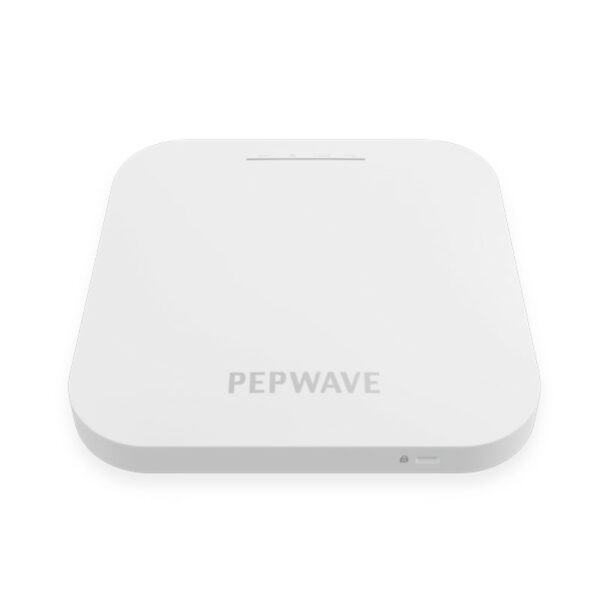
The AP One Rugged is designed for extreme environments where Wi-Fi connectivity is essential. Its rugged exterior can withstand temperatures ranging from -40°F to 149°F (-40°C to 65°C), ensuring smooth operation in harsh conditions. Key Features: • Dual-band Wi-Fi 5 with 2×2 MIMO • Professional Wi-Fi AP for Business • Rugged Metal Enclosure • Resistance to shock, vibrations, and electromagnetic waves Additional Information: Weight: 2.5 lb Dimensions: 9.1 × 8.5 × 2.5 in Wi-Fi Standard: Wi-Fi 5 (802.11ac) Network Band: Dual Band (2.4 Ghz, 5 Ghz) Frequency Band: 2.4 Ghz, 5 Ghz Mounting Options/Type: Outdoor (Pole), Wall Plate Technical Specifications: Ethernet Port: • 3x 10/100/1000M Ethernet Wi-Fi Standard: • Simultaneous Dual-Band (2.4GHz / 5GHz) Wi-Fi 5 2X2 MIMO Data Rates: • 2.4 GHz: up to 300Mbps • 5 GHz: up to 866Mbps Channel Width: • 20/40/80 MHz Recommended Concurrent Users per Radio: 60 SSID: 16 Transmit Power: • 2.4GHz: 17dBm • 5GHz: 17dBm Antenna: • External Omni Directional Antennas • 2x 3dBi – 2.4GHz • 2x 3dBi – 5GHz Connector type: • 2x RP-SMA Wi-Fi Antenna connectors

About This Product

The Peplink AP One Rugged is built for environments where standard indoor access points would fail. It is a fit for warehouses with uncontrolled temperatures, outdoor patios, manufacturing floors, and logistics yards. If your deployment is a climate-controlled office in the GTA, this device is overkill; a standard indoor AP will serve you better and cost less. This model earns its place when you need reliable Wi-Fi in a place that is unconditioned, dusty, or subject to vibration, such as a shipping dock or a walk-in freezer.

It is a dual-band Wi-Fi 5 access point, which is a mature and stable standard. While not the newest Wi‑Fi generation, Wi‑Fi 5 provides solid throughput for most business applications like inventory scanning, point-of-sale, and voice. The three gigabit Ethernet ports offer flexibility for connecting additional wired devices without an extra switch, which can be a real advantage in a remote cabinet or outdoor enclosure. It is designed to pair naturally with other Peplink routers and can be managed via Peplink’s InControl platform, giving you centralized visibility even for a solitary access point at a remote site.

There are practical limits to know. While the enclosure is rugged, the external antennas are essential for performance and must be mounted correctly; damaging them or leaving them loose will cripple signal. The device provides Wi‑Fi 5, not Wi‑Fi 6, which means it lacks OFDMA and other efficiency features newer devices can use in dense environments. For a very high-density client deployment, something newer may be warranted, but for a ruggedized workhorse serving a realistic number of clients in a tough environment, it is purpose-fit.

For a Canadian business, the wide temperature tolerance is valuable for our climate, and the device’s ability to handle condensation and rapid temperature swings in a shipping yard or unheated storage area is a genuine asset. It is also a sensible choice for temporary outdoor events where you need reliable connectivity without worrying about a little rain or dust.
Services We Provide
  • Professional Installation & Configuration
  • Ongoing Maintenance & Support
  • Troubleshooting & Repairs
  • System Upgrades & Updates