Peplink B One Cellular 5G Mobile Router– B-ONE-5GN-T-PRM

Frequently Asked Questions

Start by verifying that the SIM card is active, correctly inserted, and not locked to a different carrier. Ensure the cellular antennas are securely attached; even one loose connector can prevent registration. Log into the router's admin panel and check the Cellular status page for signal strength and network selection—if it shows 'No Service', try manually selecting your carrier's APN under the WAN > Cellular settings. If the issue persists, a Toronto-based VoIP support provider can usually resolve this remotely.
The B One does not support Power over Ethernet. It requires the included 12V 3A DC power supply. If the router isn't turning on, first check that the power adapter is firmly plugged into the router and a known-working wall outlet. Try a different outlet and verify the adapter isn't damaged. If the power LED remains off, contact your vendor for a replacement power supply—do not attempt to use a different voltage adapter.
The B One can be provisioned locally via the web interface or cloud-managed through Peplink InControl. If your config isn't applying, confirm that you are using the correct configuration file for this model. After uploading, always reboot the router from the admin panel (System > Reboot). For cloud provisioning, make sure the router is claimed in your InControl account and that it has an active internet connection (wired or cellular) to phone home.
First, check that the Wi-Fi antennas are properly attached (they are labeled for 2.4 GHz and 5 GHz bands). Log into the router and look at the Wi-Fi status page for channel interference or high noise levels. Try temporarily disabling one band (e.g., turn off 5 GHz) to see if clients on 2.4 GHz connect more stably. If you are using multiple Peplink APs, ensure they are on non-overlapping channels. A simple reboot of the router often resolves transient Wi-Fi issues.
Verify that both endpoints have stable internet connections by running a continuous ping from each router's admin panel. Confirm that the SpeedFusion tunnel settings (encryption, peer IP/domain) match on both sides. If either peer is behind a strict NAT or firewall, make sure UDP ports 4500 and 500 are open. Try reducing the number of bonded WAN links temporarily to isolate a flaky connection. A Toronto-based VoIP support provider can often diagnose tunnel stability issues remotely.
In the router's web interface, go to WAN > WAN Profiles and set your primary wired WAN (e.g., Ethernet) with a high priority (1) and the cellular interface with a lower priority (2). Under WAN > Failover & Load Balancing, enable 'Failover' mode and set a test target (like 8.8.8.8) for health checks. When the wired line fails, the router will automatically switch to cellular within about 30 seconds. If you want seamless failover for active VoIP calls, enable SpeedFusion Hot Failover—this requires a second Peplink at the remote site or cloud endpoint.
The B One's embedded modem supports North American 5G bands, including those used by Rogers, Bell, and Telus. However, carrier-specific features like VoLTE or private APNs may require manual configuration. We recommend confirming with your carrier that the IMEI of the modem (found on the router label) is allowed on their network. For business accounts, you may need to request a 'data-only' SIM with the correct APN settings.
Yes, the B One supports 802.1Q VLAN tagging. Under Network > VLANs, you can create VLAN interfaces and assign them to specific LAN ports or Wi-Fi SSIDs. For example, you can set LAN port 1 to a 'Voice' VLAN, attach your VoIP phones there, and create a separate 'Guest' VLAN on the Wi-Fi with restricted access. The firewall rules can then control traffic between VLANs. Ensure your switches downstream also support VLAN tagging.
The B One integrates with Peplink InControl, a free cloud management platform. Claim the router by entering its serial number in your InControl account. Once connected (via WAN or cellular), you can monitor status, push config changes, and reboot the router from anywhere. For troubleshooting, InControl also provides remote console access. This is especially handy for managing multiple branch offices across the GTA.
First, confirm that the router has a stable internet connection—a flaky cellular link can cause incomplete downloads. Try downloading the firmware file manually from the Peplink support site (use the latest firmware for the B One series) and upload it via System > Firmware Update > 'Upload Firmware'. Avoid power-cycling the router during the update. If it still fails, a factory reset should only be considered after consulting support, as it will erase your configuration.
Routers

Peplink B One Cellular 5G Mobile Router– B-ONE-5GN-T-PRM
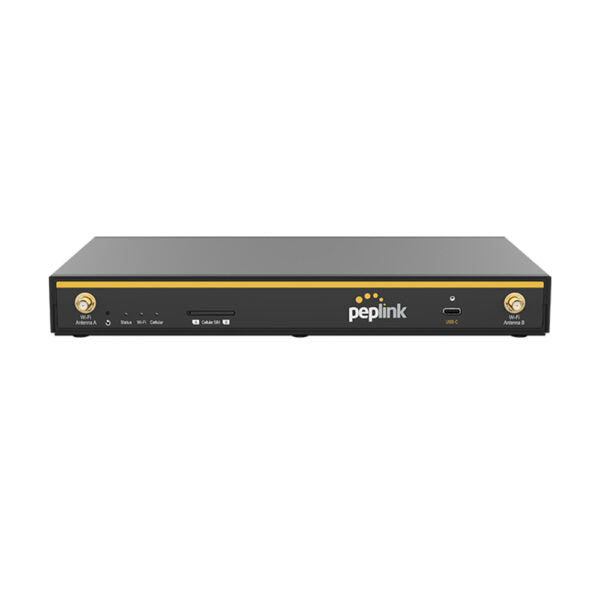
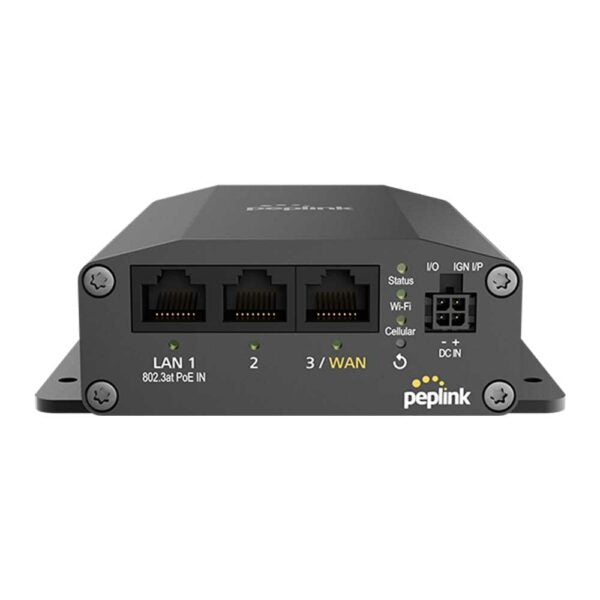
* 2x Ethernet WAN, 4x Ethernet LAN, and 1x 5G Modem * Supports 2×2 MIMO Simultaneous Dual-Band Wi-Fi 6 with 1Gbps Router Throughput * Full antenna set for optimal coverage and range * US Carrier Certifications: AT&T, T-Mobile, Verizon, FirstNet * Business Router with Cellular Routers * Network Type: Wired, Wireless * Product Family: InControl Cloud Management * Form Factor: Desktop Specifications: • Model: B-ONE-5GN-T-PRM • Box Contents: 1x B One 5G, 4x LTE/5G Antennas (ACW-235), 2x Dual Band Wi-Fi Antennas, 1x 12V 3A 4 Pin Power Supply • WAN Interface: 2 x 10/100/1000M Ethernet, Embedded Cellular Modem with Redundant SIM Slot, USB-C Interface • LAN Interface: 4x 10/100/1000M Ethernet • Wi-Fi Interface: Simultaneous Dual-Band (2.4GHz / 5GHz) Wi-Fi 6, 2X2 MIMO • SpeedFusion Features: + Hot Failover + Smoothing + Bandwidth Bonding * Number of SpeedFusion VPN Peers: 2/5 * Router Throughput: 1Gbps * SpeedFusion Throughput (No Encryption): 400 Mbps * SpeedFusion Throughput (256-bit AES): 200 Mbps * Recommended Users: 1-150 * AP Controller: Standard * Maximum Number of AP Supported: 30/50 * Cellular Data Rate (Downlink /Uplink): 5G: 3.4 Gbps / 900 Mbps, CAT-20: 1.6 Gbps/ 200 Mbps

About This Product

The Peplink B One Cellular 5G Mobile Router is purpose-built for businesses that need a reliable, always-on internet connection where traditional wired lines are either unavailable or insufficient. It fits naturally in small-to-medium offices, remote branches, temporary worksites, or mobile deployments like field service vehicles and pop-up retail locations. With two Ethernet WAN ports and an embedded 5G cellular modem, this router can combine, failover, or load-balance across multiple connections—giving you redundancy without a second service contract. It also includes a redundant SIM slot for a backup cellular plan. The built-in Wi-Fi 6 offers solid wireless coverage for up to 150 users, but the 1 Gbps routing throughput and 200 Mbps encrypted SpeedFusion bonding mean it is best suited for shops that need dependable uptime rather than blazing raw speed. For a Toronto office that relies on a single fibre connection, this router can seamlessly shift traffic to a Rogers or Bell 5G circuit during an outage, keeping VOIP calls and cloud apps alive. That said, if your environment already has symmetric gigabit internet and you do not need cellular failover, this device is overkill. On the other end, if you need bonded throughput above 200 Mbps (with encryption) or plan to support more than 150 heavy users, this model will be underpowered—look at Peplink’s Max series instead. The B One pairs naturally with Peplink access points and the InControl cloud management platform, making it easy for a Toronto MSP to monitor and reconfigure remotely. Keep in mind that while the modem has US carrier certifications, you should confirm band compatibility with Canadian carriers (Rogers, Bell, Telus) before purchase, though the hardware generally works well on North American 5G bands.
Services We Provide
  • Professional Installation & Configuration
  • Ongoing Maintenance & Support
  • Troubleshooting & Repairs
  • System Upgrades & Updates