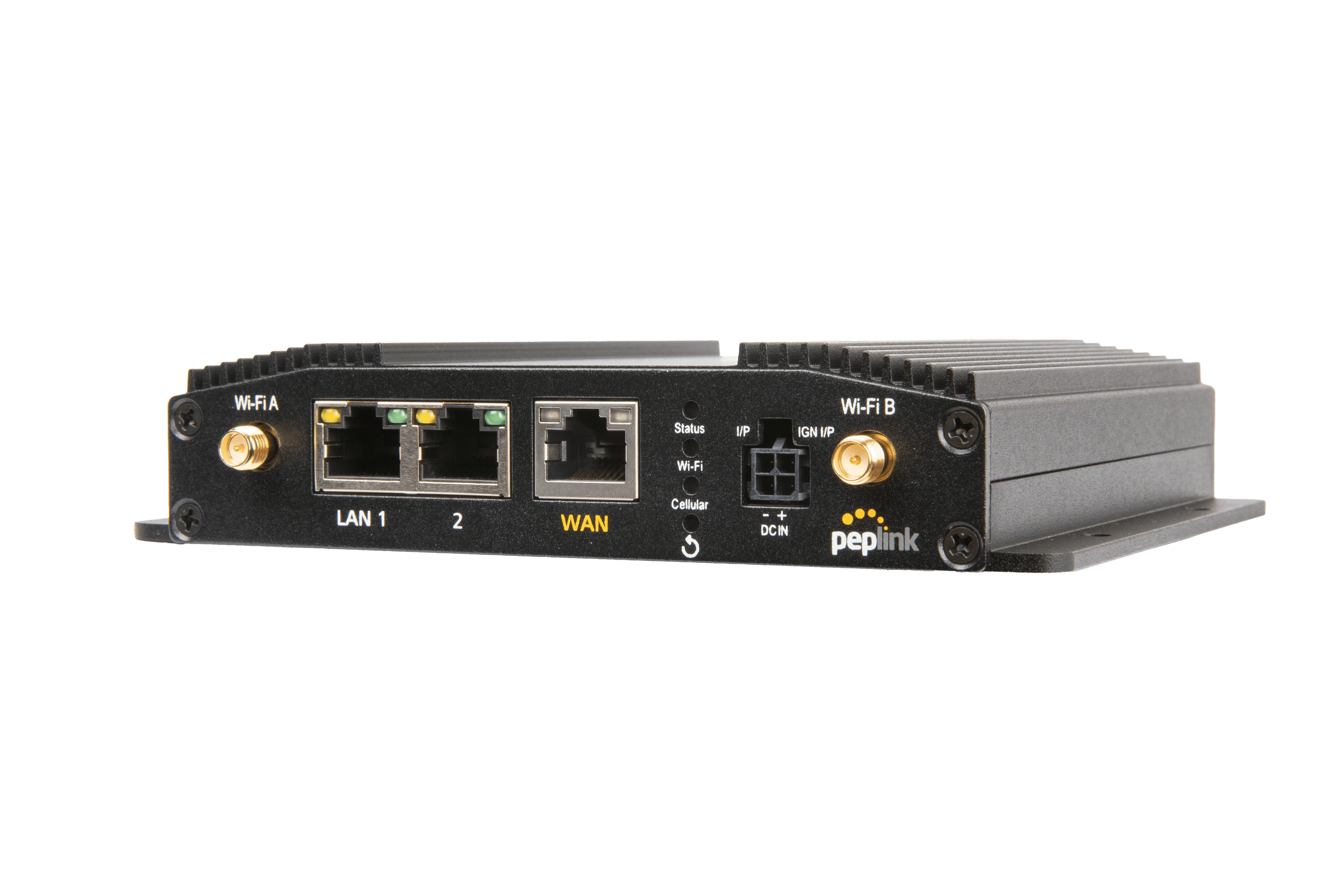
Peplink MAX-BR1-MINI-5GN-T-PRM (with WiFi)
Frequently Asked Questions
First, verify that the DC power adapter is firmly connected to both the router and a working electrical outlet. Try a different outlet or a known-good adapter if available. If the router still shows no LED activity, check that the barrel connector is fully seated—it can feel loose even when partially plugged in. If the issue persists, a Toronto-based VoIP support provider can usually resolve this remotely.
Frequent dropouts on 5G can stem from carrier-side congestion or a mismatched APN profile. Start by rebooting the router and forcing it to reconnect. In the web admin, under Cellular WAN, check that the network selection is set to ‘Auto’ and the APN matches your carrier’s recommended settings. Also disable Wi‑Fi WAN temporarily to rule out any routing loop. If the drops continue, the SIM may need a profile update from your carrier.
Power off the router completely, then remove and reinsert the SIM card with the gold contacts facing down and the notched corner properly aligned. Use the main SIM slot first. Power on and wait at least two minutes for detection. If it’s still not listed under Cellular WAN > Status, try the second SIM slot to rule out a slot defect. No further destructive steps are needed at this stage.
Intermittent Wi‑Fi is often caused by channel congestion or power-saving features. Log into the router’s dashboard, go to Wi‑Fi settings, and manually set a 2.4 GHz or 5 GHz channel that’s clear in your area (use a Wi‑Fi scanner app). Disable any ‘Enable Power Saving for Wi‑Fi’ option if present. Also ensure the latest firmware is installed—older versions sometimes have Wi‑Fi stability fixes.
Connect your laptop directly with an Ethernet cable and check if it receives an IP address (like 192.168.0.x). If not, reboot both the router and the laptop. In the router’s LAN settings, confirm the DHCP server is enabled and that the IP range doesn’t conflict with other devices. Also verify that the port is not accidentally configured as a WAN interface; some models let you repurpose LAN ports.
Antenna placement and orientation matter a great deal. Make sure the four square antennas are screwed in tightly and pointing upright, away from metal objects or thick walls. In the dashboard, under Cellular WAN, you can lock the router to a specific band (e.g., n78) to avoid crowded ones. If you’re far from the tower, try moving the unit near a window. If the problem persists, a Toronto-based VoIP support provider can usually resolve this remotely.
Yes, the redundant SIM slots are designed for exactly this. In WAN settings, assign the primary SIM under ‘SIM Slot A’ and set health check monitors (such as a ping to 8.8.8.8). When the primary loses connectivity, the router switches to the secondary SIM within seconds. You can also enable ‘SIM failback’ so it returns to the primary once it’s stable again.
Connect your existing ISP modem to the Ethernet WAN port and insert an active SIM. Under the router’s WAN settings, give the Ethernet WAN a higher priority than cellular, and configure health checks so the router can detect a failure. With this order, the wired link will be used normally, and cellular will take over automatically if the wired connection drops.
Absolutely. With a subscription to Peplink InControl 2 you can monitor, configure, and update all your devices from a single cloud portal. For day-to-day local management, each unit also has its own web interface accessible by typing its LAN IP address into a browser.
Log into the router’s web interface (commonly http://192.168.50.1 unless you’ve changed it), navigate to the Wi‑Fi section, and you’ll find fields for SSID and Pre‑Shared Key. Enter your new network name and password, apply the changes, and the radio will restart briefly. All wireless devices will then need to reconnect with the new credentials.
Routers
Peplink MAX-BR1-MINI-5GN-T-PRM (with WiFi)
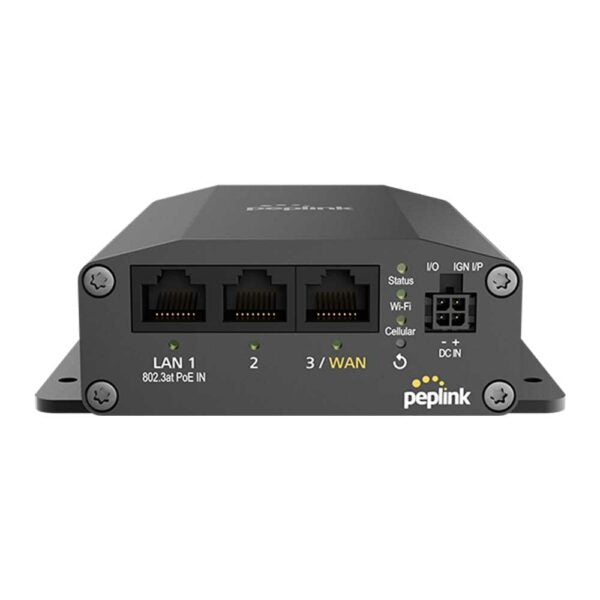
• 1x 5G Modem (Global) with Redundant SIM Slots • 1x Optional 10/100/1000M Ethernet WAN Port* • Up to 3x 10/100/1000M Ethernet LAN Port • 2×2 MIMO Simultaneous Dual-Band, Wi-Fi 5 and optional Wi-Fi WAN* • 1x Optional Ethernet WAN • Full antenna set • US Carrier Certifications: AT&T, T-Mobile, Verizon (C-Band), FirstNet
About This Product
The Peplink MAX-BR1-MINI-5GN-T-PRM is a compact, go-anywhere router built for businesses that need persistent internet connectivity when wired options are unreliable or simply absent. It shines as a primary link in pop-up retail, temporary job sites, or rural offices where 5G cellular becomes the backbone. With redundant SIM slots and the ability to bring in an optional wired WAN for backup, it sits comfortably between a simple hotspot and a full-blown SD-WAN appliance—small enough to mount on a wall or tuck behind a counter, yet powerful enough to keep a handful of employees online all day.
The trade‑offs are intentional. Wi‑Fi 5 (rather than Wi‑Fi 6) and a maximum of three LAN ports mean you’ll likely need an external switch if your office has more than a few wired devices, and you won’t get the latest wireless speeds or client density. The single optional Ethernet WAN, while handy for failover, does not support the multi‑link balancing that larger Peplink routers offer. For a typical downtown Toronto storefront that just needs reliable card-processing and guest Wi‑Fi, it’s a perfect fit; for a 20‑person office with heavy cloud traffic, it’s underpowered.
In a Canadian context, the global 5G modem will latch onto the bands used by Bell, Telus, and Rogers, making it viable from the GTA to rural Alberta. The dual‑SIM feature is particularly attractive in areas where carrier coverage is inconsistent—you can pair a low‑cost regional provider with a national carrier to avoid dead zones. Just be aware that the formal ISED certification isn’t listed here, so it’s prudent to confirm compliance with your integrator or carrier before deployment.
The trade‑offs are intentional. Wi‑Fi 5 (rather than Wi‑Fi 6) and a maximum of three LAN ports mean you’ll likely need an external switch if your office has more than a few wired devices, and you won’t get the latest wireless speeds or client density. The single optional Ethernet WAN, while handy for failover, does not support the multi‑link balancing that larger Peplink routers offer. For a typical downtown Toronto storefront that just needs reliable card-processing and guest Wi‑Fi, it’s a perfect fit; for a 20‑person office with heavy cloud traffic, it’s underpowered.
In a Canadian context, the global 5G modem will latch onto the bands used by Bell, Telus, and Rogers, making it viable from the GTA to rural Alberta. The dual‑SIM feature is particularly attractive in areas where carrier coverage is inconsistent—you can pair a low‑cost regional provider with a national carrier to avoid dead zones. Just be aware that the formal ISED certification isn’t listed here, so it’s prudent to confirm compliance with your integrator or carrier before deployment.
Services We Provide
- Professional Installation & Configuration
- Ongoing Maintenance & Support
- Troubleshooting & Repairs
- System Upgrades & Updates