Peplink B-ONE-PLUS-LTE-US-T-PRM Gigabit Dual WAN LTE Cellular Router

Frequently Asked Questions

First, confirm that the SIM card is properly inserted and activated with a valid data plan. Then, check the LTE signal strength in the Peplink admin interface under Status > Cellular; if the signal is weak, try repositioning the antennas or moving the router to a location with better reception. If the issue persists, a Toronto-based VoIP support provider can usually resolve this remotely.
In the Peplink admin interface, go to Network > WAN and ensure the cellular connection is enabled and configured as a WAN. Then navigate to Advanced > Outbound Policy and set the priority so that Ethernet WAN is primary and cellular is backup. The router will automatically fail over when the primary connection drops.
Start by verifying that the Wi-Fi antennas are securely connected and not damaged. Then, log into the router and check the Wi-Fi settings—ensure you are using a clear channel and that the 2.4 GHz and 5 GHz bands are not overly congested. A simple power cycle of the router can often resolve temporary interference issues.
Yes, the embedded LTE modem supports North American bands used by major Canadian carriers. Insert a compatible SIM card from Rogers, Bell, Telus, or their MVNOs and configure the APN settings in the admin interface under Cellular > APN. Ensure the SIM is activated and has data service.
Check that the power adapter is securely connected to the router and plugged into a working outlet. The router requires 12V DC input—if using a PoE injector, ensure it provides at least 15W and is connected to the correct port. If the router still does not power on, try a different power outlet or adapter.
The B One Plus has a USB-C interface that can support a USB cellular modem. In the admin interface, go to Network > WAN and enable the USB WAN option. Then connect the modem and configure the APN and authentication settings as required by your carrier. Note that not all USB modems are compatible, so check Peplink's compatibility list first.
Random reboots are often due to power supply issues or overheating. First, ensure the power adapter is the correct 12V/3A model and that the router is in a well-ventilated area. Check the event log in the admin interface for any error messages. If the problem continues, the power supply may need replacement.
Make sure your computer is connected to the router via Ethernet or Wi-Fi. The default IP is 192.168.1.1—try accessing that in a browser. If you have changed the IP and forgotten it, perform a factory reset by holding the reset button for 10 seconds, but only do this if you have confirmed the IP is lost and you are prepared to reconfigure the router.
This usually indicates the LTE antennas are not connected or are faulty. Ensure both SMA cellular antennas are tightly screwed onto the router's antenna connectors. If they are connected, try moving the router to a different location to rule out signal blockage. If the issue persists, the modem may need to be reseated or replaced.
Log into the admin interface and go to System > Firmware Update. The router can check for updates automatically; if one is available, download and install it. Ensure the router remains powered on and connected during the update process. A firmware update can fix bugs and improve performance.
Routers

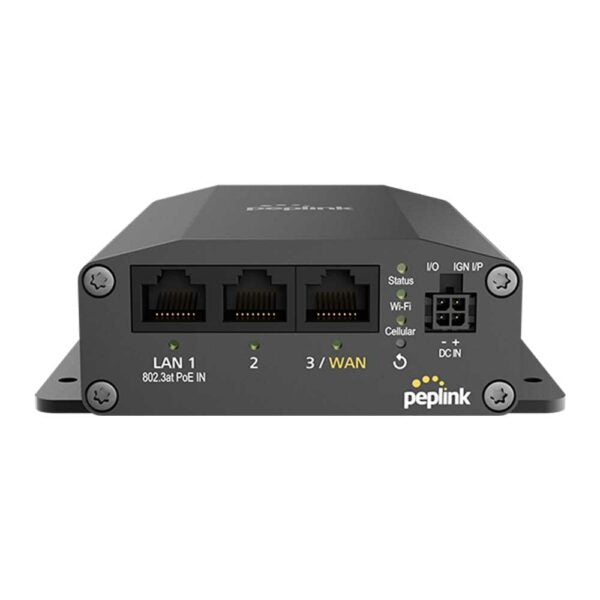
Peplink B-ONE-PLUS-LTE-US-T-PRM Gigabit Dual WAN LTE Cellular Router
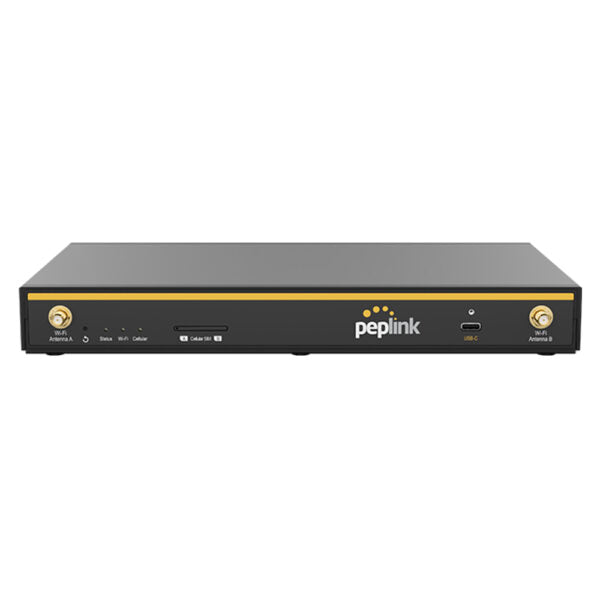
• This device features a 1Gbps router throughput and supports full antenna set, providing reliable and efficient wireless connectivity. • Key features include: • 2x Ethernet WAN • 4x Ethernet LAN • 1x Embedded 4G LTE Modem (North America*/ CAT-4) • 2×2 MIMO Simultaneous Dual-Band, Wi-Fi 6 • 1Gbps Router Throughput • Additional information: • Weight: 1.7 lb • Dimensions: 10.31 × 6.33 × 1.31 in • Business Router: Cellular Router, Load Balance Routers • Network Type: Wired, Wireless • WAN Port Count: 1-4 • WiFi Standard: Wi-Fi 6 (802.11ax) • Form Factor: Desktop • WAN Failover: Yes • Technical Specifications: • Model: B-ONE-PLUS-LTE-US-T-PRM • Package Content: Includes 1x B One Plus, 2x LTE/5G Antennas, 2x Dual Band Wi-Fi Antennas, and 1x 12V 3A 4 Pin Power Supply • WAN Interface: • 2x 10/100/1000M Ethernet • 1x Embedded Cellular Modem with a Redundant SIM Slot • 1x USB-C Interface • LAN Interface: 4x 10/100/1000M Ethernet • Wi-Fi Interface: • Simultaneous Dual-Band (2.4GHz / 5GHz) • Wi-Fi 6, 2X2 MIMO • Wi-Fi WAN and/or AP • Antenna Connectors: 2x SMA Cellular Connectors, 2x RP-SMA Wi-Fi Antenna Connectors • Power Input: • Power Port: 10V – 30V DC • AC Adapter: AC Input 100V–240V / DC Output 12V • Power Consumption: 6W (nominal), 17W (max. without USB-C output 4) • Dimension: 10.31 x 6.33 x 1.31 inches / 262 x 161 x 33.5 mm • Weight: 1.7 pounds / 761 grams • Operating Temperature: –40° – 113°F / –40° – 45°C • Humidity: 10% – 90% (non-condensing) • Warranty: 1-Year Limited Warranty

About This Product

The Peplink B-ONE-PLUS-LTE-US-T-PRM is a dual-WAN cellular router that provides a combined wired and wireless internet connection with built-in LTE failover. It is well-suited for small to medium businesses in the Greater Toronto Area (GTA) that need reliable connectivity, particularly where wired backup alone is insufficient—such as retail locations, pop-up offices, or construction site trailers. The device pairs well with Peplink's SpeedFusion technology for bonding multiple WAN links, though this feature is not built into the router itself and requires a separate subscription. Its Wi-Fi 6 capability supports modern devices, but the 1 Gbps throughput limit means it is overkill for very large offices with hundreds of users or for locations that need multi-gigabit speeds. Conversely, it may be underpowered for a home user who only needs basic internet; the LTE modem is CAT-4, offering speeds up to 150 Mbps download, which is adequate for most business applications but not for high-bandwidth tasks like 4K streaming on multiple devices. The router supports a redundant SIM slot, making it a practical choice for Canadian carriers like Rogers, Bell, or Telus, though the embedded LTE modem is locked to North American bands.
Services We Provide
  • Professional Installation & Configuration
  • Ongoing Maintenance & Support
  • Troubleshooting & Repairs
  • System Upgrades & Updates