Peplink B-ONE-T-PRM Gigabit Dual WAN Router

Frequently Asked Questions

This usually means the failover is working but the transition is not seamless for real‑time traffic. Check that the WAN health check is set to a fast enough interval and that SpeedFusion hot failover is enabled for the outbound VPN or traffic profile your phones use. A power cycle of the modem on the primary WAN can also help rule out a lingering carrier fault. If the problem repeats, a Toronto‑based VoIP support provider can usually tune the failover thresholds remotely.
First confirm that at least one WAN has a valid public IP and default gateway, not just link lights. Try a direct connection from a laptop to each WAN modem to rule out an ISP outage. On the B One, verify that the outbound policy or load‑balancing rule is not accidentally sending all traffic to a dead or misconfigured secondary link. A safe next step is to temporarily disable the secondary WAN in the dashboard and test with only the primary active.
The USB‑C port on the B One can accept a compatible USB cellular modem or tether a smartphone, so you are not limited to the built‑in Wi‑Fi WAN for cellular. Place the router where the Ethernet and power reach, then run a short USB cable to a spot with better reception. In many Canadian deployments, a dedicated USB modem on the Rogers or Bell network works more consistently than phone tethering, but either is a valid fallback.
One‑way or no audio typically points to a NAT or SIP ALG issue. Disable any SIP ALG or helper on the B One and confirm that the phones are using the correct public IP in their SIP headers. If you are running a SpeedFusion VPN to a cloud PBX, check that the VPN profile is carrying the voice VLAN traffic and that the tunnel is not exceeding the 200 Mbps AES throughput limit under load. A quick test with a softphone on a laptop behind the same LAN can isolate whether the problem is on the phone or the router.
The B One’s internal 2×2 MIMO antennas and compact form factor are designed for a single room or small open area, not for penetrating multiple drywall walls and a hallway. Start by checking that both external dual‑band antennas are attached and oriented vertically. If the signal still does not reach, the intended design is to add a dedicated access point or mesh node on the far side of the space, not to push the B One beyond its physical limits.
Yes, but it requires a policy‑based routing rule, not just a VLAN tag. Create an outbound rule that sends traffic from the voice subnet out a specific WAN, and set a separate rule for the data subnet. If you also want failover for voice, bind both WANs to that rule with a priority order. This is a common pattern in small Canadian offices that want to keep VoIP on a stable cable connection while bulk data uses a faster but less predictable fibre link.
Start by verifying the power supply is the included 12V 3A 4‑pin adapter and that it is not sharing a power bar with a high‑draw device like a laser printer. Feel the case; if it is very hot, improve airflow around the unit. Check the system log for any recurring WAN health check failures that might trigger a soft restart. If the behaviour continues, note the approximate time and load pattern and have a support provider review the logs before considering any firmware changes.
With SpeedFusion bonding and no encryption, the two units can push up to about 400 Mbps combined. When 256‑bit AES encryption is turned on, that drops to roughly 200 Mbps. These numbers assume good cable links with low jitter. In practice, if you are bonding a 100/10 Rogers link and a 50/10 Bell link, the VPN will run closer to the sum of the upload speeds, so plan your voice and video bandwidth accordingly.
Plug the new phone into an available LAN port and let it obtain an IP from the same voice subnet. If your PBX uses MAC‑based auto‑provisioning, the phone should pull its config without touching the router. If you must add a DHCP reservation or a firewall rule, make the change during a quiet period and apply it live; the B One does not require a full restart for most rule changes. Test with a single internal call before rolling it into the ring group.
Routers

Peplink B-ONE-T-PRM Gigabit Dual WAN Router
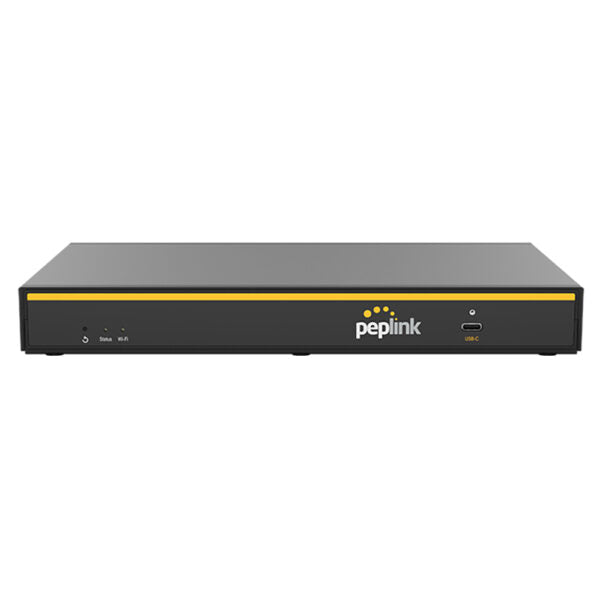
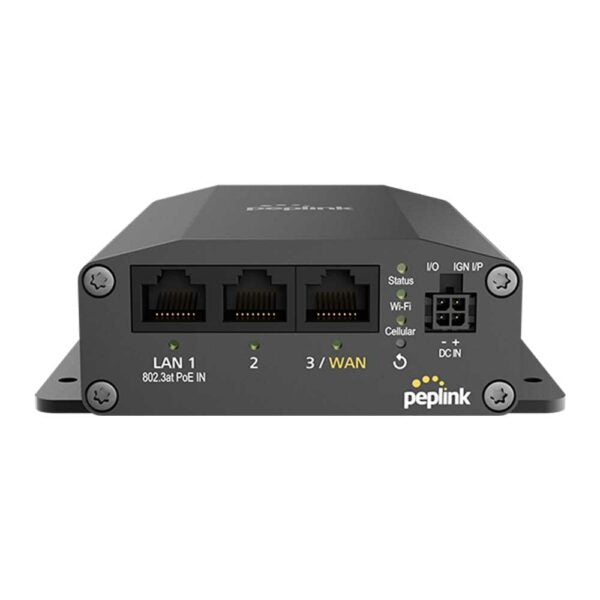
• Peplink B One Futureproof Gigabit Dual WAN Router • Core Features: • 2x Ethernet WAN • 4x Ethernet LAN • 2×2 MIMO Simultaneous Dual-Band, Wi-Fi 6 • 1Gbps Router Throughput • Full antenna set • Additional Information: • Weight: 1.6 lb • Dimensions: 10.31 × 6.33 × 1.31 in • Business Router: VPN Routers • Network Type: Wired • WAN Port Count: 1-4 • WAN Failover: Yes • Technical Specifications: • Model: B ONE • Product code: B-ONE-T-PRM • Box Contents: • 1x B One • 2x Dual Band Wi-Fi Antennas • 1x 12V 3A 4 Pin Power Supply • Interface: • WAN Interface: • 2x 10/100/1000M Ethernet • 1x USB-C Interface • LAN Interface: 4x 10/100/1000M Ethernet • Wi-Fi Interface: • Simultaneous Dual-Band (2.4GHz / 5GHz) • Wi-Fi 6, 2X2 MIMO • Wi-Fi WAN and/or AP • SpeedFusion Features: • Hot Failover • Smoothing • Bandwidth Bonding • Number of SpeedFusion VPN Peers: • 2/5 • Router Throughput: 1Gbps • SpeedFusion Throughput (No Encryption): 400 Mbps • SpeedFusion Throughput (256-bit AES): 200 Mbps

About This Product

The Peplink B One is a compact, dual‑WAN router built for small and mid‑sized businesses that need reliable internet without paying for carrier‑grade throughput. It fits well in a retail shop, a professional office, or a home‑based practice where a single broadband connection would be a risk. With two Ethernet WAN ports, USB‑C cellular tethering, and Wi‑Fi WAN fallback, it can stitch together cable, DSL, and a cellular backup into one always‑on connection. In the Greater Toronto Area, where construction outages and Bell/Rogers service flaps are a fact of life, that kind of failover saves calls and transactions without anyone needing to touch cables.

The built‑in Wi‑Fi 6 access point is a practical bonus, but it is not meant to cover a large floorplate on its own. Think of it as a clean way to serve a small open office, a waiting room, or a point‑of‑sale counter without adding a separate access point. If you already have a managed switch and ceiling‑mounted APs, the B One slots in as the gateway and leaves the heavy wireless lifting to your existing infrastructure. It pairs naturally with VoIP phones and cloud‑managed switches, and the four LAN ports are enough for a modest phone fleet, a printer, and a couple of workstations without an extra switch.

SpeedFusion VPN is the real differentiator here. The unencrypted throughput tops out around 400 Mbps, and with 256‑bit AES it drops to roughly 200 Mbps. That is enough to bond two typical Canadian business cable connections for a smooth video call or a stable cloud‑PBX link, but it will not replace a dedicated fibre line for a heavy upload workload. Buyers should treat the two‑peer VPN limit as a soft ceiling: it is perfect for linking a branch office back to headquarters or to a cloud VPN endpoint, but a multi‑site hub‑and‑spoke setup will need a larger Peplink model.

For a small VoIP deployment, the B One is overkill only if you have a single ISP and no need for failover or bonding. If you run a busy clinic or a law office where every dropped call costs, it is the right class of device. Just know that the 1 Gbps routing throughput is a best‑case number with simple NAT and no VPN, and real‑world performance will be shaped by how many SpeedFusion features are turned on at once.
Services We Provide
  • Professional Installation & Configuration
  • Ongoing Maintenance & Support
  • Troubleshooting & Repairs
  • System Upgrades & Updates