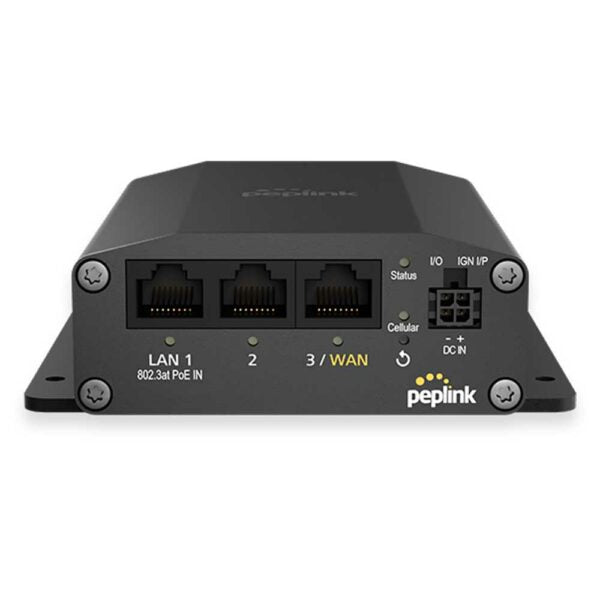
Peplink MAX-BR1-MINI-5GN-T-M-PRM (no WiFi)
Frequently Asked Questions
Start by verifying the SIM card is inserted correctly and isnât locked with a PIN. Log into the routerâs web interface and confirm the APN settings match what your carrier requiresâmany Canadian providers need a specific APN for data-only plans. If the signal indicator shows no bars, try relocating the router near a window or using the external antenna ports to improve reception.
Test with a known-good Ethernet cable and a different device to rule out a client-side issue. Check the portâs link light on the routerâif it stays dark, try moving the cable to another LAN port. If the other port works, the original port may be disabled in the routerâs settings; navigate to the LAN configuration page and ensure all ports are enabled.
First, confirm that cellular failover is enabled in the WAN settings and that both SIM slots have active data plans. Check the health check methodâICMP ping to a reliable public IP like 8.8.8.8 works well. If the primary SIM regains signal intermittently, the router may be flapping; adjusting the failover threshold timing can prevent unnecessary switching.
Begin by checking the signal strength and band the router is using in the status pageâif itâs falling back to 4G or a low-band 5G channel, speed will suffer. Reposition the router or external antennas to aim for a stronger 5G mid-band signal. Also verify with your carrier that your data plan isnât throttled after a certain usage cap.
The device is designed to operate within a wide temperature range, but direct sunlight or a sealed enclosure without airflow can cause thermal throttling or restarts. Ensure the ventilation slots are unobstructed and the router is not stacked directly on other heat-producing equipment. If the issue persists, a Toronto-based VoIP support provider can usually resolve this remotely by checking for firmware updates that improve thermal management.
Connect a computer directly to a LAN port with a static IP in the routerâs default subnet (often 192.168.50.x) and try accessing the default gateway address. If that fails, power cycle the router while holding the reset button for no more than 5 seconds to trigger a safe reboot without wiping settings. Do not perform a full factory reset unless you have a backup of your configuration, as it will erase all provisioning.
Do not power off the router during an update, as this can corrupt the firmware. First, check that your internet connection is still active on the WAN link; a dropped connection can stall the download. If the router remains unresponsive after 30 minutes, contact support with the current firmware version and LED statusâthey can guide you through a safe recovery without data loss.
Yes, the global 5G modem covers most bands used by Canadian operators like Rogers, Bell, and Telus. Youâll need to manually enter the carrierâs APN and may need to adjust the network selection mode to âAll bandsâ or âAutomatic.â Itâs a good idea to test with a prepaid SIM first to confirm band compatibility in your specific location.
Routers
Peplink MAX-BR1-MINI-5GN-T-M-PRM (no WiFi)
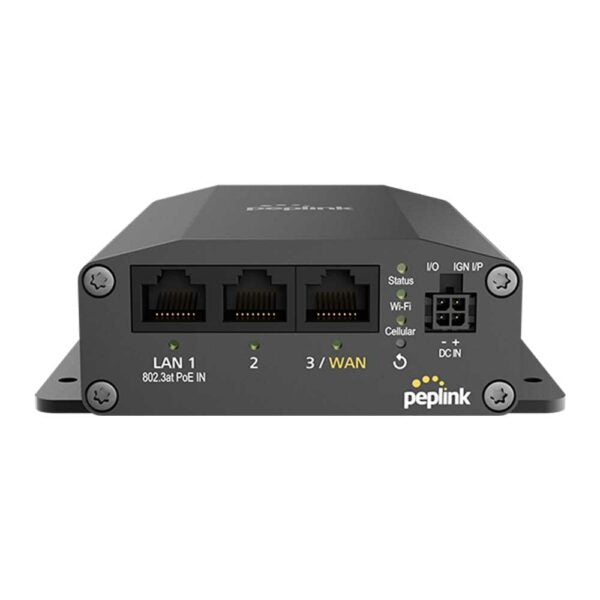
• 1x 5G Modem (Global) with Redundant SIM Slots • Up to 3x Ethernet LAN • 1x Optional Ethernet WAN • Full antenna set • US Carrier Certifications: AT&T, T-Mobile, Verizon (C-Band), FirstNet
About This Product
The Peplink MAX-BR1-MINI-5GN-T-M-PRM is a compact, wired-only 5G router built for environments where reliable cellular connectivity is the primary or backup WAN link. Without integrated Wi-Fi, it fits neatly into deployments that already have a separate access point or switch handling local wireless, such as a retail kiosk, a vehicle networking rack, or a small branch office that needs a dedicated cellular gateway. Its redundant SIM slots make it particularly appealing for Canadian businesses operating in areas where a single carrierâs coverage can be spottyâswitching to a secondary providerâs SIM can keep a point-of-sale or remote monitoring system online without manual intervention.
This model is a strong match for mobile or temporary setups where space is tight and wired Ethernet clients are few. Pairing it with a PoE switch and an access point gives you a full-featured network in a small footprint. The global 5G modem supports a broad range of bands, so while it carries US carrier certifications, it will generally work on Canadian 5G networks after correct APN configuration. Just be aware that certification logos donât automatically guarantee band compatibility with every rural Canadian tower; a site survey is wise for fixed installations.
The biggest trade-off is the absence of Wi-Fiâyouâll need to budget for and manage a separate AP if wireless clients are required. The three LAN ports are sufficient for a handful of wired devices, but itâs not a core switch for a large office. Itâs overkill for a home user who only needs basic internet, and underpowered for a campus needing dozens of wired endpoints. However, for a Toronto-based business running a pop-up location or a backup link to a cloud-based VoIP system, it hits a sweet spot of reliability and carrier flexibility at this price point.
This model is a strong match for mobile or temporary setups where space is tight and wired Ethernet clients are few. Pairing it with a PoE switch and an access point gives you a full-featured network in a small footprint. The global 5G modem supports a broad range of bands, so while it carries US carrier certifications, it will generally work on Canadian 5G networks after correct APN configuration. Just be aware that certification logos donât automatically guarantee band compatibility with every rural Canadian tower; a site survey is wise for fixed installations.
The biggest trade-off is the absence of Wi-Fiâyouâll need to budget for and manage a separate AP if wireless clients are required. The three LAN ports are sufficient for a handful of wired devices, but itâs not a core switch for a large office. Itâs overkill for a home user who only needs basic internet, and underpowered for a campus needing dozens of wired endpoints. However, for a Toronto-based business running a pop-up location or a backup link to a cloud-based VoIP system, it hits a sweet spot of reliability and carrier flexibility at this price point.
Services We Provide
- Professional Installation & Configuration
- Ongoing Maintenance & Support
- Troubleshooting & Repairs
- System Upgrades & Updates