Peplink MAX-BR1-MINI-LTEA-US-T-PRM
Frequently Asked Questions
First, check that your SIM card is properly inserted and activated with a data plan that supports the LTE bands used by your carrier. Then, log into the router's admin interface and verify that the cellular modem is recognized and that the APN settings match your carrier's requirements. If the issue persists, a Toronto-based VoIP support provider can usually resolve this remotely.
Ensure that Wi-Fi is enabled in the router's settings and that the SSID is not hidden. Also, check that the Wi-Fi radio is not disabled due to a scheduling rule or a misconfigured profile. A simple power cycle of the router often resolves temporary glitches.
Start by repositioning the router and its antennas to improve signal reception, ideally near a window or on a higher shelf. Check the cellular signal strength in the router's status page; if it is very low, an external high-gain antenna might help. Also, ensure the router's firmware is up to date.
In the router's admin interface, go to the WAN settings and set up a primary WAN connection (e.g., Ethernet) and a secondary cellular WAN connection. Then, configure a failover rule that monitors the primary connection's health (e.g., by pinging a reliable IP) and automatically switches to the cellular connection if the primary fails.
Ensure the GPS antenna is connected and has a clear view of the sky, away from metal obstructions. In the router's settings, confirm that GPS is enabled and that the location reporting interval is set appropriately. A factory reset is not recommended as a first step; instead, check the antenna connection and try moving the device to a different location.
Start by checking the router's firewall and QoS settings to ensure that VoIP traffic is prioritized. Also, verify that your internet connection has sufficient bandwidth and low latency; a wired connection is generally more reliable than Wi-Fi for VoIP. If the problem persists, consider enabling SIP ALG (if available) or disabling it, depending on your carrier's recommendation.
First, try connecting to the router using its default IP address (often 192.168.1.1) from a computer that is directly connected via Ethernet. If that fails, perform a safe reset by holding the reset button for about 10 seconds until the LEDs blink; this will restore the factory default settings, allowing you to log in again. Note that this will erase your configuration, so only do this as a last resort.
The embedded modem is certified for US carriers, so it may not automatically connect to Canadian networks. However, you can often configure the APN and other settings manually to work with Canadian carriers if the modem supports the required LTE bands. Check the router's specification for supported LTE bands and compare them with your carrier's bands before purchasing.
Wi-Fi speed depends on many factors, including distance from the router, interference from other devices, and the capabilities of your client devices. First, ensure that your devices are using the 5 GHz band if available, as it is less congested. Also, check the router's Wi-Fi settings to confirm that it is not set to a lower speed due to a configuration issue.
Log into the router's admin interface, go to the System or Firmware Update section, and check for updates. If an update is available, download it and follow the on-screen instructions to install it. Ensure the router has a stable internet connection during the update and do not power off the device until the process is complete.
Routers
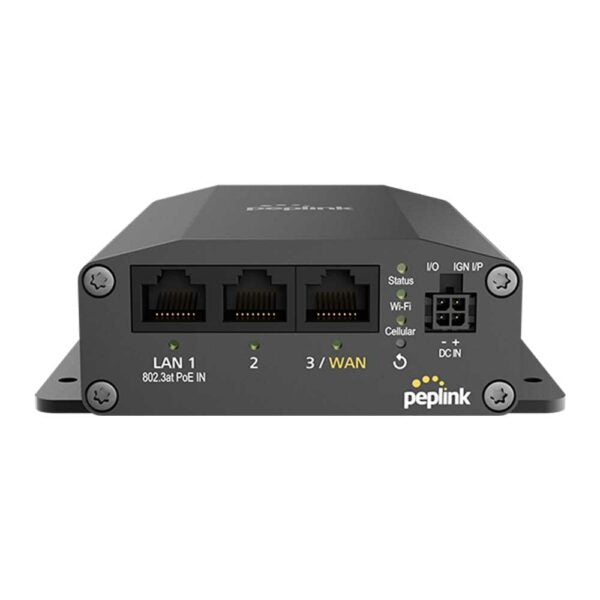
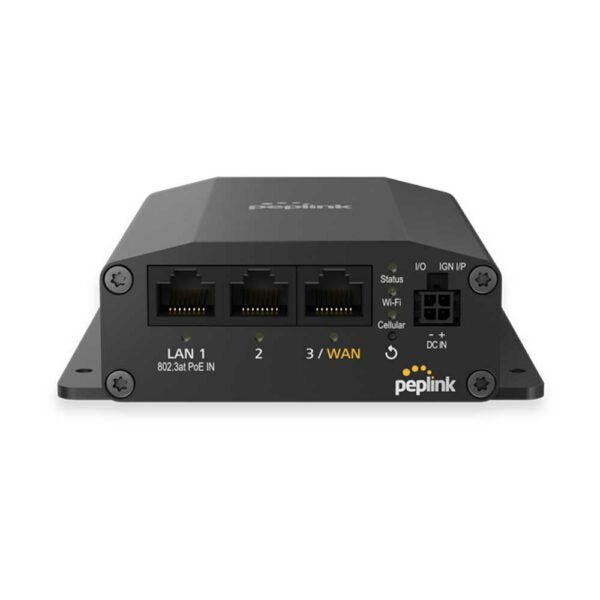
Peplink MAX-BR1-MINI-LTEA-US-T-PRM
• Durable and unbeatable price-performance ratio • Embedded 4G LTE-A modem (Americas/CAT-7) • Dual-band Wi-Fi 5 with 2×2 MIMO technology • GPS/Fleet tracking capabilities • Full antenna set for optimal signal strength • US Carrier Certifications: AT&T, FirstNet, T-Mobile, US Cellular, Verizon • Optional Ethernet WAN and WAN failover features
About This Product
The Peplink MAX-BR1-MINI-LTEA-US-T-PRM is a compact, industrial-grade cellular router designed for businesses that need reliable primary or failover internet connectivity in locations where wired broadband is unavailable or unreliable. It is an excellent fit for remote offices, temporary job sites, retail pop-ups, or mobile fleets that require constant, secure internet access. The built-in 4G LTE-A modem and dual-band Wi-Fi 5 make it a self-contained connectivity hub, and the inclusion of GPS/fleet tracking capabilities suggests it is equally suited for vehicle-based deployments or asset tracking scenarios.
This device pairs well with Peplink's SpeedFusion technology (available through a separate subscription) to bond multiple WAN links for increased bandwidth or seamless failover. It can replace a simple cellular hotspot or a basic router, but it is overkill for a single-user home office that only needs a basic internet connection. Conversely, it may be underpowered for a large office with dozens of concurrent users or for environments that require the higher throughput of a 5G modem.
Practical tradeoffs include the fact that the embedded modem is certified for US carriers only, meaning it may not work optimally with Canadian carriers like Rogers, Bell, or Telus without additional configuration or a third-party modem. The device is compact but not pocket-sized, and while it includes a full antenna set for optimal signal, it does not include a SIM card or data plan. For a Toronto-based business that relies on a mix of wired and wireless connectivity, this router offers a robust and manageable solution, but buyers should verify carrier compatibility and consider whether the fleet-tracking features are necessary for their use case.
This device pairs well with Peplink's SpeedFusion technology (available through a separate subscription) to bond multiple WAN links for increased bandwidth or seamless failover. It can replace a simple cellular hotspot or a basic router, but it is overkill for a single-user home office that only needs a basic internet connection. Conversely, it may be underpowered for a large office with dozens of concurrent users or for environments that require the higher throughput of a 5G modem.
Practical tradeoffs include the fact that the embedded modem is certified for US carriers only, meaning it may not work optimally with Canadian carriers like Rogers, Bell, or Telus without additional configuration or a third-party modem. The device is compact but not pocket-sized, and while it includes a full antenna set for optimal signal, it does not include a SIM card or data plan. For a Toronto-based business that relies on a mix of wired and wireless connectivity, this router offers a robust and manageable solution, but buyers should verify carrier compatibility and consider whether the fleet-tracking features are necessary for their use case.
Services We Provide
- Professional Installation & Configuration
- Ongoing Maintenance & Support
- Troubleshooting & Repairs
- System Upgrades & Updates