Teltonika RUT241 4G LTE Cat 4 Industrial Router | North America Version-RUT241098000

Frequently Asked Questions

First, confirm that the SIM card is properly inserted and activated with a valid data plan. Verify that the APN settings in the router exactly match what your carrier requires. If you're in the GTA, most major Canadian carriers are supported, but a quick call to your provider for the correct APN can save time.
In the router's web interface, go to Network > WAN and ensure the failover priority lists the wired WAN as primary and cellular as backup. Check the 'Restore If WAN Is Alive' option so it automatically reverts once the wired connection returns.
Start by checking that the included 9W power supply is firmly plugged into both the wall outlet and the router. If using a different power adapter, confirm it meets the router's voltage and current requirements. If still no power, try a different outlet or cable before contacting support.
Ensure the WAN connection (wired or cellular) is active by checking the status LEDs on the router. Log into the web interface and verify that the WAN interface has obtained an IP address. Also confirm that DHCP is enabled on the LAN so your devices get proper IP settings.
Try repositioning the included antennas away from metal surfaces and towards a window or higher location. Switching to higher-gain external antennas (SMA male for cellular) can help in weak-signal areas. Avoid placing the router near large machinery or concrete walls.
The default IP is 192.168.1.1. Make sure your computer is set to obtain an IP address automatically and is on the same subnet. If you still can't connect, try clearing your browser cache or using a different browser. Do not attempt a factory reset unless you are certain the issue is not a simple network conflict.
First, note the firmware version you updated to and any error messages. Power cycle the router by unplugging it for 30 seconds. If problems persist, contact your support provider before attempting to downgrade the firmware, as a reflash can be risky without proper guidance.
Log into the web interface and navigate to Services > VPN. Choose the protocol (OpenVPN or IPsec) and enter the server details provided by your VPN provider. Ensure firewall rules allow VPN traffic. If you need help with specific parameters, a Toronto-based VoIP support provider can usually assist remotely.
Yes, the RUT241 is certified for North American carriers including Rogers, Bell, Telus, and their MVNOs. You will need to configure the correct APN for your carrier. The quick start guide includes instructions for the most common networks.
Check the WAN cable for damage and try reseating it at both ends. In the router's web interface, look for the failover settings and increase the 'Ping Timeout' value—this prevents brief glitches from triggering a failover. If the problem continues, your ISP connection may have intermittent issues.
Routers

Teltonika RUT241 4G LTE Cat 4 Industrial Router | North America Version-RUT241098000
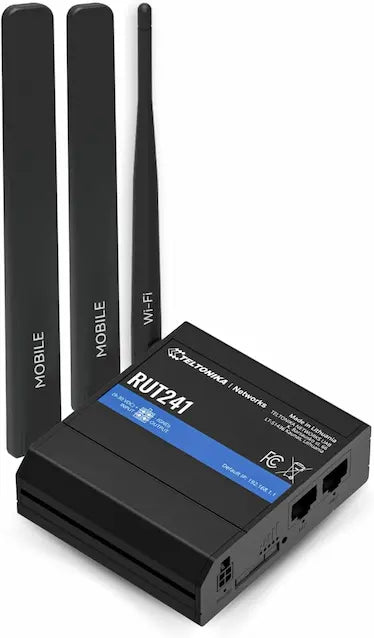
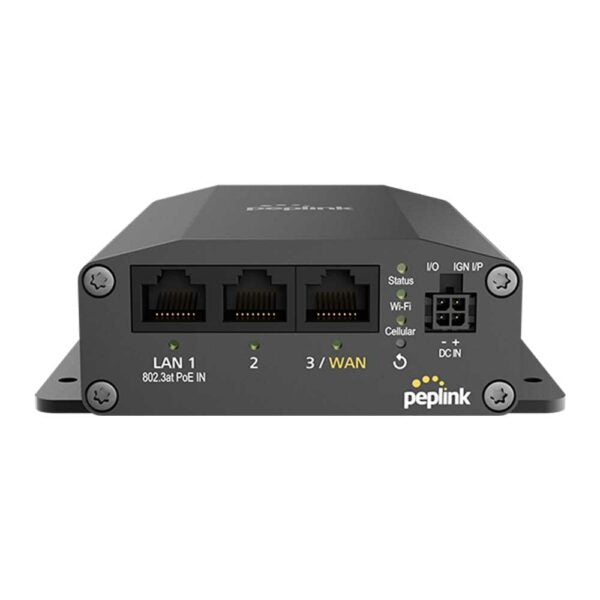
The Teltonika RUT241 is a versatile and highly reliable industrial cellular router designed for mission-critical M2M and IoT applications. Built to withstand demanding environments, this compact device ensures persistent connectivity for remote equipment, monitoring systems, and digital infrastructure across Canada and North America. Key Features: • Uninterruptible Service with WAN Failover: • 4G LTE Cat 4 Speed: up to 150 Mbps • WAN to Cellular Failover: automatic switch from wired WAN to 4G LTE cellular connection on failure • North American Compatible: pre-configured and certified for major carriers in Canada • Rugged Design and Flexible Deployment: • Durable Aluminum Casing with wide operating temperature range (-40°C to 75°C) • Compact Size: easy integration into control panels, vending machines, and tight spaces • Ports: 2 x 10/100 Mbps Ethernet ports (1 LAN, 1 configurable as WAN/Failover) and external antenna connectors • Centralized Management for IoT: • RMS Support: fully compatible with Teltonika's Remote Management System (RMS) • VPN Capabilities: supports essential VPN protocols (OpenVPN, IPsec) What's Included in the Package: • Teltonika RUT241 Router • 9W US Power Supply • 2 x Mobile Antennas (swivel, SMA male) • 1 x WiFi Antenna (swivel, RP-SMA male) • Ethernet Cable (1.5m) • Quick Start Guide (QSG) • SIM Adapter Kit

About This Product

The Teltonika RUT241 is a compact industrial cellular router built for mission-critical connectivity in harsh environments. It is ideal for organizations that need to monitor remote equipment, vending machines, or digital signage across Canada, particularly in areas where wired internet is unreliable. Its aluminum casing and wide operating temperature range make it suitable for outdoor cabinets or unheated warehouses.

This device serves as a failover solution: if the primary wired WAN connection drops, the RUT241 automatically switches to 4G LTE Cat 4 cellular backup. It pairs naturally with Teltonika's Remote Management System (RMS) for central oversight, and its VPN support ensures secure data transmission. However, buyers should note the limited Ethernet ports (two 10/100) and Cat 4 speeds, which may not suit high-bandwidth applications like video streaming or large file transfers.

For a GTA-based business with scattered field assets, the RUT241 offers a reliable, cost-effective bridge to the cloud. It is overkill for a single office with stable fiber, but essential for remote monitoring where every minute of downtime costs money. The included antennas and SIM adapter help ease setup, but carrier-specific APN configuration may be needed.
Services We Provide
  • Professional Installation & Configuration
  • Ongoing Maintenance & Support
  • Troubleshooting & Repairs
  • System Upgrades & Updates