Teltonika RUT956A00A00 All Canada Carrier Dual SIM LTE Router

Frequently Asked Questions

First, check the signal strength on the status page. If it is weak, reposition the router or its antennas away from metal enclosures. Next, confirm that the SIM card is seated properly and that the APN matches your carrier’s requirements. If the issue persists, a Toronto‑based VoIP support provider can usually resolve this remotely.
Verify that the failover settings are enabled under Network > WAN > SIM Switch. Ensure the second SIM is active and has credit or a data plan. Also check that the signal threshold for triggering a switch is set appropriately—if it is too low, the router may never attempt the failover.
Confirm you are using the correct IP address (default is 192.168.1.1) and that your computer is on the same subnet. If you changed the LAN IP, try connecting via the new address. A simple power cycle often restores access if the interface has hung.
Make sure the GNSS antenna has a clear view of the sky and is connected to the correct SMA port. In the router’s Services > GPS settings, confirm that GPS is enabled and that the module is not set to a mode that requires assisted data over a network that may be unavailable.
Go to Network > WAN > edit the mobile interface. In the APN field, enter the exact APN provided by your carrier (for example, ‘inet.bell.ca’ for Bell or ‘ltemobile.apn’ for Rogers). Leave the username and password blank unless your carrier specifically requires them.
Check the physical wiring first: ensure TX, RX, and ground are correctly mapped between the router and your device. In the router’s Services > Serial settings, confirm the baud rate, parity, and stop bits match your equipment. A loopback test can help isolate whether the issue is with the router or the attached device.
Yes, the operator blacklist feature lets you block incoming calls and SMS from numbers you specify. Go to Services > Call Utilities > Blacklist and add the numbers. This is useful if you are using the router’s cellular line for data only and want to avoid unwanted charges.
This often points to a DNS issue or a problem with the default gateway. Check that the router’s DNS servers are set to reliable public servers like 8.8.8.8. Also verify that the WAN interface has not lost its IP address lease; a quick test is to ping an external IP address directly rather than a domain name.
Routers

Teltonika RUT956A00A00 All Canada Carrier Dual SIM LTE Router
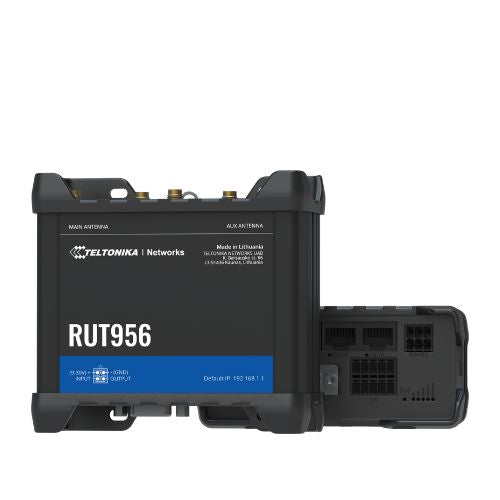
The Teltonika RUT956 router offers a comprehensive package of switching technologies and connective capabilities, allowing teams to scale their operations with the assurance of a system that can handle the payload. Key features include: • Dual SIM with auto-failover, backup WAN, and other switching scenarios • Multiple interfaces including Ethernet, Serial (RS232, RS485) and multiple inputs and outputs • Global Navigation Satellite System (GNSS) for location services and time synchronization • Operator black- and whitelist for full control over call lists • Mobile module with 4G (LTE), 3G, and 2G connectivity options • Full SIM-switch capabilities with auto-switch cases for various network conditions For a full list of specifications, please refer to the Product Data Sheet.

About This Product

The Teltonika RUT956 is built for businesses that cannot afford a connectivity gap. It suits remote kiosks, digital signage, field trailers, and industrial monitoring where a wired internet connection is absent or unreliable. The dual‑SIM design with auto‑failover means it will quietly switch carriers if one network degrades, making it a natural fit for Canadian deployments that span both urban cores and rural stretches where coverage from a single provider may be patchy.

This is not a consumer Wi‑Fi router. It provides Ethernet and serial connectivity, so it pairs with a switch, a controller, or a PLC rather than directly serving laptops and phones over wireless. If your site already has a managed switch and you simply need a cellular backhaul that can survive a SIM outage, the RUT956 slots in cleanly. The built‑in GNSS receiver adds value for fleet tracking or time‑synchronized logging, but it is not a navigation device.

A buyer should understand the trade‑offs. There is no built‑in Wi‑Fi, so you will need a separate access point if wireless clients are required. The cellular throughput is adequate for telemetry, VoIP, and moderate data loads, but it is not a replacement for a high‑speed fixed‑line connection in a busy office. The serial ports are a strength for legacy industrial gear, but they require some configuration knowledge to use effectively.

For a Toronto‑based business with a single downtown office, this router is overkill; a simpler LTE gateway would suffice. It shines when you manage multiple unattended locations across the country and need a rugged, self‑healing cellular link that can be monitored remotely. At its price point, it competes well with other industrial dual‑SIM routers, especially given its all‑carrier compatibility in Canada.
Services We Provide
  • Professional Installation & Configuration
  • Ongoing Maintenance & Support
  • Troubleshooting & Repairs
  • System Upgrades & Updates