
Ubiquiti UniFi 8-Port Gigabit PoE+ Switch-USW-Lite-8-POE

Frequently Asked Questions

First, confirm the Ethernet cable is firmly connected at both ends. Then, verify the port you’re using on the switch is one of the four PoE ports; only the four rightmost ports provide power. In the UniFi Network Application, check the port’s configuration to ensure PoE is not manually disabled.
Ensure the switch is on the same local network as the device running the UniFi Network Application. Verify the switch's LED is solid white, indicating it has an IP address. You can use the UniFi mobile app to try adopting it via Bluetooth, which can bypass initial network configuration issues.
Check the switch’s uplink cable to your router or main switch; a loose or damaged cable is a common cause. In the UniFi controller, look for high error rates or STP (Spanning Tree Protocol) blockages on the uplink port, which could indicate a loop in your network topology.
In the UniFi Network Application, first create a new corporate network under the Networks section and assign it a VLAN ID. Then, for the specific switch port connected to your access point, edit its profile to allow traffic from both your main network and the new guest VLAN. This allows the AP to broadcast a separate SSID for guests.
It is normal for this fanless switch to feel warm to the touch, especially when powering multiple PoE devices. Ensure it has adequate ventilation and isn't stacked under other warm equipment. If the unit becomes too hot to touch or starts dropping connections, you may be exceeding its total 52W PoE budget.
No, this model cannot be powered by PoE. It requires the included external 60W AC power adapter to operate. The PoE ports on this switch only provide power out to other devices, not receive it.
Verify that the switch itself has a stable internet connection by checking if the LED is solid white. Then, use the UniFi Network Application to confirm the switch is 'Connected' and your controller has valid remote access credentials enabled. A local firewall blocking the necessary ports is a common issue in Canadian business networks.
In the UniFi controller, edit the port profile for the port your phone is connected to. You'll likely want to set the native VLAN for the phone’s voice traffic and then allow the data VLAN for the PC daisy-chained from the phone. This configuration ensures the phone and PC can communicate on their respective networks. If the issue persists, a Toronto-based VoIP support provider can usually resolve this remotely.
Switches

Ubiquiti UniFi 8-Port Gigabit PoE+ Switch-USW-Lite-8-POE
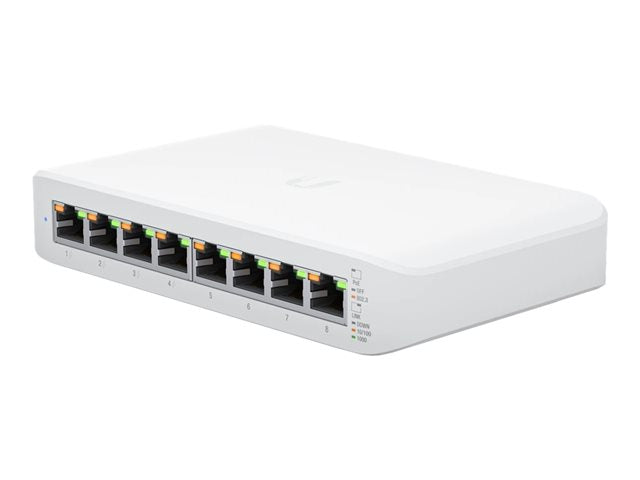
• Fully managed Layer 2 switch with eight Gigabit Ethernet ports for RJ45 Ethernet devices • Four ports offer auto-sensing 802.3at PoE+ for up to a total PoE wattage of 52W • Managed and configured by the UniFi Network Application with UniFi mobile app support • Key features include: • (8) Gigabit RJ45 ports including (4) 802.3af/at PoE+ ports • Managed by UniFi Network Application (5.13.10 or later) • External 60W power adapter • Wall-mountable with included mounting kit • Package contents: • USW-Lite-8-PoE Ethernet Switch • Mounting Kit • Technical specifications: • Total Number of Network Ports: 8 • Port/Expansion Slot Details: • 4 x Gigabit Ethernet PoE+ • 4 x Gigabit Ethernet Network • Media Type Supported: Twisted Pair • Ethernet Technology: Gigabit Ethernet • Network Technology: 10/100/1000Base-T

About This Product

The USW-Lite-8-POE is a practical choice for a small business setting up a network for the first time or expanding a UniFi ecosystem. It’s designed for environments like a small office, a retail space, or a classroom where you need to connect a handful of wired devices and power a few modern access points or cameras without a separate rack. Its quiet, fanless design makes it suitable for use in open areas where noise is a distraction, a real advantage over many small business switches.

The switch pairs naturally with other UniFi devices, forming the wired backbone for a Wi-Fi network powered by UniFi access points. With a 52W total power budget, it can run up to four PoE+ devices, which is sufficient for a few access points and a security camera. For a growing Canadian small business, this is a cost-effective way to bring UniFi’s centralized management to a compact office or storefront.

A key practical limit is the 52W PoE budget. While it can power four devices, it cannot support four devices that each draw the maximum PoE+ power. For a deployment with multiple high-draw cameras or high-performance access points, this switch would be underpowered and a model with a larger power supply is necessary. It's ideally suited for a handful of access points or a small camera setup.

For a Toronto-based startup or a small office in the GTA, this switch represents a logical entry point into the UniFi ecosystem, managed easily from a local controller or a cloud key. It is overkill for a home network needing just one or two extra ports, but it is precisely the right fit for a small professional space needing a managed, PoE-capable network core.
Services We Provide
  • Professional Installation & Configuration
  • Ongoing Maintenance & Support
  • Troubleshooting & Repairs
  • System Upgrades & Updates



