
Yealink CP925 Touch-Sensitive HD Conference Phone-1304015
AIM Telecom provides troubleshooting and configuration support for this product to businesses across Toronto and the GTA. Contact us to confirm whether the issue can be handled by phone or requires on-site service.
Get Support Call 416-312-4819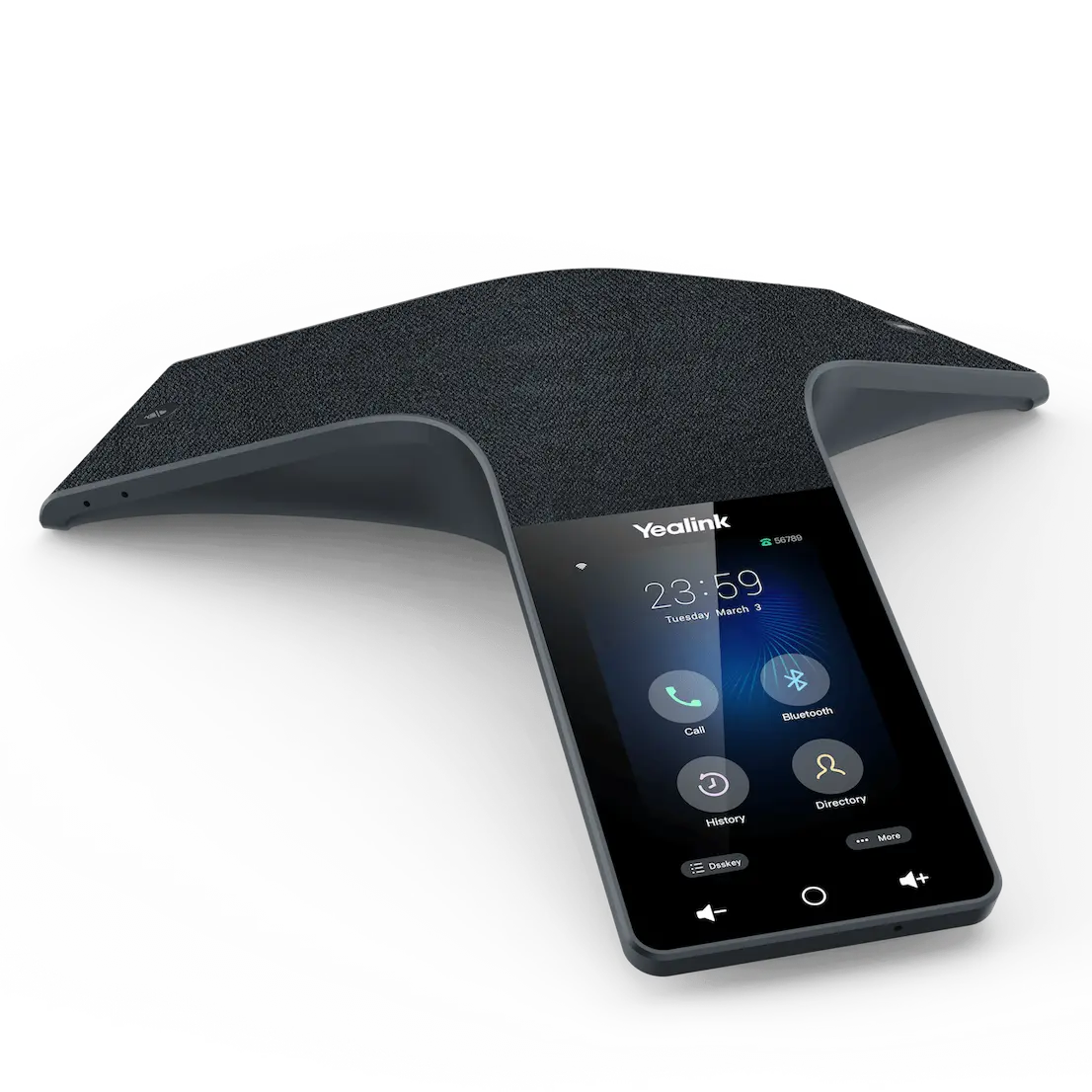
Common issues and fixes
Reviewed troubleshooting steps are not yet available for this model.
Ask AIM Telecom about this productAbout this product
• The Yealink CP925 HD Conference Phone is a touch-sensitive, business-class audio solution designed for small to medium conference rooms. Its introverted and professional design perfectly matches any corporate environment.
• Key features include:
• A premium acoustics fabric that is resistant to accidental liquid spills
• A 4-inch, fingerprint-proof LCD screen with clear UI for easy control and management of meetings
• The phone offers unrivaled audio clarity powered by advanced technology and expansive voice pickup.
• It features seven built-in microphones (six for voice pickup, one for noise cancellation) providing a 360-degree, 20-foot voice pickup radius.
• Noise Proof Technology dynamically eliminates distracting background noise, ensuring superior HD audio performance.
• Flexible conferencing supports up to 5-way conference calls and local 3-way PSTN conferencing (via the optional CPN10).
• The phone features a touch-sensitive display with 480x800 resolution for clear visual interaction and simple meeting controls.
• It is built for hybrid UC meetings, easily connecting to mobile devices via built-in Bluetooth 4.2.
• Includes built-in dual-band Wi-Fi (2.4GHz/5GHz) for flexible network connectivity without excessive cabling.
• Supports standard Power over Ethernet (PoE) for simplified installation.
• For a full list of specifications, please refer to the Yealink CP925 Conference Phone datasheet (PDF).
• Key features include:
• A premium acoustics fabric that is resistant to accidental liquid spills
• A 4-inch, fingerprint-proof LCD screen with clear UI for easy control and management of meetings
• The phone offers unrivaled audio clarity powered by advanced technology and expansive voice pickup.
• It features seven built-in microphones (six for voice pickup, one for noise cancellation) providing a 360-degree, 20-foot voice pickup radius.
• Noise Proof Technology dynamically eliminates distracting background noise, ensuring superior HD audio performance.
• Flexible conferencing supports up to 5-way conference calls and local 3-way PSTN conferencing (via the optional CPN10).
• The phone features a touch-sensitive display with 480x800 resolution for clear visual interaction and simple meeting controls.
• It is built for hybrid UC meetings, easily connecting to mobile devices via built-in Bluetooth 4.2.
• Includes built-in dual-band Wi-Fi (2.4GHz/5GHz) for flexible network connectivity without excessive cabling.
• Supports standard Power over Ethernet (PoE) for simplified installation.
• For a full list of specifications, please refer to the Yealink CP925 Conference Phone datasheet (PDF).
More product details
The Yealink CP925 is a business-class conference phone built for small to medium conference rooms where audio clarity and ease of use are critical. It is designed for hybrid meetings, allowing participants in the room to connect with remote attendees via Bluetooth or Wi-Fi without needing a central PC or additional hardware. The touch-sensitive display and spill-resistant fabric make it a practical choice for busy office environments, such as those common in GTA corporate offices, where accidental coffee spills or quick meeting start-ups are routine.
This device pairs well with a VoIP PBX or a cloud-based UC platform, and it can serve as a standalone speakerphone for mobile devices via Bluetooth. It replaces older, less capable conference phones that struggle with background noise or limited microphone pickup. However, buyers should note that while the CP925 offers excellent voice pickup for a 20-foot radius, it is not designed for large boardrooms or open-plan areas; in those settings, a daisy-chained or ceiling-mic solution would be more appropriate.
For a small-to-medium room with up to six to eight participants, the CP925 delivers clear, full-duplex audio and easy meeting controls. It is overkill for a single-person office and underpowered for a 30-person boardroom. The built-in Bluetooth and Wi-Fi add flexibility for ad-hoc connections, but for permanent installations, wired Ethernet with PoE is the most reliable option. Canadian businesses should confirm that their VoIP provider supports Yealink provisioning and that the phone's Wi-Fi bands are compatible with their office network (2.4 GHz and 5 GHz are standard).
This device pairs well with a VoIP PBX or a cloud-based UC platform, and it can serve as a standalone speakerphone for mobile devices via Bluetooth. It replaces older, less capable conference phones that struggle with background noise or limited microphone pickup. However, buyers should note that while the CP925 offers excellent voice pickup for a 20-foot radius, it is not designed for large boardrooms or open-plan areas; in those settings, a daisy-chained or ceiling-mic solution would be more appropriate.
For a small-to-medium room with up to six to eight participants, the CP925 delivers clear, full-duplex audio and easy meeting controls. It is overkill for a single-person office and underpowered for a 30-person boardroom. The built-in Bluetooth and Wi-Fi add flexibility for ad-hoc connections, but for permanent installations, wired Ethernet with PoE is the most reliable option. Canadian businesses should confirm that their VoIP provider supports Yealink provisioning and that the phone's Wi-Fi bands are compatible with their office network (2.4 GHz and 5 GHz are standard).