Yealink CPW65 DECT Duo Wireless Full Duplex Microphone for CP965
Frequently Asked Questions
First, ensure both devices are within 20 meters of each other and that there’s no heavy interference from other DECT devices nearby. Check that the CPW65 is fully charged or seated in its cradle; low battery can prevent pairing. From the CP965, navigate to the DECT accessory menu and try a fresh pairing sequence, then confirm the CPW65’s LED shows a solid connection. If it still fails, verify that your CP965 firmware is up to date.
Dropouts are often caused by distance or obstacles. Move the CPW65 closer to the CP965 base, especially if there are concrete walls or metal furniture in the signal path. Also, check that no other DECT equipment (such as cordless headsets or multi-handset phones) is operating on the same frequency band in the room, as this can cause interference. If the issue persists in a clean environment, a Toronto-based VoIP support provider can usually help diagnose this remotely.
The mute button is capacitive and requires a full touch, not a quick tap. Try pressing and holding for a moment, and confirm that the CP965 itself shows a mute state change. If there’s no reaction, make sure the microphone is paired and the call is active—muting may not function outside a call. Also, wipe the button surface clean; dirt or moisture can interfere with capacitive sensing.
Verify that you’re getting roughly 13 hours of talk time under normal conditions. If not, check that the microphone isn’t left permanently on the edge of the cradle where it might make intermittent contact. Let it fully charge overnight with the cradle’s LED showing a steady charging indicator. Extreme room temperatures can also shorten battery performance—keep the unit away from direct sunlight or heating vents.
Ensure the CPW65 is placed upright with its microphone array oriented towards the speakers, and confirm nothing is physically covering the microphone openings. On the CP965, check that the audio input settings are selecting the expansion mic and not just the built-in mics. Also, test with a soft voice at 2-3 meters to see if the issue is simply low talk volume rather than a hardware fault.
The CPW65 is designed exclusively for the Yealink CP965. It will not pair with the CP960, CP920, or any other model, because the DECT protocol and pairing method are tailored to the CP965. If you need wireless expansion for a different Yealink conference phone, you’ll need the accessory specified for that model.
A single CP965 can pair with up to two CPW65 microphones simultaneously. This configuration covers larger tables, but both mics must be within range of the base. If you need more coverage, consider repositioning the mics for optimal pickup rather than adding more, as the limit is fixed.
A blinking cradle light usually indicates a poor connection. Remove the CPW65, check for dust or debris on the charging contacts (both on the mic and in the cradle), and reseat it firmly. The 360-degree design should allow any orientation, but misalignment can still happen if the cradle isn’t on a flat surface. Try a different power outlet to rule out an adapter issue.
Video Systems
Yealink CPW65 DECT Duo Wireless Full Duplex Microphone for CP965
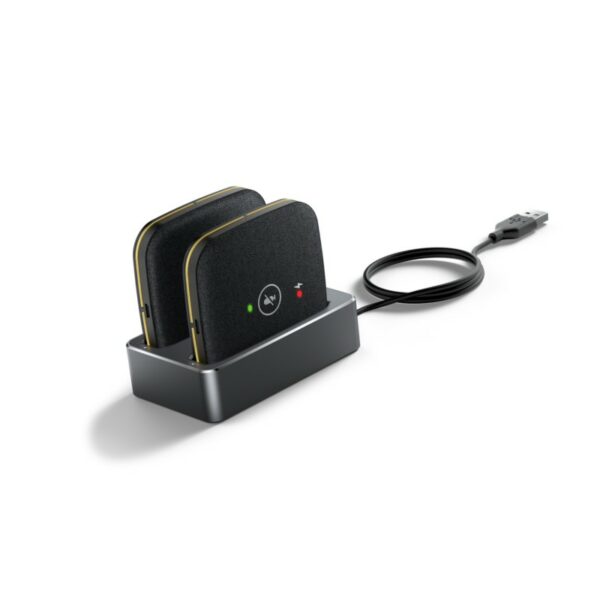
The Yealink CPW65 is a wireless expansion mic that works as an audio input device for Yealink CP965 conference phones. It features: • 3 built-in microphones supporting a 360-degree voice pickup range with a 10-foot (3-meter) radius • Up to 20-meter connection distance with CP965 • 11-day standby time and 13-hour talk time • Intuitive capacitive mute buttons • 360° nondirectional charging on charger cradle • DECT Technology Weight: 0.81 lbs Dimensions: 7.48 × 3.23 × 1.89 in Brand: Yealink Phone Type: Conference, DECT
About This Product
The Yealink CPW65 is a wireless expansion microphone built specifically for the CP965 conference phone. It’s designed for meeting spaces where the built-in pickup of the CP965 falls short, such as larger rectangular tables, boardrooms where participants spread out, or rooms with challenging acoustics. By adding one or more of these satellite mics, a single CP965 can cover more seats without requiring everyone to huddle around the base unit. This is particularly relevant for hybrid meetings where remote participants rely on clear, room-wide audio.
Because the CPW65 connects over DECT, no additional cabling is needed across the conference table. Setup is simple: pair it with the CP965 and place the charging cradle anywhere within range. The trade-off is that it’s a dedicated accessory. It only works with the CP965, so it won’t extend audio for other Yealink models or third-party systems. This lack of universal compatibility is a practical limit—if your room has a mix of devices, you won’t repurpose this mic elsewhere.
Battery life is generous for a typical workday, with talk time that should outlast most back-to-back meetings. However, it’s worth noting that the 20-meter connection distance is measured in open space. In real offices with partitions, glass walls, or dense furniture, usable range may be shorter. The charging cradle is forgiving with its nondirectional design, so placing the mic back on the charger quickly becomes a no-look habit after meetings.
For compact huddle rooms where everyone sits close to the CP965, the CPW65 is overkill—the base unit’s own mics will handle the pickup without issue. It’s most justified in mid-sized rooms seating six to twelve people, where a single expansion mic bridges the coverage gap. In very large boardrooms, one unit might still leave dead spots, but the CP965 can pair up to two CPW65 units (as per design) to scale further. For Toronto-area businesses outfitting mixed-use meeting rooms with Yealink equipment, the CPW65 is a practical add-on when the CP965’s native reach isn’t enough, and it integrates without adding clutter to the table.
Because the CPW65 connects over DECT, no additional cabling is needed across the conference table. Setup is simple: pair it with the CP965 and place the charging cradle anywhere within range. The trade-off is that it’s a dedicated accessory. It only works with the CP965, so it won’t extend audio for other Yealink models or third-party systems. This lack of universal compatibility is a practical limit—if your room has a mix of devices, you won’t repurpose this mic elsewhere.
Battery life is generous for a typical workday, with talk time that should outlast most back-to-back meetings. However, it’s worth noting that the 20-meter connection distance is measured in open space. In real offices with partitions, glass walls, or dense furniture, usable range may be shorter. The charging cradle is forgiving with its nondirectional design, so placing the mic back on the charger quickly becomes a no-look habit after meetings.
For compact huddle rooms where everyone sits close to the CP965, the CPW65 is overkill—the base unit’s own mics will handle the pickup without issue. It’s most justified in mid-sized rooms seating six to twelve people, where a single expansion mic bridges the coverage gap. In very large boardrooms, one unit might still leave dead spots, but the CP965 can pair up to two CPW65 units (as per design) to scale further. For Toronto-area businesses outfitting mixed-use meeting rooms with Yealink equipment, the CPW65 is a practical add-on when the CP965’s native reach isn’t enough, and it integrates without adding clutter to the table.
Services We Provide
- Professional Installation & Configuration
- Ongoing Maintenance & Support
- Troubleshooting & Repairs
- System Upgrades & Updates