Yealink SkySound CS10-2-Way Coaxial Networked Ceiling Loudspeaker

Frequently Asked Questions

First, confirm the speaker is receiving power by checking if the PoE switch or injector is active and the Ethernet cable is securely connected. If the speaker has a status LED, verify it is lit. If it still does not appear, try a different port on the switch or a known-working cable. If the issue persists, a Toronto-based VoIP support provider can usually resolve this remotely.
The CS10 is Dante-ready, meaning it can receive audio over a Dante network once configured. You will need a Dante controller software (like Audinate's Dante Controller) running on a computer on the same network to assign the speaker to a Dante audio stream. Ensure your network supports multicast traffic and that the speaker and the Dante source are on the same VLAN if applicable.
A humming noise often indicates a ground loop or interference from nearby electrical cables. First, try moving the Ethernet cable away from power cables and ensure the PoE switch is properly grounded. If the hum persists, test the speaker with a different PoE source to rule out power supply issues.
No, the CS10 is a networked speaker that requires a Dante-compatible audio source or a Dante-enabled mixer. It does not have analog audio inputs. To use it with an analog source, you would need a Dante audio interface or converter that takes analog input and outputs Dante.
Distortion can be caused by the audio source sending too high a signal level. Check the gain settings on your Dante source or mixer and reduce the output level. Also, ensure the speaker is not placed in a corner or against a wall, as that can cause bass buildup and muddiness. If the issue continues, verify that the speaker's firmware is up to date.
The CS10 comes with an assembly fixing bracket and a deployment instruction template. For a drop ceiling, you will typically cut a hole using the template, then secure the bracket to the ceiling grid. The speaker then attaches to the bracket. Ensure the ceiling tile can support the speaker's weight (about 10 lb) and that the area above is clear of obstructions.
First, confirm that the speaker is receiving a Dante audio stream by checking the Dante Controller software to see if the speaker is subscribed to a transmitter. If it is, check the volume level on the source and ensure the speaker is not muted. Also, verify that the network cable is not damaged and that the PoE switch is providing sufficient power (the CS10 requires PoE+).
Yes, the CS10 can be used with Yealink video conferencing systems that support Dante audio output, such as the Yealink MVC series. You would connect the video system's Dante output to the same network as the CS10 and configure the audio routing in Dante Controller. This allows the speaker to serve as the room's main audio output for calls.
Intermittent connection issues are often network-related. Check that the Ethernet cable is not loose and that the PoE switch port is not experiencing power fluctuations. Also, ensure the network is not congested; Dante audio requires a dedicated or properly managed network to avoid packet loss. If the problem persists, try a different switch port or cable.
No, the CS10 is not designed for daisy-chaining. Each speaker requires its own Ethernet connection to the network for both power and data. To use multiple CS10 units, connect each to a PoE switch and configure them individually in Dante Controller for multi-channel audio routing.
Video Systems

Yealink SkySound CS10-2-Way Coaxial Networked Ceiling Loudspeaker
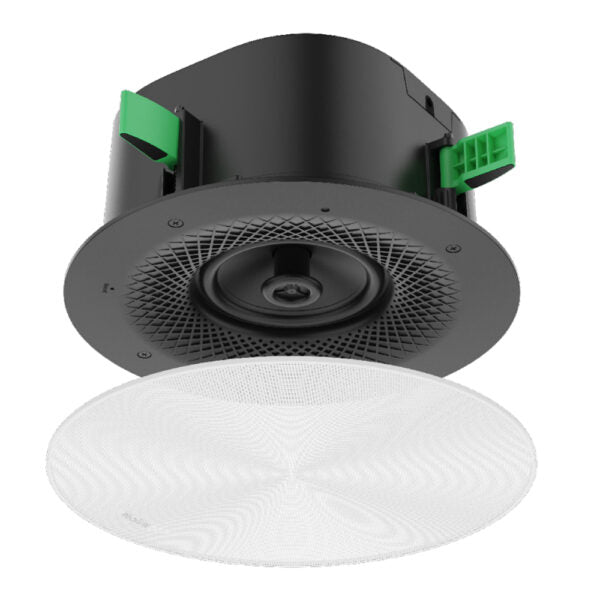
• The Yealink SkySound CS10 is a low-profile 2-way coaxial network speaker designed for modern meeting environments, offering exceptional audio performance and elegant design. • Key features: • Innovative Coaxial Structure • High-Performance Acoustics • PoE-Enabled Active Speaker • Dante Ready for Advanced Audio Networking • Versatile Deployment Options • Sophisticated Design • Weight: 10.21 lb Dimensions: 15.67 × 14.45 × 7.88 in Video Conferencing: Ceiling Speaker • Technical Specifications: • Model: SkySound CS10 • Part number: 1303094 • Size: 294*H125.8mm (with cover mesh), 287.2*H125mm (without cover mesh) • Weight: 2808g (without cover mesh), 207g (Cover mesh) • Product Color: white/black, Cover Mesh Color: white/black • Product Materials: PC/ABS Welded SPCC, PA (Polyamide) with 15% GF, aluminum alloy, PC/ABS and SGCC • Plenum Rated UL 2043 (suitable for air handling spaces) • Box Contents: SkySound CS10 Speaker, White Mesh Cover (Black Optional), Quick Start Guide, Assembly Fixing Bracket, Dust Cover, Deployment Instruction Template, Bracing Bridge (Optional), Dust Cover Screw*6 (M3*4CMHOZN3) • Audio Specifications: • Frequency Response (-6dB): 100-20kHz • Maximum SPL: Continuous 99dB @20W 1m, Sensitivity: 88dB@1m 1W • Speaker Specifications: • LF: 5.7 inch (145 mm) woofer • HF: 1.1 inch (28 mm) tweeter • Nominal Impedance: 8Ω • Nominal Coverage Angle: 120

About This Product

The Yealink SkySound CS10 is a networked ceiling speaker designed for conference rooms and huddle spaces where clean, unobtrusive audio is a priority. It fits best in environments that already use or plan to adopt Dante audio networking, such as larger meeting rooms or multi-room setups where centralized audio routing is needed. The speaker is PoE-powered, which simplifies installation by eliminating the need for separate power runs, making it a good choice for retrofit projects or spaces where ceiling access is limited. However, its 5.7-inch woofer and 120-degree coverage mean it is best suited for small to medium rooms; in a large open-plan office or a boardroom with high ceilings, you may need multiple units or a more powerful system. It is also worth noting that while the CS10 is Dante-ready, you will need a Dante-compatible audio source or mixer to take full advantage of that capability. For a Toronto office deploying a few meeting rooms with existing network infrastructure, this speaker offers a clean, professional solution that avoids the clutter of desktop speakers.
Services We Provide
  • Professional Installation & Configuration
  • Ongoing Maintenance & Support
  • Troubleshooting & Repairs
  • System Upgrades & Updates