Yealink T40-T41-T42-T43-T44 Wall Mount Bracket
Frequently Asked Questions
First, confirm the phone is fully seated by pressing it firmly into the bracket until you hear or feel the locking tabs click into place. Then check that the bracket itself is tightly screwed to the wall; loose wall screws are the most common cause of wobble. If the wall surface is uneven, small rubber spacers behind the bracket can often eliminate movement.
The original screws are not a standard hardware-store item, and using incorrectly sized fasteners can damage the bracket or wall. Contact your vendor for a replacement screw kit specific to this Yealink bracket. If you’re in a hurry, a Toronto-based VoIP support provider can often source the exact hardware and advise on suitable anchors for your wall type.
Yes, but you must use appropriate hollow-wall anchors rated for the weight of the phone plus bracket. Standard plastic expansion anchors are usually sufficient for drywall if installed correctly. Avoid using just the screws alone—they will pull out over time, especially if users frequently press buttons on the wall-mounted phone.
No, this bracket is specifically designed for the T40G, T41S, T41P, T42G, T42S, T43U, T44W, and T44U models. The T46U has a different chassis and mounting pattern, so it will not fit securely. Check Yealink’s accessory guide for the correct wall mount for your T46U.
Wall-mounted Yealink phones include a reversible handset tab that needs to be pulled out, rotated, and reinserted so it protrudes to catch the handset when vertical. If the tab is still in its desk-position orientation, the handset will not stay in place. Remove the handset, adjust the tab, and test the hang-up latch before reinstalling the phone on the bracket.
The bracket has a cable management channel that lets you route the network cable down and out the bottom. You may need to use a flat or right-angle Ethernet patch cable to keep the profile tight against the wall. If the existing cable is too stiff, swapping to a slim, flexible cable often solves the problem without any modification to the bracket.
Absolutely. The bracket doesn’t interfere with PoE—power is delivered over the same Ethernet cable. Just ensure the injector is placed where the cable can reach, and that the cable management channel on the bracket isn’t pinching the cord. The installation is identical to a desk setup from a power perspective.
The bracket is designed for the phone to be mounted in its standard vertical orientation with the screen at the top. Mounting it upside down may cause the handset to fall and could put stress on the locking tabs not intended for that load direction. If you need an inverted mount, you’ll likely need a third-party solution with adjustable cradles.
VoIP Accessories
Yealink T40-T41-T42-T43-T44 Wall Mount Bracket
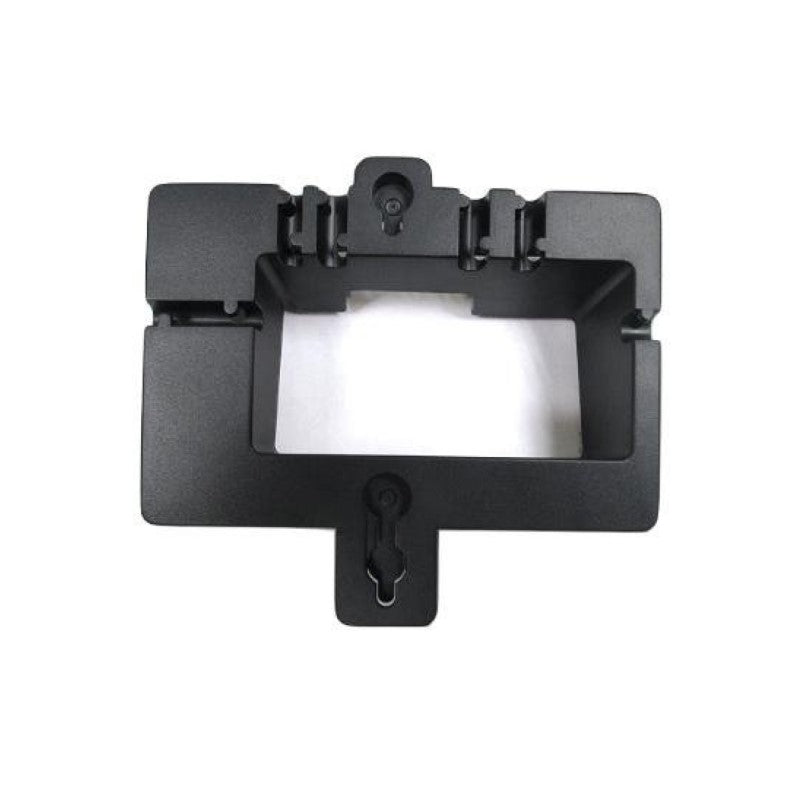
• Wall Mount Bracket for Yealink SIP IP Phones Designed to securely hold Yealink T40G, T41S, T41P, T42G, T42S, T43U, T44W & T44U IP Phones in place Key Features: • Weight: 0.5 lbs • Dimensions: 8 × 8 × 4 in • Accessory Type: Wall Mount Brackets • Black Color Option
About This Product
This wall mount bracket is a straightforward solution for businesses that need to place a Yealink T4 series phone in a location where desk space is at a premium. Common deployment spots include hallways, shared work areas, warehouse offices, and small conference rooms where a clean, fixed installation keeps the phone accessible without cluttering a surface. It’s designed for Canadian office environments where every square foot counts, particularly in downtown Toronto high-rises or medical clinics that prefer tidy, wall-mounted endpoints.
The bracket pairs directly with the listed Yealink models, replacing the desk stand and letting you orient the phone vertically. It’s a no-frills accessory—there’s no tilt or swivel adjustment, so you’ll want to confirm the viewing angle works for your users before drilling. The fixed position is reliable but may be less forgiving in tight corners or where glare from overhead lighting hits the screen at an awkward angle.
For a permanent, out-of-the-way installation, this bracket does exactly what it promises. It’s overkill for a phone that sits on a desk 90% of the time and only occasionally needs wall mounting, since swapping between desk and wall is not something you’d do daily. Conversely, if you need a mount that allows the phone to be tilted down for wheelchair accessibility or angled toward a specific work area, a more adjustable aftermarket solution would be a better fit.
The bracket pairs directly with the listed Yealink models, replacing the desk stand and letting you orient the phone vertically. It’s a no-frills accessory—there’s no tilt or swivel adjustment, so you’ll want to confirm the viewing angle works for your users before drilling. The fixed position is reliable but may be less forgiving in tight corners or where glare from overhead lighting hits the screen at an awkward angle.
For a permanent, out-of-the-way installation, this bracket does exactly what it promises. It’s overkill for a phone that sits on a desk 90% of the time and only occasionally needs wall mounting, since swapping between desk and wall is not something you’d do daily. Conversely, if you need a mount that allows the phone to be tilted down for wheelchair accessibility or angled toward a specific work area, a more adjustable aftermarket solution would be a better fit.
Services We Provide
- Professional Installation & Configuration
- Ongoing Maintenance & Support
- Troubleshooting & Repairs
- System Upgrades & Updates