
Yealink VCM35 Video Conferencing Microphone Array
AIM Telecom provides troubleshooting and configuration support for this product to businesses across Toronto and the GTA. Contact us to confirm whether the issue can be handled by phone or requires on-site service.
Get Support Call 416-312-4819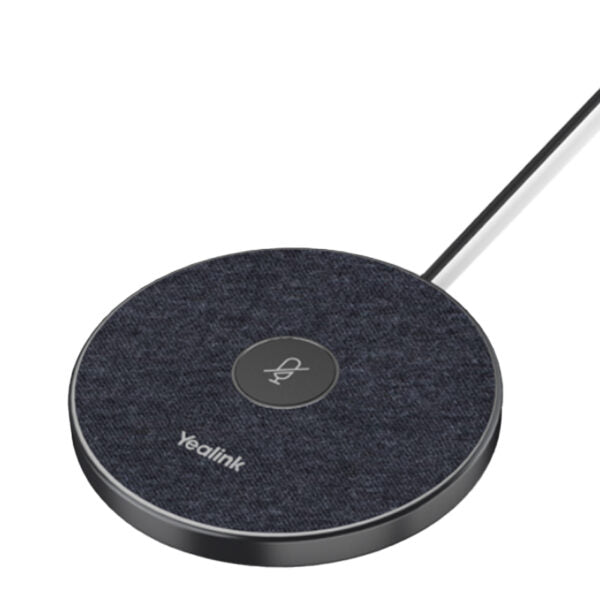
Common issues and fixes
Reviewed troubleshooting steps are not yet available for this model.
Ask AIM Telecom about this productAbout this product
• Yealink VCM35 is a wired video conferencing microphone array specifically designed for the third generation of Yealink Video Conferencing System. Its 3-microphone array provides an ideal solution for conference rooms of varying sizes, with a 20ft (6m) radius and 360° voice pickup range.
• Key features:
• Optima HD Audio
• Yealink Full Duplex Technology
• Yealink Acoustic Echo Canceling
• Yealink Noise Proof Technology
• Muting the microphone with touchpad
• Supports star-cascaded deployment, offering high scalability and flexibility for easy deployment in conference rooms of various sizes.
• Includes:
• VCM35 microphone array
• RJ45 connector for Ethernet cable
• Double-sided tape
• Quick Start Guide
• Additional information:
• Weight: 0.54 lbs
• Dimensions: 5.83 × 5.32 × 1.77 in
• Brand: Yealink
• Accessory Type: Microphone
• Key features:
• Optima HD Audio
• Yealink Full Duplex Technology
• Yealink Acoustic Echo Canceling
• Yealink Noise Proof Technology
• Muting the microphone with touchpad
• Supports star-cascaded deployment, offering high scalability and flexibility for easy deployment in conference rooms of various sizes.
• Includes:
• VCM35 microphone array
• RJ45 connector for Ethernet cable
• Double-sided tape
• Quick Start Guide
• Additional information:
• Weight: 0.54 lbs
• Dimensions: 5.83 × 5.32 × 1.77 in
• Brand: Yealink
• Accessory Type: Microphone
More product details
The Yealink VCM35 is a wired microphone array purpose-built for the third-generation Yealink video conferencing ecosystem. It is a dedicated audio capture device, not a standalone speakerphone, so it works in tandem with a compatible Yealink video conferencing codec or endpoint. For organizations that have already standardized on the Yealink platform, the VCM35 extends the audio pickup capability into larger spaces without replacing the core system.
This microphone array fits best in small to medium-sized conference rooms where a tabletop unit can sit centrally and capture voices within a 20-foot radius. It makes the most sense when paired with a Yealink VCS endpoint and camera, forming the audio half of a complete room solution. Buyers should know that this is a wired, passive microphone array; it requires a direct connection to a host system and does not function as a USB microphone for a computer. Its value lies in scaling up an existing Yealink room, not in acting as a standalone device.
The VCM35 supports star-cascaded deployment, which means you can chain multiple units to cover larger or unusually shaped rooms. This scalability is useful for boardrooms or training spaces where a single microphone cannot capture everyone cleanly. The trade-off is that this adds cost and cabling complexity, and the cascading feature is only relevant when the host endpoint supports it. For a small huddle room, a single unit is often sufficient; for a divisible ballroom, you may need several.
In a Canadian business context, this accessory pairs naturally with the Yealink MeetingBar or MVC series systems commonly deployed in Toronto and GTA offices. It is overkill for a personal office or a phone-booth-sized focus room, where the built-in microphone on a Yealink bar is already adequate. It is also not a fit for organizations using non-Yealink conferencing hardware, as the proprietary connection limits cross-platform use.
This microphone array fits best in small to medium-sized conference rooms where a tabletop unit can sit centrally and capture voices within a 20-foot radius. It makes the most sense when paired with a Yealink VCS endpoint and camera, forming the audio half of a complete room solution. Buyers should know that this is a wired, passive microphone array; it requires a direct connection to a host system and does not function as a USB microphone for a computer. Its value lies in scaling up an existing Yealink room, not in acting as a standalone device.
The VCM35 supports star-cascaded deployment, which means you can chain multiple units to cover larger or unusually shaped rooms. This scalability is useful for boardrooms or training spaces where a single microphone cannot capture everyone cleanly. The trade-off is that this adds cost and cabling complexity, and the cascading feature is only relevant when the host endpoint supports it. For a small huddle room, a single unit is often sufficient; for a divisible ballroom, you may need several.
In a Canadian business context, this accessory pairs naturally with the Yealink MeetingBar or MVC series systems commonly deployed in Toronto and GTA offices. It is overkill for a personal office or a phone-booth-sized focus room, where the built-in microphone on a Yealink bar is already adequate. It is also not a fit for organizations using non-Yealink conferencing hardware, as the proprietary connection limits cross-platform use.