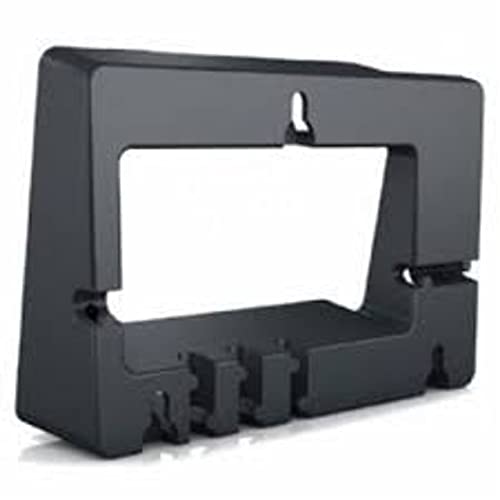
Yealink Wall Mount for MP50 MP54
Frequently Asked Questions
First, make sure you’re using the correct bracket model for the MP50; the MP54 bracket looks identical but has slightly different locking tabs. Then remove the phone and inspect the two top hooks and bottom latch for any plastic flashing left from the mold. If everything is clean, reseat the phone by tilting the top in first, then pressing the bottom firmly until you hear a click.
The bracket package typically includes screws and wall anchors, but if they’re missing, you’ll need pan-head wood screws suitable for your wall type – usually #6 or #8 screws, about 1.5 inches long for drywall with anchors, or shorter for solid wood. Avoid using drywall screws alone without anchors, as the phone’s weight could pull them out over time.
Yes, but you must supply your own masonry anchors and appropriate screws, as the included hardware is intended for stud-and-drywall installations. Drill pilot holes with a masonry bit, insert plastic expansion anchors, and attach the bracket securely. If you’re unsure about the wall’s composition, consult your building maintenance team before drilling.
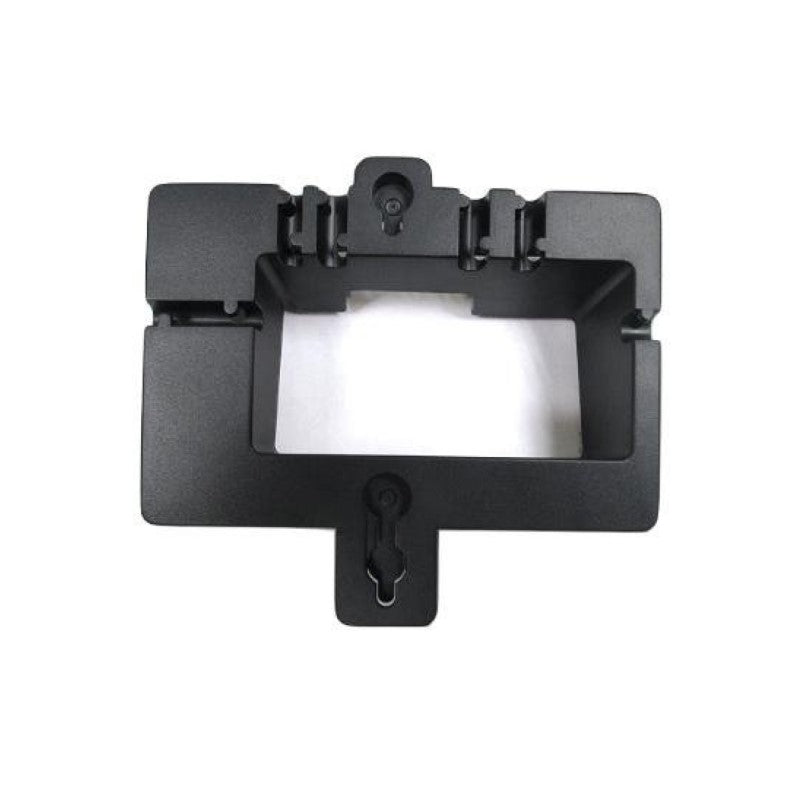
The bracket has a recessed channel on the back that routes the cable downward. Feed the Ethernet cord through this channel before securing the phone, leaving a small service loop so the connector isn’t strained. For a professional look, use a white or paintable cable raceway down the wall to conceal the cord completely.
Crooked mounting usually means the bracket itself is not level. Remove the phone, place a torpedo level on the bracket, and adjust the screw positions slightly. If the wall is uneven, a small shim behind the bracket can correct the tilt. Avoid over-tightening the screws, which can warp the plastic and pull the bracket out of alignment.
Yes, the MP50 and MP54 handsets are designed to latch securely whether the phone is on a desk or wall. The handset cradle has a small retainer hook that keeps the receiver in place. If it’s falling off, check that the hook isn’t broken and that you’re placing the handset squarely into the cradle with the earpiece facing up.
No, this mount is specifically designed for the MP50 and MP54. The MP56 has different dimensions and mounting points, and the T4S series uses a much larger wall-mount plate. Using this bracket with an incompatible phone could damage the phone’s housing or lead to a poor fit.
It’s not strictly required, but powering down the phone or unplugging the PoE cable first is a good idea. This prevents accidental key presses during installation and reduces the risk of a short if the Ethernet connector gets jostled. Plug it back in after the phone is securely mounted and the cable is routed.
Yes, the bracket can be oriented in either portrait or landscape position, as long as the phone’s handset and keypad remain accessible. Just ensure there’s enough clearance for the handset to be lifted without hitting the wall. In tight spaces, measure the phone’s depth plus the handset arc before drilling.
VoIP Accessories
Yealink Wall Mount for MP50 MP54
The Yealink Wall mount Bracket is specifically designed to fit accurately with MP54 and MP50 models. Key features include: • Weight: 0.5 lbs • Dimensions: 8 × 8 × 4 in • Brand: Yealink • Accessory Type: Wall Mount Brackets
About This Product
Yealink’s dedicated wall mount is a simple but essential accessory for businesses that need to free up desk space or position an MP50 or MP54 phone in a fixed, semi-public location. It’s particularly well-suited to reception counters, common-area hallways, and compact office cubicles where countertop real estate is at a premium. The bracket keeps the phone securely mounted while still allowing easy access to the handset and keypad, and it blends neatly into most professional interiors.
This accessory is purpose-built for the MP50 and MP54 IP phones, so it’s not a universal solution. Before ordering, confirm your exact handset model; it will not fit the MP56, T4-series desk phones, or any third‑party device. The installation is straightforward, but you’ll want to ensure the mounting surface can support the phone’s weight and that the included hardware matches your wall type. Drywall anchors and masonry screws aren’t provided, so plan a trip to the hardware store if your wall isn’t standard stud-and-drywall construction.
In a Canadian context, these brackets are often seen in GTA medical offices, legal firms, or small retail counters where a clean, minimal footprint matters. Since the bracket itself weighs only half a pound, it doesn’t add much to a standard PoE deployment, and cable management remains tidy when you route the Ethernet cord through the built-in channel. It’s a low-stakes add-on that can make the difference between a cluttered desk and a streamlined touchpoint for staff or customers.
On the flip side, if you’re simply looking for a temporary mounting option or need to frequently reposition the phone, a desktop stand might be more practical. This bracket is designed for a permanent installation, so removing or re-mounting it will leave screw holes. For floor-standing kiosks or heavy steel surfaces, a magnetic mount would be overkill, while for a home office with occasional use, the bracket may be unnecessary entirely. It’s a niche accessory that shines in exactly the right environment.
This accessory is purpose-built for the MP50 and MP54 IP phones, so it’s not a universal solution. Before ordering, confirm your exact handset model; it will not fit the MP56, T4-series desk phones, or any third‑party device. The installation is straightforward, but you’ll want to ensure the mounting surface can support the phone’s weight and that the included hardware matches your wall type. Drywall anchors and masonry screws aren’t provided, so plan a trip to the hardware store if your wall isn’t standard stud-and-drywall construction.
In a Canadian context, these brackets are often seen in GTA medical offices, legal firms, or small retail counters where a clean, minimal footprint matters. Since the bracket itself weighs only half a pound, it doesn’t add much to a standard PoE deployment, and cable management remains tidy when you route the Ethernet cord through the built-in channel. It’s a low-stakes add-on that can make the difference between a cluttered desk and a streamlined touchpoint for staff or customers.
On the flip side, if you’re simply looking for a temporary mounting option or need to frequently reposition the phone, a desktop stand might be more practical. This bracket is designed for a permanent installation, so removing or re-mounting it will leave screw holes. For floor-standing kiosks or heavy steel surfaces, a magnetic mount would be overkill, while for a home office with occasional use, the bracket may be unnecessary entirely. It’s a niche accessory that shines in exactly the right environment.
Services We Provide
- Professional Installation & Configuration
- Ongoing Maintenance & Support
- Troubleshooting & Repairs
- System Upgrades & Updates